EasyManua.ls Logo

Nine Eagles SOLO PRO 290 - Page 8

Nine Eagles SOLO PRO 290
20 pages
Print Icon
To Next Page IconTo Next Page
To Previous Page IconTo Previous Page
Loading...
8
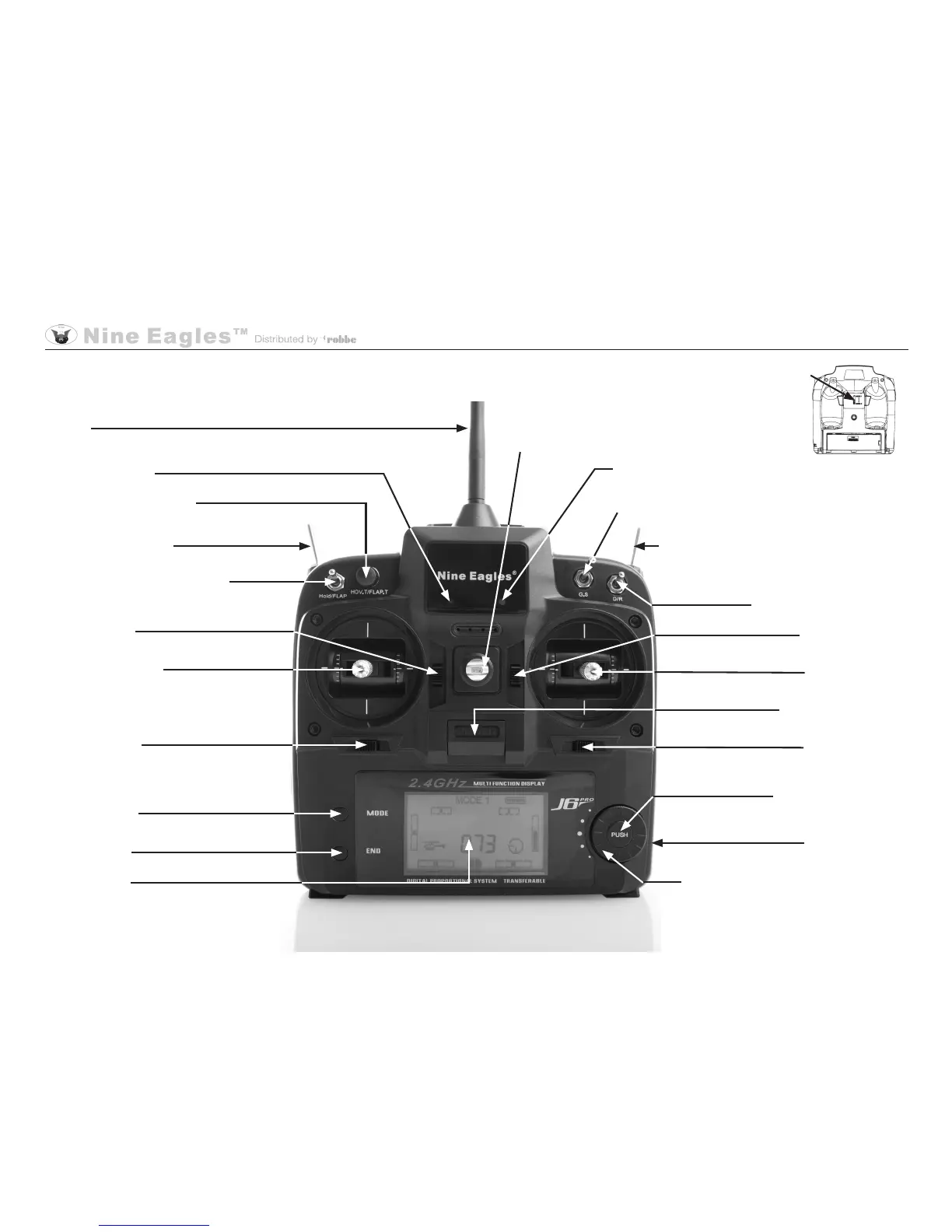
Hover throttle setting
Aerial
3D switch SW (B)
Throttle off switch SW (A)
Throttle trim
Battery display
Stick
Collective pitch / motor speed and
tail rotor
Tail rotor trim
Mode button
END button
LCD screen
Servo travel reduction
Pitch-axis trim
Stick
Pitch-axis / roll
On / Off switch
Roll trim
Adjustment
Neckstrap
lug
Operating display
Gyro gain
switch
Trainer
Switches
** After
changing mode
you must switch
the transmitter off
and then on again,
in order to activate
the new mode.
Transmitter description* (Mode 2) - The mode select switch** is located on the back of the transmitter
(*Complete operating instructions for the J6 transmitter can be found in the Download area at www.robbe.com)
Push-button
Level select
Charge socket
Operating Instructions - SOLO PRO 290 RTF 2.4 GHz No. NE2516