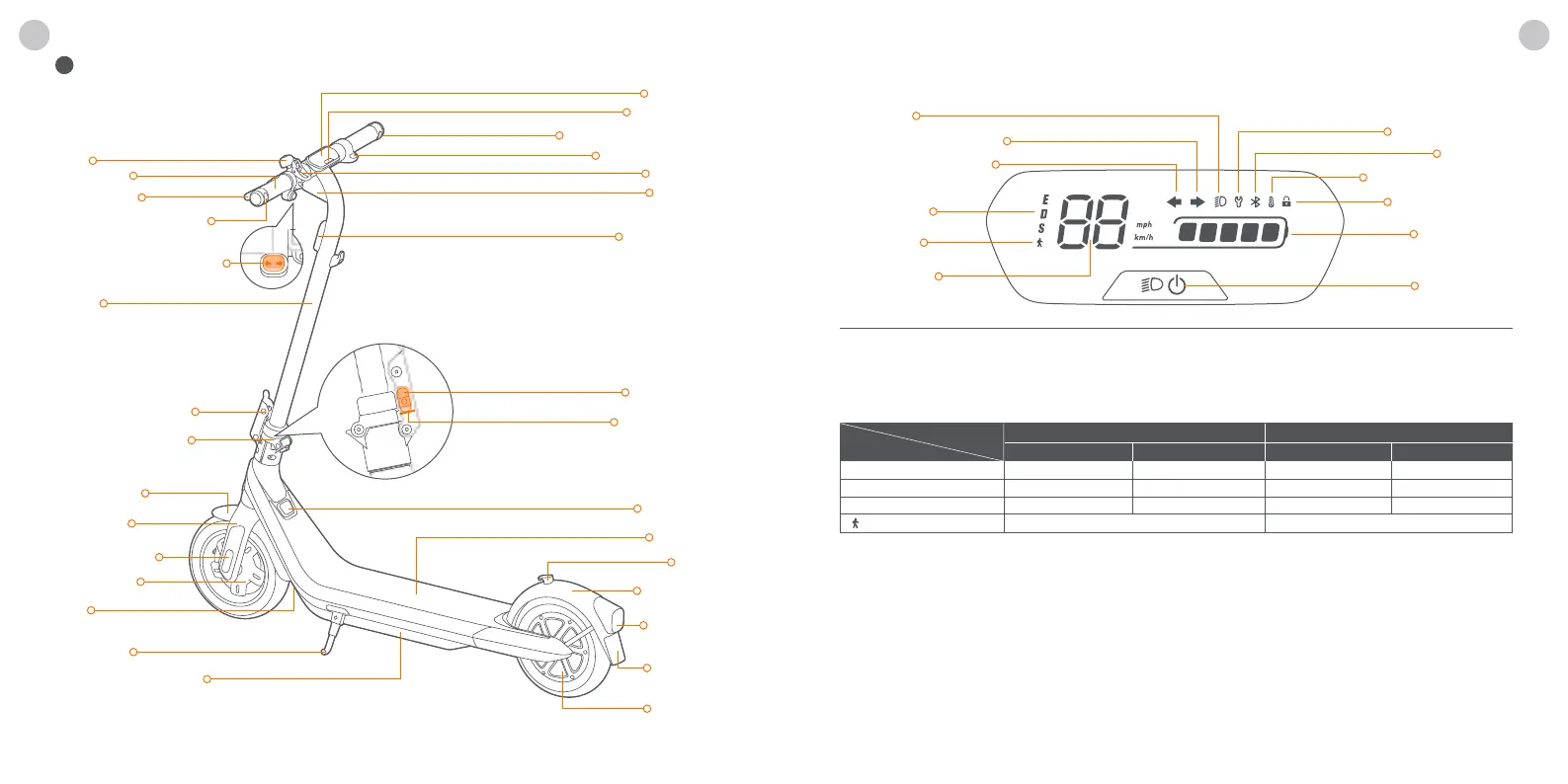
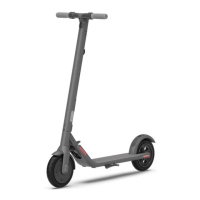
Direction Indicator Switch
Left Direction Indicator
Right Direction Indicator
Bell
Handlebar
Electronic Throttle
Snap Hook
Dashboard
Power Button
Brake Lever
Headlight
Stem
Folding Mechanism
Quick-release Lever
Front Fork
Front Fender
Hub Motor
Insurance
Plate Area
Charge Port
Footboard
Buckle
Rear Fender
Drum Brake
VIN
Nameplate
Taillight &
Rear Reflector
Side Reflector
Front Reflector
Kickstand
Battery Compartment
Safety Button
Returning mark
Speedometer
Temperature Warning
Locking Reminder
Bluetooth
Speed Mode
Walk Mode
Headlight
Error Notification
Battery Level
Power Button
Left Direction Indicator
Right Direction Indicator
Power Button: Press the button to power on the scooter; press and hold the button for 2 seconds to power it o. When the scooter is
on, press the button to turn on/o the headlight and taillight, and press twice to switch among the four speed modes. Press five times
to switch the unit between km/h and mph.
Speedometer: It displays the current speed of the scooter during riding, and displays the battery power during
charging. Walk Mode: The headlight and tail light are always on and can't be turned o.
Speed Mode: There are 4 modes available. The speed limit and ranges of each speed mode are as follows:
* Ranges of Speed Modes: tested while riding with a full battery, 75 kg (165 lbs) load, 25 °C (77 °F), at the max. speed of each speed
mode on average on pavement. Left Direction Indicator: When this icon blinks, it indicates that the direction indicators on the le side
are turned on. Right Direction Indicator: When this icon blinks, it indicates that the direction indicators on the right side are turned on.
Error Notification: It indicates that the scooter has detected an error. Please check the error code via Segway-Ninebot app.
Temperature Warning: It indicates that the temperature of the battery, controller or motor is too high or too low. Please check the
device temperature via Segway-Ninebot app.
* At this point, the scooter cannot accelerate normally and may not be charged. Do not use until the temperature has reverted to
the normal range. Bluetooth: It indicates that the scooter has been successfully connected to the mobile device. Battery Level:
The total battery power equals 5 bars.
* The battery power is very low when the first battery bar is red. Please charge your scooter immediately. Locking Reminder: When
the icon lights up, it means the scooter is locked. If abnormal movements are detected, the scooter will start
beeping and the tail light will falsh.
1 Diagram
EN EN
Dashboard & Power Button
Model
Mode
Speed limit
051405E 051405D 051405E 051405D
15 km/h (9.3 mph)
20 km/h (12.4 mph)
25 km/h (15.5 mph)
5 km/h (3.1 mph)
15 km/h (9.3 mph)
20 km/h (12.4 mph)
20 km/h (12.4 mph)
Ranges*
35 km (21.7 miles)
27 km (16.8 miles)
40 km (24.9 miles)
35 km (21.7 miles)
35 km (21.7 miles)
D (Standard mode)
E (ECO mode)
S (Sport mode)
(Walk mode)
40 km (24.9 miles)
N/A
01 02




 To Next Page