15 16ninjakitch en.co.uk
ninjakitchen . co.uk
COOKING IN YOUR AIR FRYER – CONT.
Dehydrate
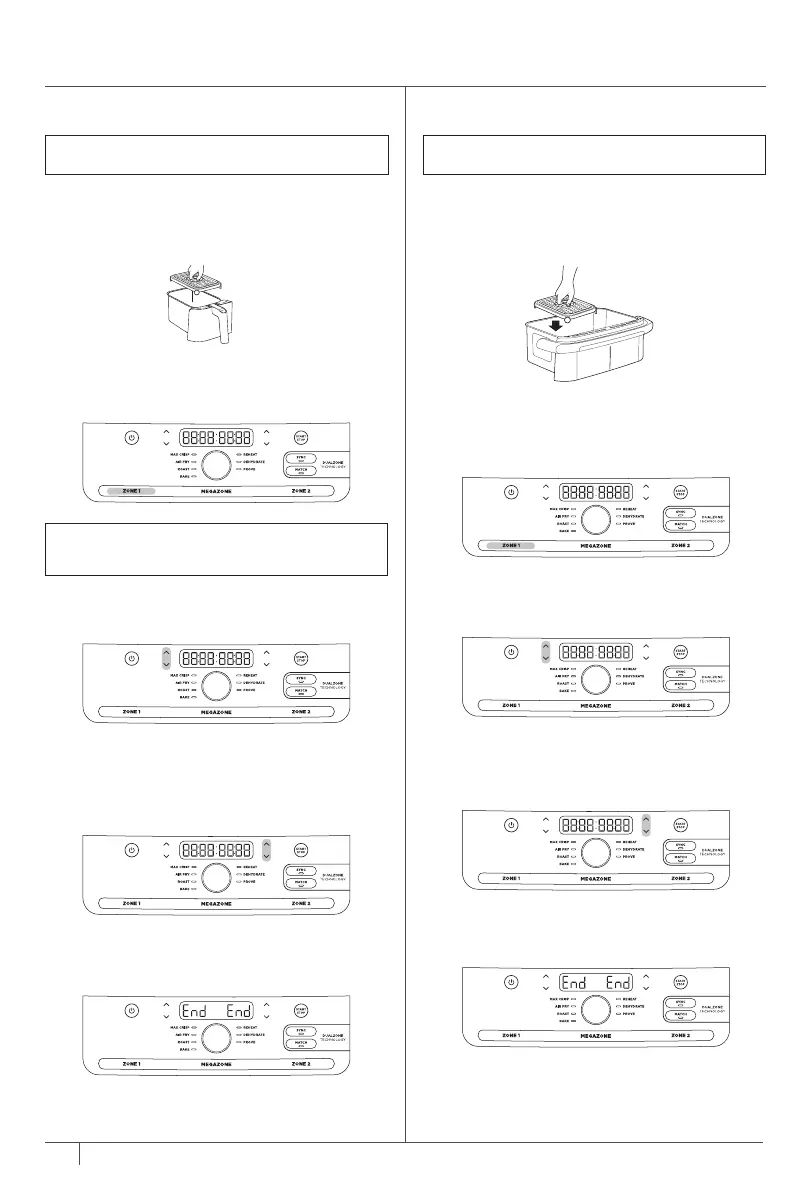
1 Install divider in the middle of the drawer.
2 Place a single layer of ingredients in the
drawer. Then install the crisper plates in
the drawer on top of the ingredients and
place another layer of ingredients on the
crisper plate.
3 The unit will default to Zone 1 (to use
Zone 2 instead, select Zone 2). Select
DEHYDRATE using the dial. The default
temperature will appear on the display.
Use the TEMP arrows to set the desired
temperature.
4 Use the TIME arrows to set the time
in 15-minute increments from 1 to 12
hours. Press START/STOP to begin
dehydrating.
5 When cooking is complete, the unit will
beep and “End” will appear on the display.
6 Remove ingredients using silicone-
tipped tongs/utensils.
NOTE: The temperature is preset to 60°C
Prove
1 Install divider in the middle of the drawer.
2 Place dough in the drawer.
3 The unit will default to Zone 1 (to use
Zone 2 instead, select Zone 2). Select
PROVE using the dial. The default
temperature will appear on the display.
Use the TEMP arrows to set the desired
temperature.
4 Use the TIME arrows to set the time in
15-minute increments from 1 to 12 hours.
Press START/STOP to begin to prove.
5 When cooking is complete, the unit will
beep and “End” will appear on the display.
6 Remove ingredients using silicone-
tipped tongs/utensils.
NOTE: The temperature is preset to 75°C.
Set temperature to 35°C for PROVE
Reheat
1 Install divider in the middle of the drawer.
2 Install crisper plates in the drawer
(optional), then place ingredients in the
drawer, and insert drawer in unit.
3 The unit will default to Zone 1 (to use
Zone 2 instead, select Zone 2). Select
REHEAT using the dial.
4 Use the TEMP arrows to set the desired
temperature.
5 Use the TIME arrows to set the time
in 1-minute increments up to 1 hour.
Press START/STOP to begin reheating.
6 When reheating is complete, the unit will
beep and “End” will appear on the display.
7 Remove ingredients using silicone-
tipped tongs/utensils.
NOTE: The temperature is preset to 170°C
Bake
1 Install divider in the middle of the drawer.
2 Install crisper plates in the drawer
(optional), then place ingredients in the
drawer and insert drawer in unit.
3 The unit will default to Zone 1 (to use
Zone 2 instead, select Zone 2).
Select BAKE using the dial.
4 Use the TEMP arrows to set the desired
temperature.
5 Use the TIME arrows to set the time in
1-minute increments up to 1 hour and in
5-minute increments from 1 to 4 hours.
Press START/STOP to begin cooking.
6 When cooking is complete, the unit will
beep and “End” will appear on the display.
7 Remove ingredients using silicone-tipped
tongs/utensils.
NOTE: To convert recipes from a traditional
oven, reduce the temperature by 10°C.
NOTE: The temperature is preset to 160°C


 To Next Page
 Loading...