EasyManua.ls Logo

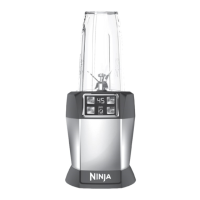
Ninja NUTRI BL480D - User Manual

Ninja NUTRI BL480D
23 pages
Print Icon
To Next Page IconTo Next Page
Loading...
BL480D
OWNER’S GUIDE
GUIDE DE L’UTILISATEUR
GUÍA DEL USUARIO
ninjakitchen.com
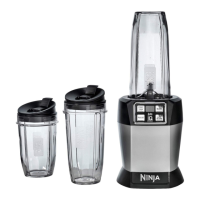
NUTRI NINJ
WITH AUTO-IQ®
NUTRI NINJ
AVEC AUTO-IQ®
NUTRI NINJ
CON AUTO-IQ®

Questions and Answers

  • C
    cummingsjoanJul 26, 2025
    What to do if my Ninja Blender doesn't turn on?
    • M
      mistysteeleJul 26, 2025
      If your Ninja Blender unit doesn't turn on, ensure it is properly plugged into a working outlet. Also, make sure the cup is correctly inserted and rotated clockwise into the base until you hear a "click," which should activate the display.
  • F
    fmedinaJul 30, 2025
    How to remove Ninja NUTRI BL480D from counter easily?
    • D
      Darius Bowen Jr.Jul 30, 2025
      If you're having difficulty removing your Ninja Blender from the counter for storage, tip the unit forward from the back to easily disengage the suction feet.
  • M
    Michael TaylorAug 3, 2025
    Why doesn't my Ninja Blender mix well, and food gets stuck?
    • J
      Jeanne HernandezAug 3, 2025
      If your Ninja Blender doesn't mix well and food gets stuck, try these solutions: * Use the AUTO-iQ™ programs for optimal results. The programmed pulses and pauses will help the food settle towards the blade. * If food consistently gets stuck, adding some liquid can help. * When filling the cups, layer ingredients in this order: fresh items, powders/nuts, liquids, and finally, frozen items or ice.
  • A
    Angela TylerAug 7, 2025
    How to assemble lid on Ninja Blender?
    • K
      Katie MurphyAug 7, 2025
      If the lid or Pro Extractor Blades Assembly is hard to assemble on your Ninja Blender, place the cup on a level surface. Then, position the lid or blade assembly on top of the cup, aligning the threads so they sit flat. Twist clockwise until you achieve a tight seal and even alignment.
  • D
    danielle71Aug 11, 2025
    Why is food not evenly chopped in my Ninja Blender?
    • S
      Sandra AnthonyAug 11, 2025
      If food is not being evenly chopped in your Ninja Blender, ensure all ingredients are as dry as possible for best results. Cut the ingredients into even sizes and reduce the amount of food in the cup. Use very short pulses by quickly pressing the "PULSE" button.
  • J
    Jennifer CollierAug 16, 2025
    Why does my Ninja NUTRI BL480D move on the counter while blending?
    • T
      Tammy GarciaAug 16, 2025
      If your Ninja Blender unit is moving on the counter while blending, ensure that both the surface and the feet of the unit are clean and dry.
  • K
    Kristin StewartAug 20, 2025
    What to do if my Ninja NUTRI BL480D doesn't turn off?
    • S
      steven19Aug 20, 2025
      If your Ninja Blender unit doesn't turn off, try these steps: first, remove the cup from the base by rotating it counter-clockwise and lifting it out. This should turn off the display. If that doesn't work, unplug the power cord from the outlet.

Summary

Important Safeguards

General Safety Precautions

Essential safety rules for operating the appliance, covering usage and handling.

Save These Instructions

Specific Usage Warnings

Detailed safety instructions and warnings for appliance usage and potential hazards.

Getting to Know Your Nutri Ninja

Appliance Parts Identification

Identifies and describes the main components of the Nutri Ninja appliance.

Key Features and Programs

Highlights main capabilities, manual controls, and Auto-iQ programs.

Before First Use

Initial Setup and Preparation

Outlines necessary steps to prepare the appliance before initial operation.

Using the Nutri Ninja with Auto-iQ

Operating the Appliance

Details the step-by-step process for using the Nutri Ninja with Auto-iQ features.

Suggested Uses

Usage Recommendations

Provides guidance on various purposes and recommended food types for the appliance.

Care & Maintenance

Cleaning and Storage

Explains how to properly clean and store the Nutri Ninja components.

Troubleshooting

Issue Resolution Guide

Addresses common operational problems and provides solutions for the appliance.

Replacement Parts

Ordering Information

Information on how to order new parts for the appliance.

Product Registration

Registration Guide

Instructions on how to register the product for warranty and safety notifications.

One Year Limited Warranty

Warranty Coverage and Exclusions

Outlines what the limited warranty covers and its exclusions.

Service and Claim Procedures

Provides instructions on how to obtain warranty service and initiate a claim.

Ninja NUTRI BL480D Specifications

General IconGeneral
BrandNinja
ModelNUTRI BL480D
CategoryBlender
LanguageEnglish

Related product manuals