EasyManua.ls Logo

Nintendo N64 - Page 2

Nintendo N64
3 pages
Print Icon
To Next Page IconTo Next Page
To Previous Page IconTo Previous Page
Loading...
AWARNING
PLEASE
CAREFULLY
READ
THE
CONSUMER
INFORMATION
AND
PRECAUTIONS
BOOKLET
INCLUDED
WITH
THE
NINTENDO
64
SYSTEM
OR
GAME
PAKS
BEFORE
USING
THE
Né4
EXPANSION
PAK.
THIS
BOOKLET
CONTAINS
IMPORTANT
SAFETY
INFORMATION.
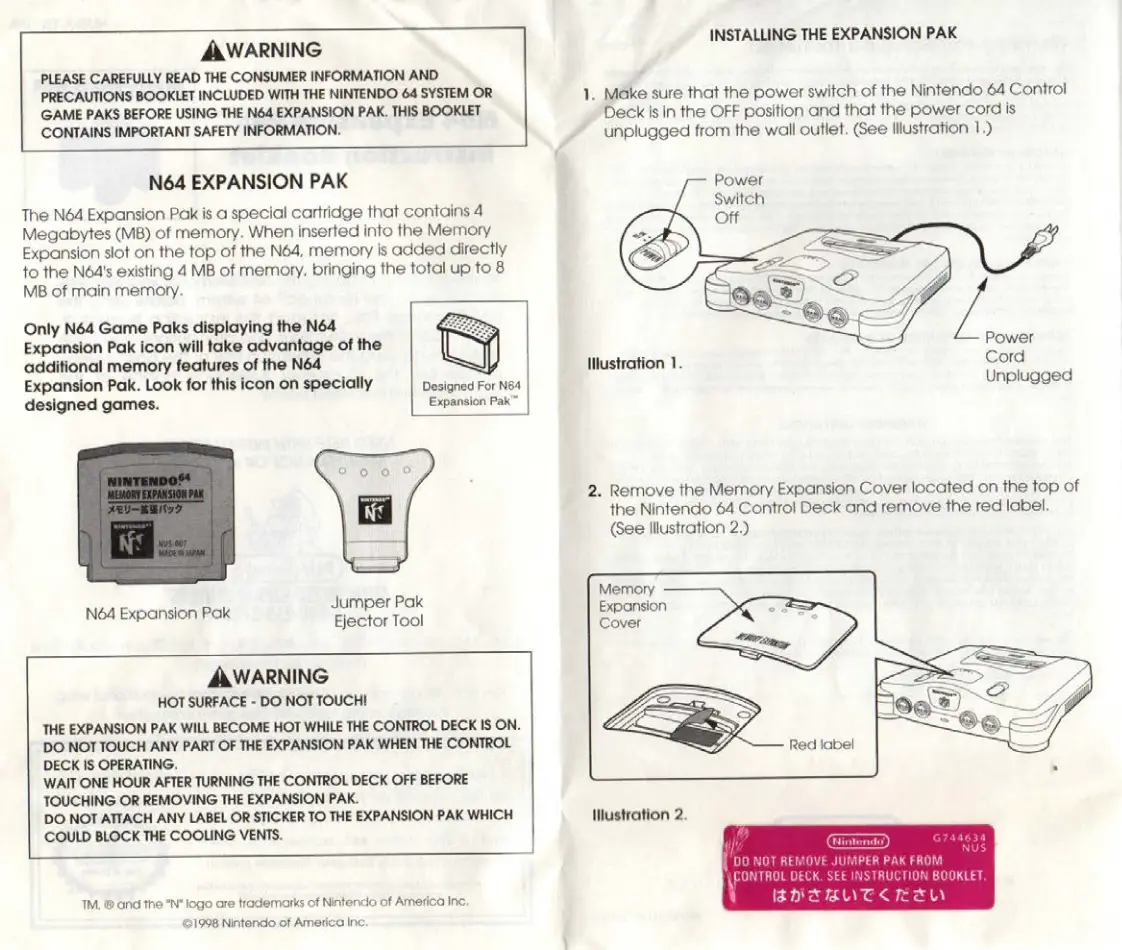
N64
EXPANSION
PAK
The
N64
Expansion
Pak
is
a
special
cartridge
that
contains
4
Megabytes
(MB)
of
memory.
When
inserted
into
the
Memory
Expansion
slot
on
the
top
of
the
No4,
memory
is
added
directly
to
the
Né4's
existing
4
MB
of
memory,
bringing
the
total
up
to
8
MB
of
main
memory.
Only
N64
Game
Paks
displaying
the
N64
Expansion
Pak
icon
will
take
advantage
of
the
additional
memory
features
of
the
N64
Expansion
Pak.
Look
for
this
icon
on
specially
Designed
For
Ned
designed
games.
Jumper
Pak
Né4
Expansion
Pak
Ejector
Tool
AWARNING
HOT
SURFACE
-
DO
NOT
TOUCHI
THE
EXPANSION
PAK
WILL
BECOME
HOT
WHILE
THE
CONTROL
DECK
IS
ON.
|
DO
NOT
TOUCH
ANY
PART
OF
THE
EXPANSION
PAK
WHEN
THE
CONTROL
DECK
IS
OPERATING.
WAIT
ONE
HOUR
AFTER
TURNING
THE
CONTROL
DECK
OFF
BEFORE
TOUCHING
OR
REMOVING
THE
EXPANSION
PAK.
DO
NOT
ATTACH
ANY
LABEL
OR
STICKER
TO
THE
EXPANSION
PAK
WHICH
COULD
BLOCK
THE
COOLING
VENTS.
TM,
©
and
the
"N"
logo
are
trademarks
of
Nintendo
of
America
Inc,
©1998
Nintendo
of
America
Inc.
Expansion
Pak”
|
INSTALLING
THE
EXPANSION
PAK
1.
Make
sure
that
the
power
switch
of
the
Nintendo
64
Control
Deck
is
in
the
OFF
position
and
that
the
power
cord
is
unplugged
from
the
wall
outlet.
Gee
Illustration
1.)
Power
illustration
1.
Cord
Unplugged
2.
Remove
the
Memory
Expansion
Cover
located
on
the
top
of
the
Nintendo
64
Control
Deck
and
remove
the
red
label.
(See
Illustration
2.)
Memory
Expansion
Cover
Mustration
2.
DO
NOT
REMOVE
JUMPER
PAK
FROM
CONTROL
DECK.
SEE
INSTRUCTION
BUUKLET
ADTT
fara

Related product manuals