EasyManua.ls Logo

Nintendo N64 - Page 3

Nintendo N64
3 pages
Print Icon
To Previous Page IconTo Previous Page
Loading...
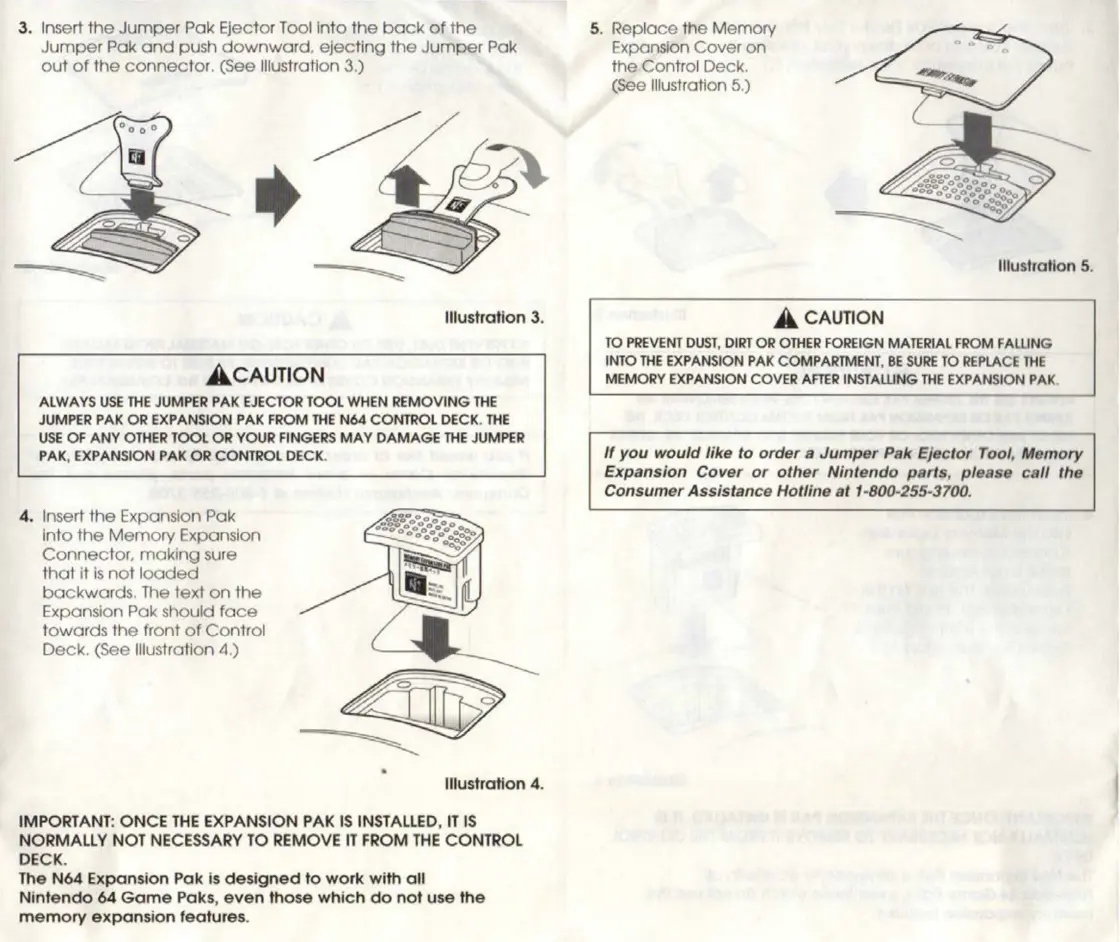
3.
Insert
the
Jumper
Pak
Ejector
Tool
into
the
back
of
the
5.
Replace
the
Memory
Jumper
Pak
and
push
downward,
ejecting
the
Jumper
Pak
Expansion
Cover
on
out
of
the
connector.
(See
Illustration
3.)
the
Control
Deck.
(See
Illustration
5.)
illustration
5.
Illustration
3.
TO
PREVENT
DUST,
DIRT
OR
OTHER
FOREIGN
MATERIAL
FROM
FALLING
INTO
THE
EXPANSION
PAK
COMPARTMENT,
BE
SURE
TO
REPLACE
THE
ACAUTION
MEMORY
EXPANSION
COVER
AFTER
INSTALLING
THE
EXPANSION
PAK.
ALWAYS
USE
THE
JUMPER
PAK
EJECTOR
TOOL
WHEN
REMOVING
THE
JUMPER
PAK
OR
EXPANSION
PAK
FROM
THE
N64
CONTROL
DECK.
THE
USE
OF
ANY
OTHER
TOOL
OR
YOUR
FINGERS
MAY
DAMAGE
THE
JUMPER
PAK,
EXPANSION
PAK
OR
CONTROL
DECK.
If
you
would
like
to
order
a
Jumper
Pak
Ejector
Tool,
Memory
Expansion
Cover
or
other
Nintendo
parts,
please
call
the
Consumer
Assistance
Hotline
at
1-800-255-3700.
4,
Insert
the
Expansion
Pak
into
the
Memory
Expansion
Connector,
making
sure
that
it
is
not
loaded
backwards.
The
text
on
the
Expansion
Pak
should
face
towards
the
front
of
Control
Deck.
(See
Illustration
4.)
illustration
4.
IMPORTANT:
ONCE
THE
EXPANSION
PAK
IS
INSTALLED,
IT
IS
NORMALLY
NOT
NECESSARY
TO
REMOVE
IT
FROM
THE
CONTROL
DECK.
The
N64
Expansion
Pak
is
designed
to
work
with
all
Nintendo
64
Game
Paks,
even
those
which
do
not
use
the
memory
expansion
features.

Related product manuals