EasyManua.ls Logo

Nintendo RVL-003 - User Manual

Nintendo RVL-003
2 pages
Print Icon
To Next Page IconTo Next Page
Loading...
THANKYOUFORSELECTINGTHENITENDOWiiREMOTE,READTHEFOLLOWINGWARNINGSBEFOREYOU
ORYOURCHILDPLAYVIDEOGAMES.IFTHISPRODUCTISTOBEUSEDBYYOUNGCHILDREN,THIS
MANUALSHOULDBEREADANDEXPLAINEDTOTHEMBYANADULT.FAILINGTODOSOMAYCAUSE
INJURY.
※PleasestudywithWiiconsoleinstructionbooklet。
RVL-A-C-JPN
RVL-003
INSTRUCTIONBOOKLET
Remote
■Attention
WiiRemoteisdelicatemachinery。Pleasetakeattentionthefollowing
ImportantSafetyInformationPleasereadcertainty
Warning
Keepawaypeopleandthingsappropriately,somaycauseinjuryanddamagefamilypropertiesand
broken-down
Donotswingunnecessarily,somaycauseinjuryanddamagefamilypropertiesandbroken-down
InPlayinggames,inordertopromisewhenWiiRemoteisdepartedformpalm,theremotewouldnotbethrown
off,pleaseusingspecialstrap(RVL-018)totidthewristimmovably,otherwisemaycauseinjuryanddamagefamily
propertiesandbroken-down。Donottidthestraptootightorloose,somaycauseaccidents。
DonothangtheperipheralofWiiRemoteonthehead,somaycauseaccidents。
Donotplayanymoreifthereisliquid(water,juice,orurineofpet)andforeignthingsetc.inWiiRemote.Ifthe
WiiRemoteiswetted,foreignthingsinside,pleasedonoteplayanymore,seekadvicefromnearlyNintendo
ServiceCentreorshop.IfplayingtheRemotecontinually,somaycausefire,getanelectricshockandbroken-down.
Ifdiscoversmoke,smell,afterconfirmingthesmokedisappear,pleasetakeawaythebatteryandsendtoNintendo
ServiceCentre,somaycausefireandaccidents.
Donotplayingiftheromoteisdamaged,somaycauseelectricshockandinjury.
DonotdisassembleortrytorepairtheNitendoWiiRemote
Avoidtouchingtheconnectorswithyourfingers,somaycauseelectricshockandinjury.
Accessories
Thefollowingisaccessorieslist,pleasecheck:
WiiRemote(RVL-003
●SpecialStrap(RVL-018)
AAtypeBattery
InstructionBooket
1pcs
1pcs
2pcs
1pcs
Cooperation
WARNING
WARNING
DonotpreservetheRemoteinextremetemperaturecondition.
Donotunderbigshock.
Forinformationonbatterydisposalcontactyourlocalsolidwasteauthority.
Pleasetakeattentionthefollowingitem,theinappropriateopeartingmaycausebatteryleakage,heat,broken,and
unusable.
WARNING-DRYBATTERYandRECHARGEABLEBATTERY
WARNING
DonotputtheRemoteonthebed,somaycausedamageorstumble.
DonotputtheRemoteonplacechildcangetorunstable,somayfalltoinjuryorbroken-down.
Wasteelectricalmaycontainhazardoussubstance,pleasedisposeinaccordcewithyourlocalrecyclinglaws.
PleasetakecarethefollowingitemtolaybytheRemote,somaycausebroken-down.
DonotplaytheRemoteinwet,dust,soot.
DonotexposetheRemotesunlightdirectly,andclosefire.
Ifpullouttheperipheral,pleaefollowtheindicate,somaycausebroken-downorsavingtheinformationerror.
Danger
Ifbatteryleakageoccurs,avoidcontactwithskin.Ifcontactoccurs,immediatelywashthoroughlywithsoapand
water.Ifliquidleakingfromabatterycomesintocontactwithyoureyes,immediatelyflushthoroughlywithwater
andseeadoctor.
Donotexposethebatterytoheatordisposeofinafire.
Donotdisassemble,attempttorepairordeformthebattery.
Donottouchtheterminalsofthebatterywithanyforeignmaterialsorametalobject.
Pleasecheckelectrodebeforetopackbattery.
Donotmixtheoldandnewbatteries,anddifferentkindofbatteries.
Donotrechargethedrybattery.
Pleaseremovethebatterywhenemptyandunderunusedlongtime.
Donotusethebatterywithfissure,deformed,leakage.
PleasebuythebatteryNintendoacknowledged,whenbuyingtherechargeablebattery(NiorNi-CdBattery)in
market.
※Therechargeablebatteriesonmarketmaycausefireorburniftheelectrodeshorted.
Thebatteriesisonlytoberechargedunderadultsupervision.
Components
Wiiリモコン
Strap
TurnON/OFFthe
WiiconsolePower
PowerButton
○○○○○○○
WristStrapAttachement
ArrowKey
AButton
(Minus)Button
(Plus)Button
HOMEButton
BatteryCover
Pointer
1Button
2Button
SYNCButton
PlayerIndicator
ExpandtheFNUor
Classicalcontroller(Option)
ExpandConnector
Pressthebuttonto
connecttheconsole
ピーカー
Thebuttonoperationinstructiono,pleaserefertheeachusermamualsofthegames.
TietheWiiRemote
BButtion
LR6(AA)1.5Vx2
Question and Answer IconNeed help?

Do you have a question about the Nintendo RVL-003 and is the answer not in the manual?

Summary

Wii Remote Components

Important Safety Information

General Safety Warnings

Provides essential precautions for handling the Wii Remote to prevent injury and damage.

Battery Safety Precautions

Dry Battery and Rechargeable Battery Hazards

Details dangers and warnings related to battery leakage, heat, and improper use.

Regulatory Compliance

FCC and Industry Canada Statements

Information on compliance with FCC rules and Industry Canada regulations for radio frequency devices.

Summary

Wii Remote Components

Important Safety Information

General Safety Warnings

Provides essential precautions for handling the Wii Remote to prevent injury and damage.

Battery Safety Precautions

Dry Battery and Rechargeable Battery Hazards

Details dangers and warnings related to battery leakage, heat, and improper use.

Regulatory Compliance

FCC and Industry Canada Statements

Information on compliance with FCC rules and Industry Canada regulations for radio frequency devices.

Overview

This document describes the Nintendo Wii Remote, a device designed for interactive video game play. It serves as the primary controller for the Wii console, allowing users to interact with games through motion sensing and button presses.

Function Description

The Wii Remote (model RVL-003) is a wireless controller that enables players to engage with games through a combination of physical movement and traditional button inputs. Its core functionality revolves around motion sensing, which allows the device to detect and translate a player's gestures and movements into in-game actions. This creates an immersive and intuitive gaming experience, moving beyond traditional button-only controls.

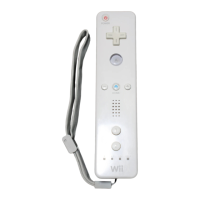
The remote features a Power Button to turn the Wii console on and off, an Arrow Key for directional input, and several action buttons including A, HOME, 1, and 2. It also includes a Minus (-) Button and a Plus (+) Button, along with a Speaker for in-game audio feedback. A Player Indicator lights up to show which player number the remote is assigned to.

At the top of the remote, there is a Pointer function, which allows users to aim and select items on the screen, similar to a mouse. This is particularly useful for menu navigation and games that require precise targeting.

The bottom of the remote includes an Expand Connector, which allows for the attachment of peripherals such as the Nunchuk or Classic Controller, expanding the range of control options for different game types. There is also a Wrist Strap Attachment point, designed to secure the remote to the player's wrist during active gameplay, preventing accidental release.

On the back of the remote, a Battery Cover protects the battery compartment, which houses two AA type batteries. A SYNC Button is located within the battery compartment, used to connect the remote wirelessly to the Wii console.

Usage Features

The Wii Remote is designed for ease of use and interactive gameplay. Before playing, users are instructed to connect the remote to the console using the SYNC button. For active games, it is crucial to use the included Special Strap (RVL-018) to secure the remote to the wrist. This strap prevents the remote from being accidentally thrown during vigorous gameplay, which could lead to injury or damage to property. The strap should be worn comfortably, not too tight or too loose, to ensure both safety and freedom of movement.

Players are advised to maintain an appropriate distance from other people and objects while playing to avoid accidental collisions or damage. Unnecessary swinging of the remote should be avoided. The manual also warns against hanging peripherals from the remote on one's head, as this could lead to accidents.

The remote's motion-sensing capabilities allow for a wide range of gameplay styles, from sports simulations to adventure games, where physical gestures directly control in-game characters or actions. The pointer function enhances precision for targeting and menu navigation. The various buttons provide additional control for specific actions, menus, and character movements.

The Player Indicator lights help players easily identify their assigned remote in multiplayer settings. The built-in speaker provides auditory cues and effects directly from the remote, adding another layer of immersion to the gaming experience.

Maintenance Features

Proper care and maintenance are essential to ensure the longevity and safe operation of the Wii Remote. The device is described as delicate machinery, requiring careful handling.

General Care:

  • Avoid placing the remote on unstable surfaces or beds where it could fall, be damaged, or cause someone to stumble.
  • Keep the remote away from wet, dusty, or sooty environments.
  • Do not expose the remote to direct sunlight or close to fire.
  • If attaching or detaching peripherals, follow the instructions carefully to prevent damage or data errors.
  • Do not play with the remote if it has come into contact with liquids (water, juice, pet urine, etc.) or if foreign objects are inside. If this occurs, stop playing immediately and seek advice from a Nintendo Service Centre or shop to prevent fire, electric shock, or further damage.
  • If smoke or unusual smells are detected, immediately remove the batteries after confirming the smoke has dissipated and send the device to a Nintendo Service Centre to prevent fire or accidents.
  • Do not use the remote if it is damaged, as this could lead to electric shock or injury.
  • Do not attempt to disassemble or repair the Nintendo Wii Remote yourself.
  • Avoid touching the connectors with fingers to prevent electric shock or injury.

Battery Care (for dry and rechargeable batteries):

  • Improper battery handling can lead to leakage, heat, breakage, or render the batteries unusable.
  • Danger: If battery leakage occurs, avoid skin contact. If contact happens, wash thoroughly with soap and water. If battery liquid gets into eyes, flush thoroughly with water immediately and consult a doctor.
  • Do not expose batteries to heat or dispose of them in fire.
  • Do not disassemble, attempt to repair, or deform batteries.
  • Do not touch battery terminals with foreign materials or metal objects.
  • Always check electrode polarity before inserting batteries.
  • Warning:
    • Do not mix old and new batteries, or different types of batteries.
    • Do not attempt to recharge dry batteries.
    • Remove batteries when they are empty or if the remote will not be used for a long time.
    • Do not use batteries that are fissured, deformed, or leaking.
    • For rechargeable batteries (Ni or Ni-Cd), purchase only Nintendo-acknowledged batteries. Be aware that non-approved rechargeable batteries may cause fire or burns if the electrodes short-circuit.
    • Recharging of batteries should only be done under adult supervision.
  • General Battery Warnings:
    • Do not store the remote in extreme temperature conditions.
    • Avoid subjecting the remote to strong shocks.
    • For information on battery disposal, contact your local solid waste authority.

FCC and Industry Canada Compliance: The device complies with FCC and Industry Canada regulations, ensuring it meets standards for radio frequency emissions. Users are advised that any changes or modifications not expressly approved by the responsible party could void their authority to operate the equipment. If the device causes harmful interference, users are encouraged to try measures such as reorienting the receiving antenna, increasing separation between equipment and receiver, connecting to a different circuit outlet, or consulting a radio/TV technician. The device is designed to accept any interference received and not cause harmful interference itself.

Nintendo RVL-003 Specifications

General IconGeneral
ModelRVL-003
ConnectivityBluetooth
Power2 AA batteries
Motion SensingYes
RumbleYes
SpeakerYes
Infrared SensorYes
Expansion PortYes
TypeRemote
CompatibilityWii console