EasyManua.ls Logo

Nippon DENON DCA-800 - Removal each Sections

Nippon DENON DCA-800
22 pages
Print Icon
To Next Page IconTo Next Page
To Previous Page IconTo Previous Page
Loading...
(Eo
oan
a
ST
a
(>
A-8O0
Baas
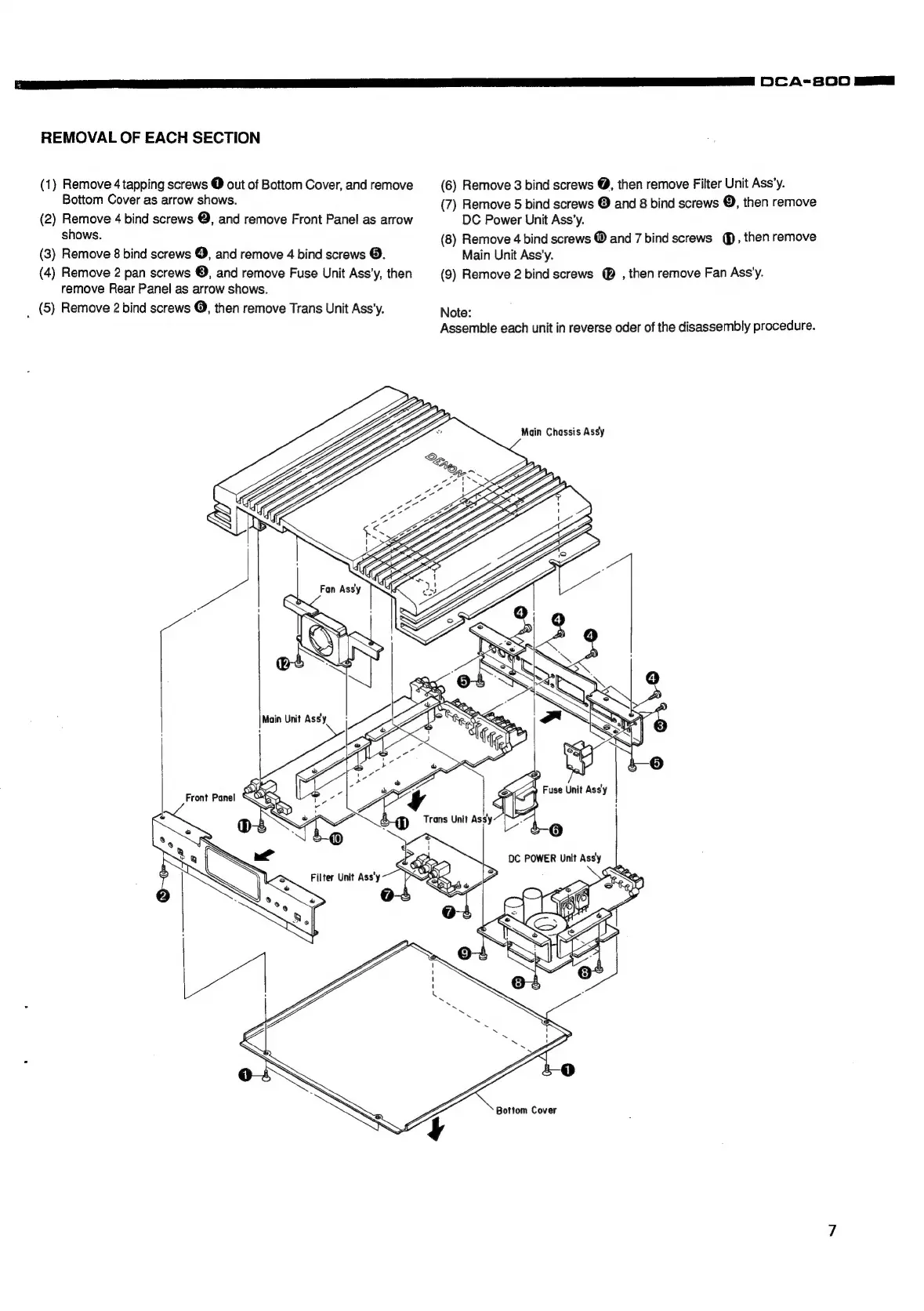
REMOVAL
OF
EACH
SECTION
(1)
Remove
4
tapping
screws
@
out
of
Bottom
Cover,
and
remove
Bottom
Cover
as
arrow
shows.
(2)
Remove
4
bind
screws
@,
and
remove
Front
Panel
as
arrow
shows.
(3)
Remove
8
bind
screws
@,
and
remove
4
bind
screws
@.
(4)
Remove
2
pan
screws
©,
and
remove
Fuse
Unit
Ass’y,
then
remove
Rear
Panel
as
arrow
shows.
_
(5)
Remove
2
bind
screws
@,
then
remove
Trans
Unit
Ass’y.
Front
Panel
(6)
Remove
3
bind
screws
@,
then
remove
Filter
Unit
Ass’y.
(7)
Remove
5
bind
screws
®
and
8
bind
screws
©,
then
remove
DC
Power
Unit
Ass’y.
(8)
Remove
4
bind
screws
@
and
7
bind
screws
@,
then
remove
Main
Unit
Ass’y.
(9)
Remove
2
bind
screws
(@®
,
then
remove
Fan
Ass’y.
Note:
Assemble
each
unit
in
reverse
oder
of
the
disassembly
procedure.
Main
Chassis
Assy