INFO:
. When a waypoint has been set on the route,
the system will search for only one route,
even if route recalculation is performed.
. When the vehicle deviates from the sug-
gested route, the route from the current
location to the destination is automatically
searched again.
“Detailed route settings” (page 3-52)
SETTING DETOUR ROUTE
To detour from the suggested route, a route
detouring for a specified distance can be
calculated.
1. Push the MENU button and touch [Route].
2. Touch [Detour].
3. Touch a detour distance. After calculating
the detour, the system displays the detour
route on the map.
INFO:
. When the vehicle has deviated from the
suggested route, [Detour] cannot be se-
lected.
. If the system cannot calculate a detour with
the specified conditions, it displays the
previous suggested route.
. If the vehicle is traveling very fast, the detour
route may start from a location that the
vehicle has already passed.
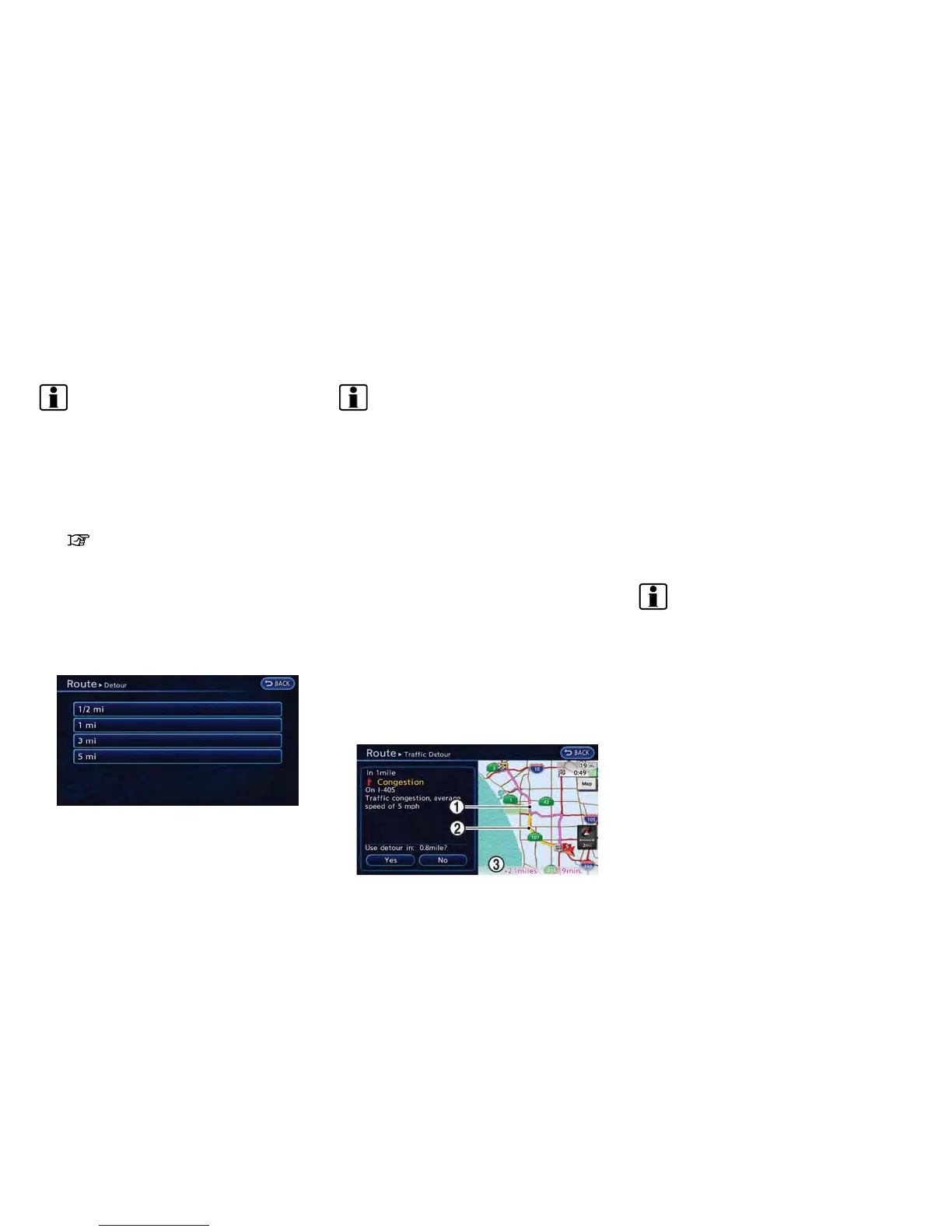
SEARCHING FOR DETOUR ROUTE
USING TRAFFIC INFORMATION
When a serious traffic event occurs on the route,
or if the system finds a faster route, a detour alert
will pop up automatically. If the automatic alert is
not noticed, a detour can also be manually
searched.
1. Push the MENU button and touch [Route].
2. Touch [Traffic Detour].
3. When the detour search is successful,
detailed information about the detour route
(left screen) and the comparison screen of
the two routes (right screen) are displayed.
*
1
Detour route (pink)
*
2
Original route (yellow)
*
3
The change of distance and estimated travel
time to destination when the detour route is
taken.
4. To accept the suggested detour route, touch
[Yes].
INFO:
. If no route is set, or [Use Real Time Traffic
Information] is turned off, this function
cannot be operated.
. If a detour route is not selected and no
further action is performed, the detour route
will be automatically canceled.
. The detour suggestion can be retrieved even
after the message disappears by manually
selecting [Traffic Detour]. The system will
then search for the detour again and will
suggest a detour if one is available at that
time.
. Without a subscription to an XM NavTraffic
®
broadcast, it will not be possible to get a
traffic detour or apply settings for functions
related to traffic information. A message
Navigation 3-51



 To Next Page