3-60 Navigation
dress book” (page 3-67)
Editing stored home and address
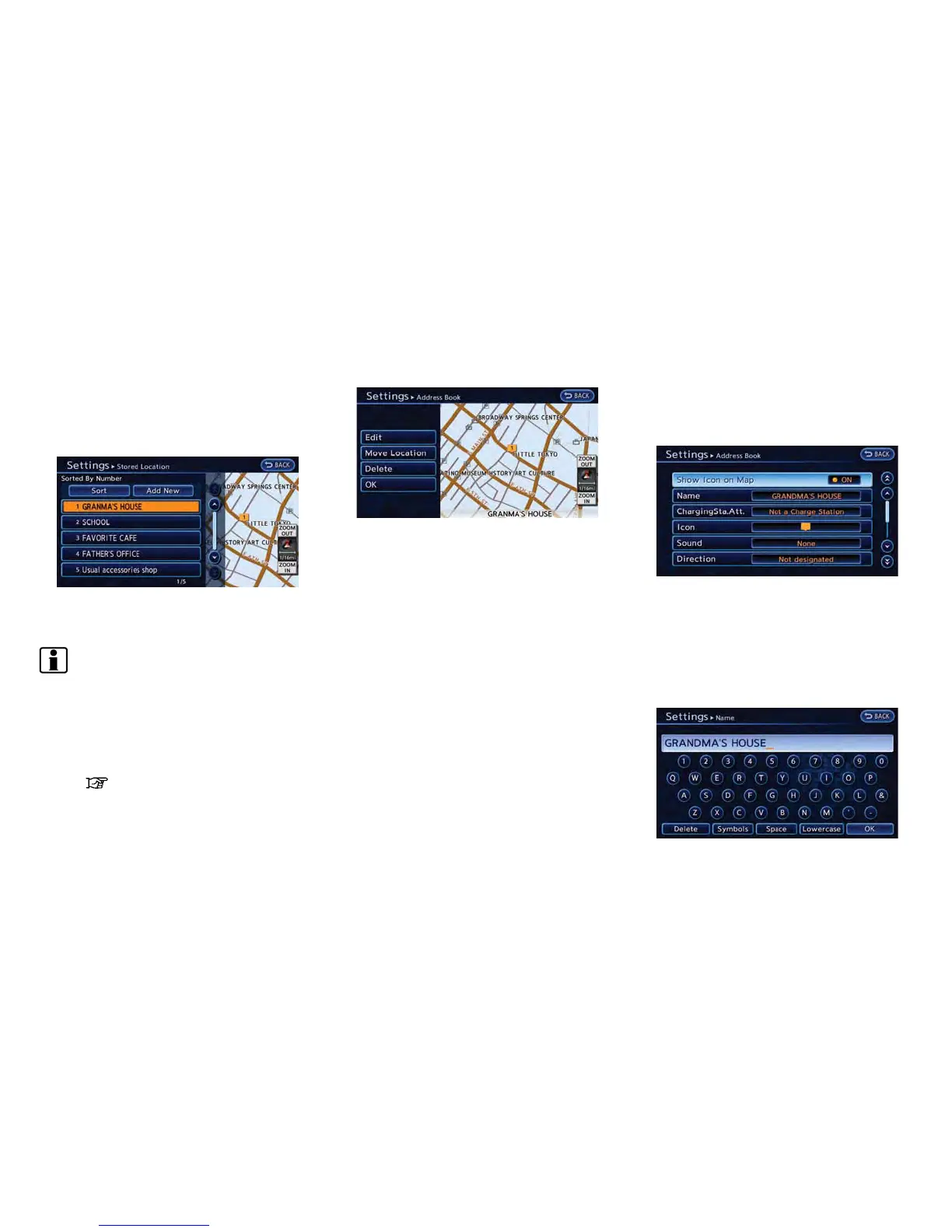
1. Touch [Home Location] or [Stored Location].
2. Touch the preferred stored address from the
list.
INFO:
.
When [Home Location] is touched, it is
not necessary to be perform "step 2".
.
Touching [Sort] displays a list of various
sort functions. To use the sort functions,
stored addresses must be set in ad-
vance.
“Minor adjustment of home or
stored address” (page 3-60)
3. Touch the item you would like to set.
Available settings
.
[Edit]:
Edits the stored address information.
.
[Move Location]:
Adjusts the location of the stored ad-
dress.
.
[Delete]:
Deletes the stored address.
.
[OK]:
Applies the settings.
Minor adjustment of home or stored
address
When [Edit] is selected, you can edit the
following items of the home or stored address
can be edited.
Show Icon on Map:
Displays the home icon or the stored address
icon on the map.
1. Touch [Show Icon on Map].
2. The indicator illuminates when the item is
set. Then the system displays the icon on
the map.
Name (only for stored addresses):
Changes the name of a stored address.



 To Next Page