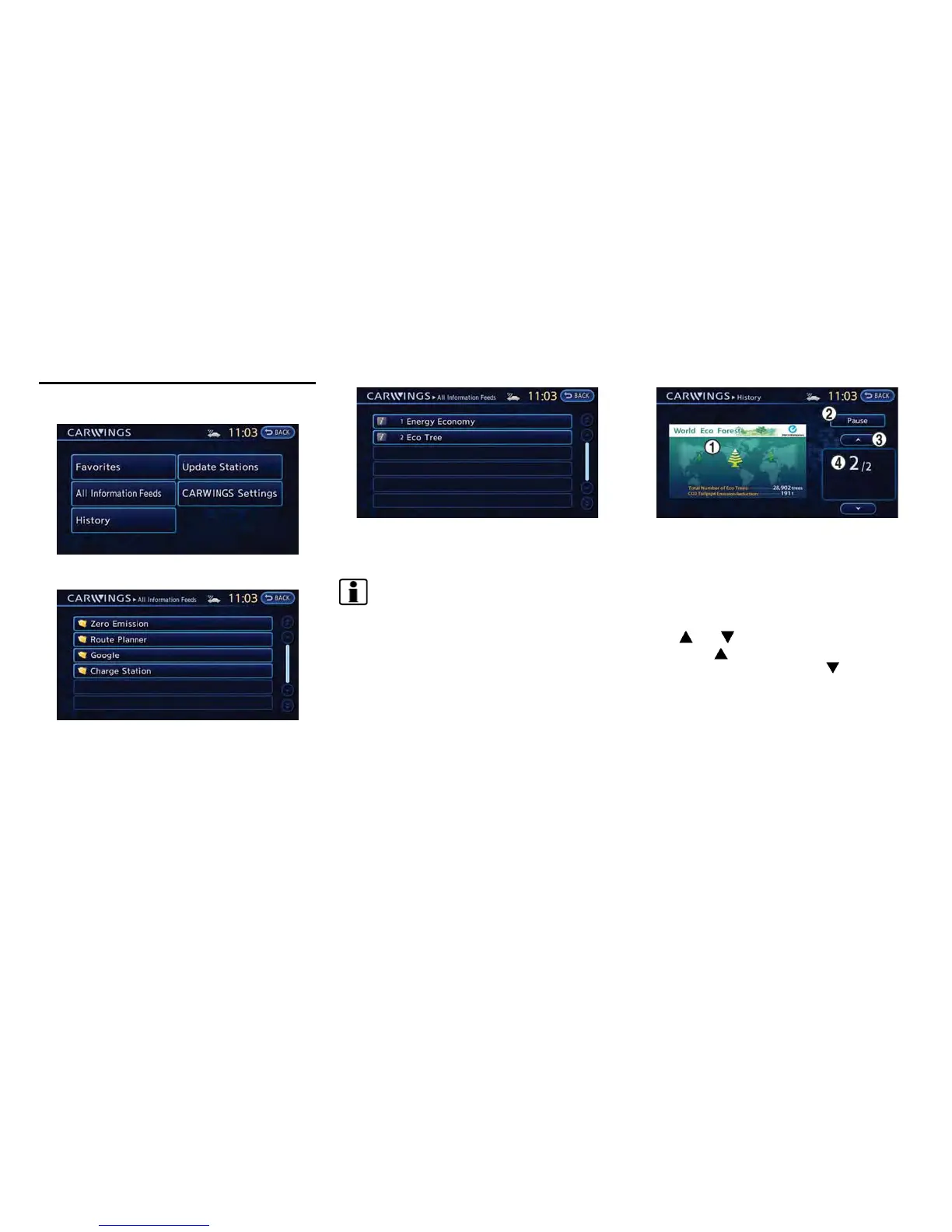
1. Push the MENU button and touch [CARW-
INGS].
2. Touch [All Information Feeds].
3. Touch the preferred folder. An information
feed list is displayed.
4. Touch the preferred information feed. An
information feed screen is displayed.
INFO:
. Touch [Stop] while communicating with the
NISSAN CARWINGS Data Center to can-
cel the communication.
. A message is displayed when the commu-
nication is disconnected while downloading
information due to poor communication
status. Touch [Yes] to restart the download.
HOW TO VIEW INFORMATION
SCREEN
When the information screen is displayed, the
contents are shown with images and sounds.
Screen when Auto-play is on
*
1
When the selected feed includes image data, the
images are displayed. If not, only titles are shown.
*
2
[Pause]:
Touch to stop the voice announcement function
that reads out the information that is currently
displayed.
*
3
[ ]/[ ]:
Touch [
] to have the system announce the
previous information. Touch [
] to have the
system announce the next information.
*
4
The page number, the number of information
items, location data information and telephone
data information are displayed.
Auto-play function:
This function receives feeds from the NISSAN
CARWINGS Data Center, displays them on the
screen, and then automatically reads out the
contents.
CARWINGS
TM
5-7
DISPLAYING CARWINGS
TM
INFORMATION SCREEN



 To Next Page