The settings included in this section should be
performed before using the system for the first
time.
SUBSCRIPTION TO CARWINGS
TM
SERVICE
It is necessary to subscribe to CARWINGS
TM
in
order to use the CARWINGS
TM
service. For the
details about the subscription, visit the NISSAN
Owner’s Portal Website or contact a NISSAN
certified LEAF dealer.
INPUTTING USER ID AND PASS-
WORD
User registration is required before using the
CARWINGS
TM
service. CARWINGS
TM
is a
service that provides various types of informa-
tion by communicating with the NISSAN
CARWINGS Data Center. Access the NISSAN
Owner’s Portal Website before starting the
service. Confirm the terms of service and
complete the user registration form. After
registration is completed, a user ID and pass-
word are provided.
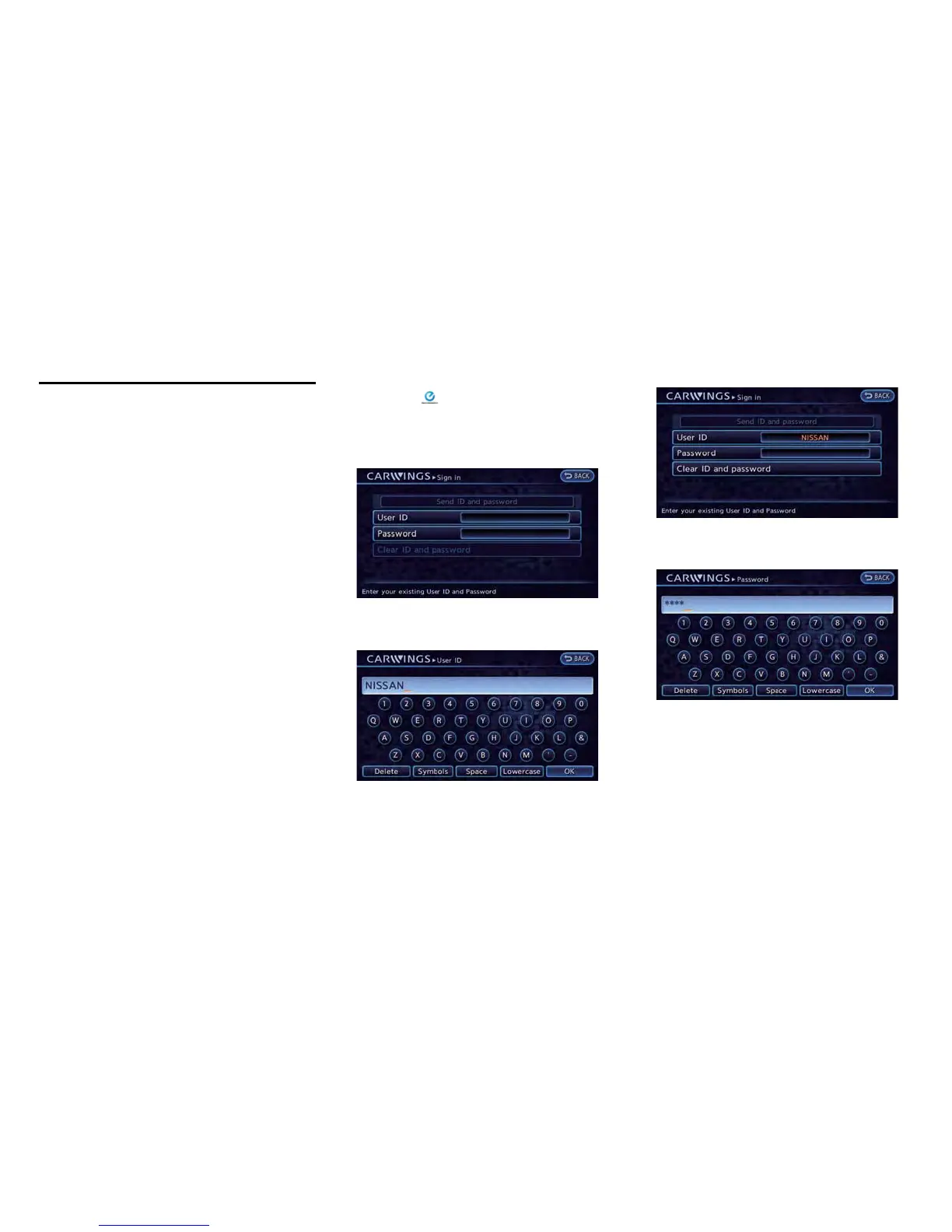
Inputting procedure
Enter the user ID and password in the system by
preforming the following procedure.
1. Push the
(Zero Emission menu) button
and touch [CARWINGS].
2. Touch [CARWINGS Settings].
3. Touch [Sign in].
4. Touch [User ID]. The user ID input screen is
displayed.
5. Enter the user ID and touch [OK]. Return to
the previous screen.
6. Touch [Password]. The password input
screen is displayed.
7. Enter your password and touch [OK]. Return
to the previous screen.
Getting Started 1-11
ITEMS TO BE SET INITIALLY



 To Next Page