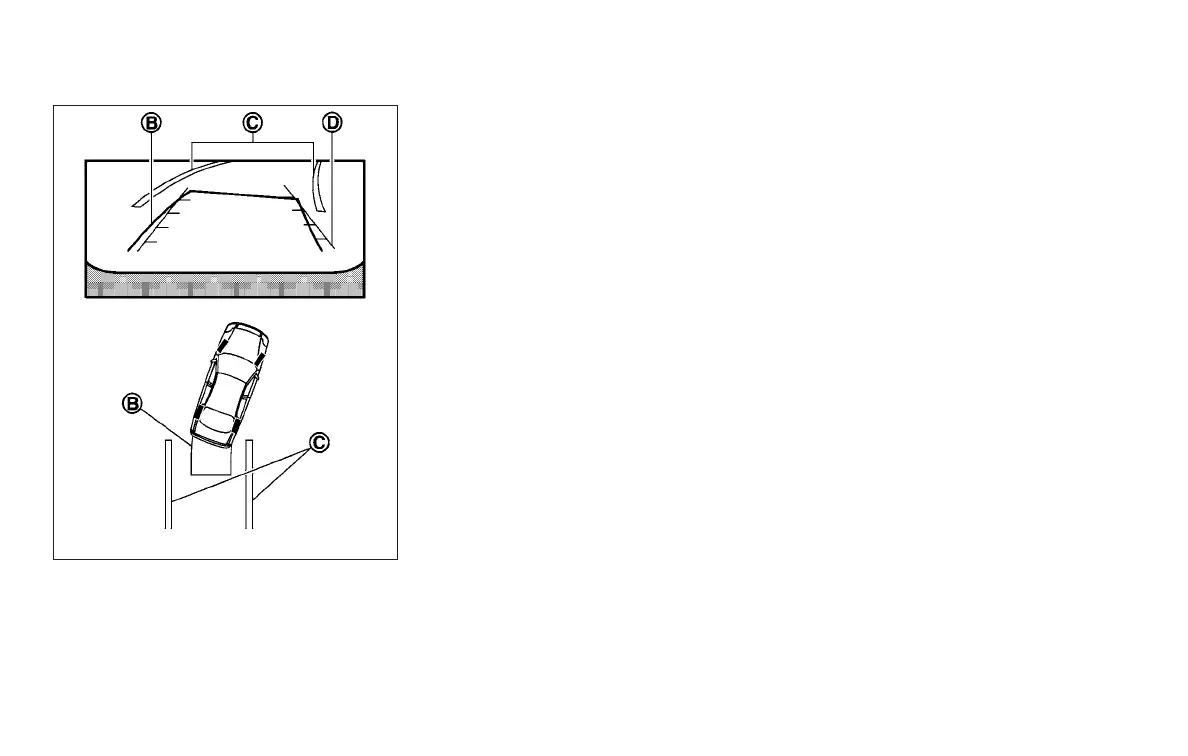
3. Slowly back up the vehicle adjusting the
steering wheel so that the predicted course
lines
䊊
B
enter the parking space
䊊
C
.
4. Maneuver the steering wheel to make the
vehicle width guide lines
䊊
D
parallel to the
parking space
䊊
C
while referring to the pre-
dicted course lines.
5. When the vehicle is parked in the space
completely, move the shift lever to the P
(Park) position and apply the parking brake.
HOW TO SWITCH THE DISPLAY
With the ignition switch in the ON position, press
the CAMERA button or move the shift lever to the
R (Reverse) position to operate the Around
View® Monitor.
The Around View® Monitor displays different
split screen views depending on the position of
the shift lever. Press the CAMERA button to
switch between the available views.
If the shift lever is in the R (Reverse) position, the
available views are:
● Rear view/bird’s-eye view split screen
● Rear view/front-side view split screen
If the shift lever is in the P (Park) position, the
available views are:
● Front view/bird’s-eye view split screen
● Front view/front-side view split screen
If the shift lever is in the D (Drive) position, the
only available view is front view/front-side view
split screen.
The display will switch from the Around View®
Monitor screen when:
● The shift lever is in the D (Drive) position and
the vehicle speed increases above approxi-
mately 6 mph (10 km/h)
● A different screen is selected.
LHA1198
Monitor, climate, audio, phone and voice recognition systems 4-23



 To Next Page