To view detailed instructional videos regarding these and other features,
please go to www.nissanownersinfo.mobi.
29
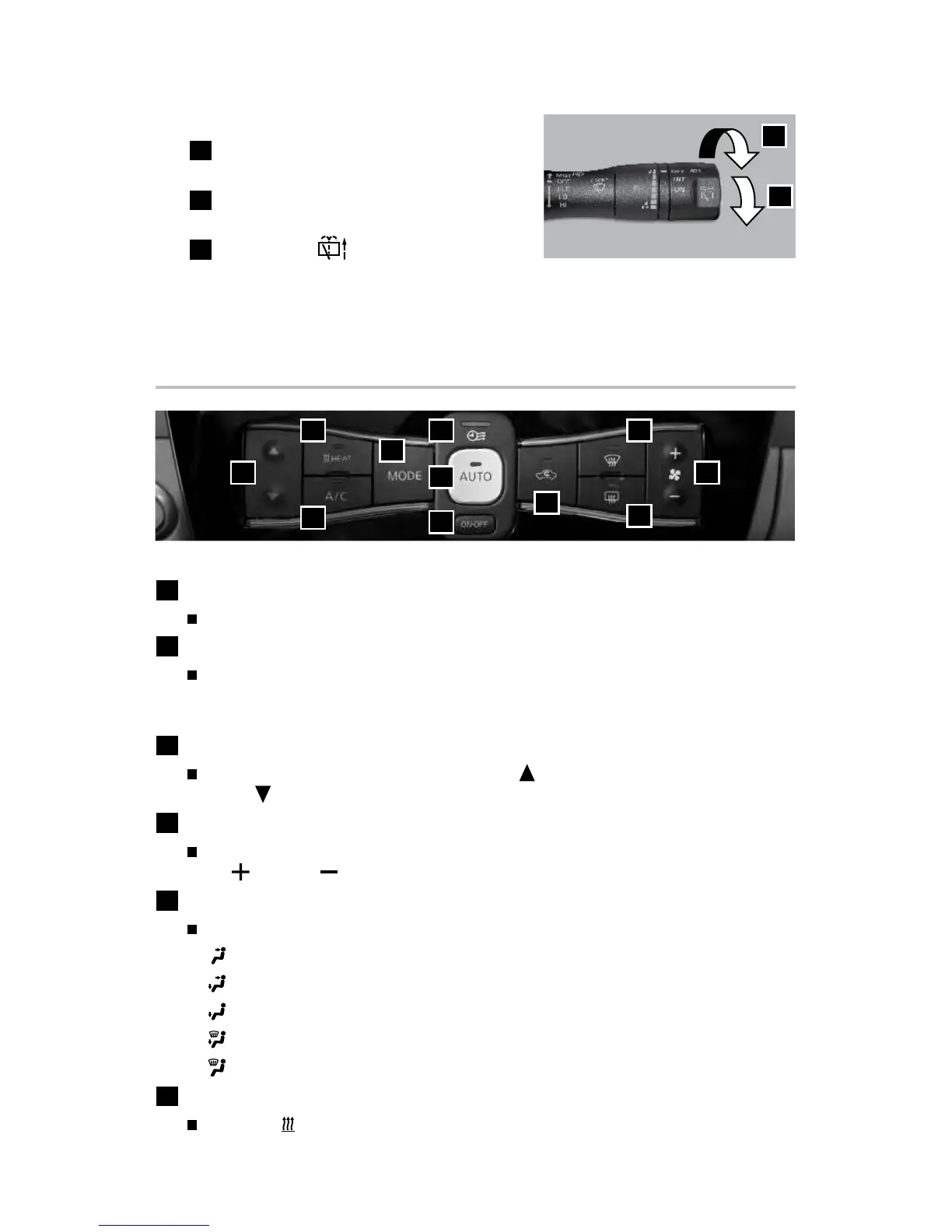
HEATER AND AIR CONDITIONER (automatic)
1
ON•OFF BUTTON
Press the ON•OFF button to turn the climate control system on or o.
2
AUTO BUTTON
The automatic mode may be used year-round. Press the AUTO button, and
the system will automatically control the inside temperature (automatic
cooling and/or dehumidied heating), air ow distribution and fan speed.
3
TEMPERATURE CONTROL BUTTON
Press the temperature control button up
for warmer air or
down
for cooler air.
4
FAN SPEED CONTROL BUTTON
Press the fan speed control button to manually adjust the fan speed
up
or
down
.
5
MODE BUTTON
Press the MODE button to cycle through the following air ow outlets:
Air ows from the center and side vents.
Air ows from the center, side and foot vents.
Air ows mainly from the foot vents.
Air ows from the front defroster and foot vents.
Air ows from the front defroster vents.
6
HEAT BUTTON
Press the HEAT button to manually turn the heater on and o.
3
1
11
2
5
4
7
10
9
6 8
REAR WIPER AND WASHER SWITCH
7
Intermittent (INT) – Rear wiper
operates intermittently.
8
Low (ON) – Rear wiper operates at
a continuous low-speed.
9
Rear washer – Push the lever forward
to activate the rear washer. The rear
wiper will operate several times.
Please see your Owner’s Manual for important safety information, system limitations, and additional
operating and feature information.
For more information, refer to the “Instruments and controls (section 2)” of your Owner’s Manual.
INT
ON
7
8
FIRST DRIVE FEATURES
2948550_18a_Leaf_QRG_100317.indd 29 10/3/17 3:59 PM



 To Next Page