CAUTION
• Be careful not to allow children to
swallow the battery and removed
parts.
• An improperly disposed battery can
harm the environment. Always confirm
local regulations for battery disposal.
• When changing batteries, do not let
dust or oil get on the components.
• There is danger of explosion if the
lithium battery is incorrectly replaced.
Replace only with the same or equiva-
lent type.
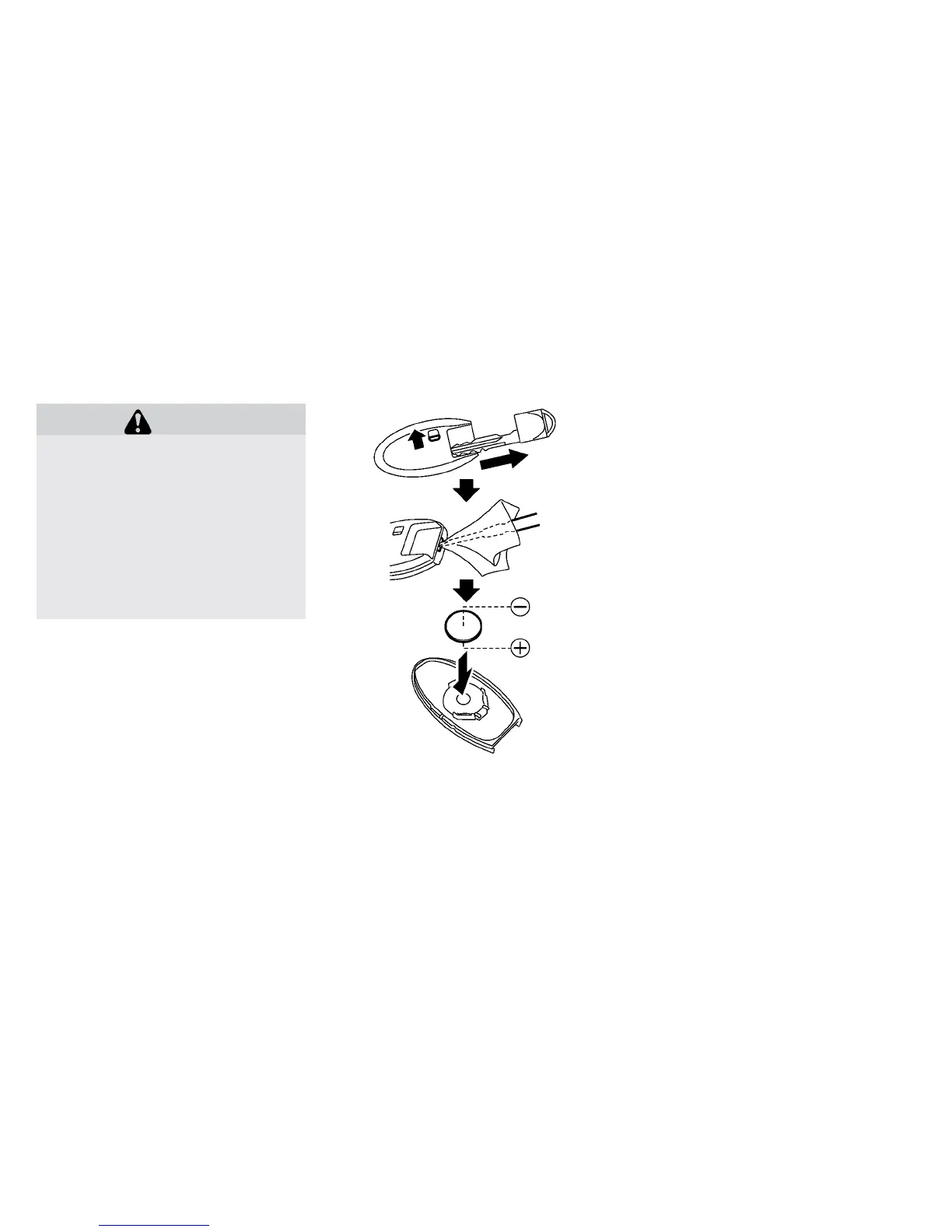
Replace the battery in the Intelligent Key as fol-
lows:
1. Remove the mechanical key from the Intelli-
gent Key.
2. Insert a small screwdriver into the slit of the
corner and twist it to separate the upper part
from the lower part. Use a cloth to protect the
casing.
3. Replace the battery with a new one.
Recommended battery:
CR2025 or equivalent
• Do not touch the internal circuit and electric
terminals as doing so could cause a malfunc-
tion.
• Hold the battery by the edges. Holding the
battery across the contact points will seri-
ously deplete the storage capacity.
• Make sure that the 丣 side faces the bottom
of the case.
NISSAN INTELLIGENT KEY®
BATTERY REPLACEMENT
Maintenance and do-it yourself 8-19





 To Next Page