[ Edit: 2016/ 11/ 24 Model: E12-A ]
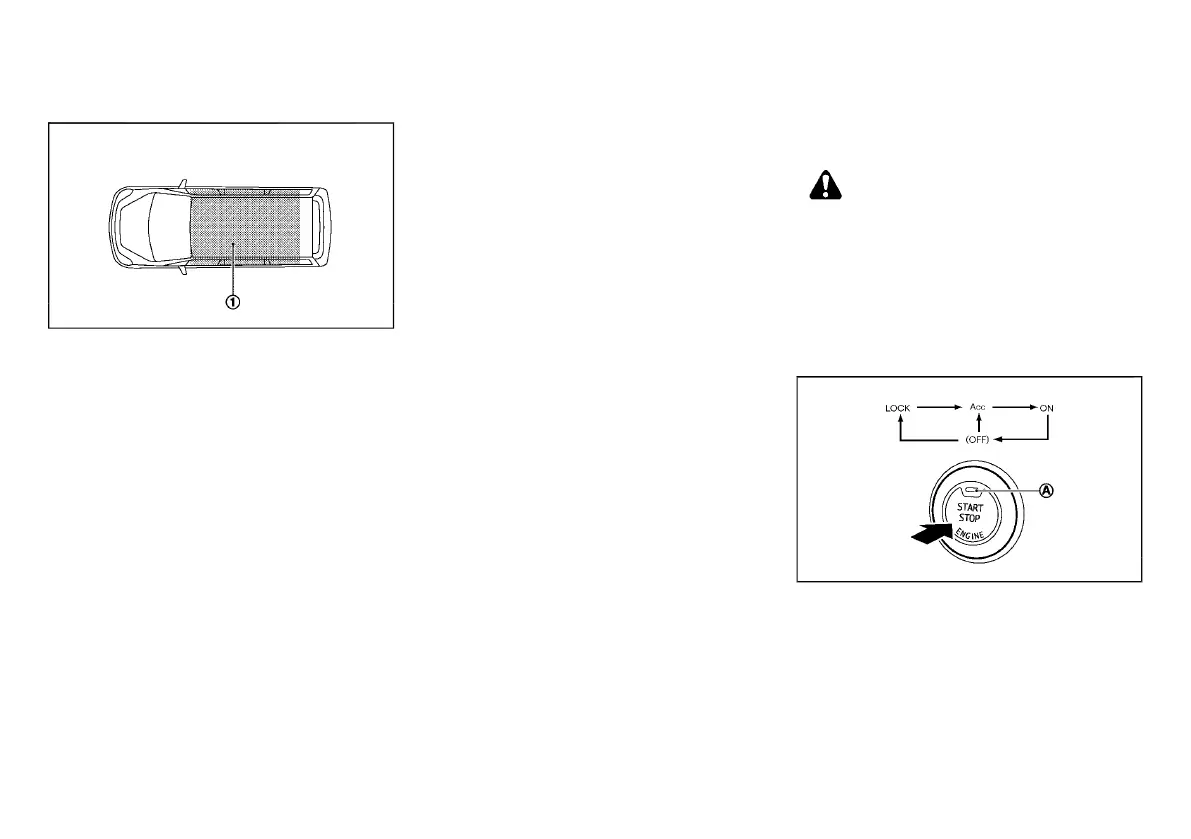
Operating range
E12-A-120227-F4B305E6-5716-4B0A-8C41-A551B759EC8E
SSD0436
The Intelligent Key can only be used for starting the
engine when the Intelligent Key is within the specified
operating range
*
1
as illustrated.
When the Intelligent Key battery is almost discharged
or strong radio waves are present near the operating
location, the Intelligent Key system’s operating range
becomes narrower and may not function properly.
If the Intelligent Key is within the operating range, it is
possible for anyone, even someone who does not carry
the Intelligent Key, to push the ignition switch to start
the engine.
. The luggage room area is not included in the
operating range, but the Intelligent Key may
function.
. If the Intelligent Key is placed on the instrument
panel, inside the glove box, door pocket or the
corner of the interior compartment, the Intelligent
Key may not function.
. If the Intelligent Key is placed near the door or
window outside the vehicle, the Intelligent Key
may function.
Continuously Variable Transmission (CVT)
model
E12-A-120227-86817AE4-683C-4F5B-83F9-1DB304978BF0
The ignition lock is designed so that the ignition switch
cannot be switched to the “LOCK” position until the
shift lever is moved to the “P” (Park) position. When
pushing the ignition switch to the “OFF” position, make
sure the shift lever is in the “P” (Park) position.
When the ignition switch cannot be switched to the
“LOCK” position:
1. Move the shift lever to the “P” (Park) position.
2. Push the ignition switch to the “OFF” position.
3. Open the door. The ignition switch will change to
the “LOCK” position.
If the ignition switch is switched to the “LOCK”
position, the shift lever cannot be moved from the “P”
(Park) position. The shift lever can be moved if the
ignition switch is in the “ON” position with the foot
brake depressed.
STEERING LOCK
E12-A-120227-914D3B9D-F720-4504-9ED4-4E4F2DA374ED
The ignition switch is equipped with an anti-theft
steering lock device.
To lock steering wheel
E12-A-120227-2C665240-41B9-48F8-A9B2-CB4E268CB563
1. Push the ignition switch to the “OFF” position
where the ignition switch position indicator will not
illuminate.
2. Open or close the door. The ignition switch turns
to the “LOCK” position.
3. Turn the steering wheel 1/6 of a turn to the right or
left from the straight up position.
To unlock steering wheel
E12-A-120227-10918C66-44D9-4576-8607-B43EC7F70FFB
Push the ignition switch, and the steering wheel will be
automatically unlocked.
CAUTION:
. If the battery of the vehicle is discharged, the
push-button ignition switch cannot be
switched from the “LOCK” position.
. If the ignition switch position does not
change from the “LOCK” position, push the
ignition switch again while rotating the
steering wheel slightly to the right and left.
IGNITION SWITCH POSITIONS
E12-A-120227-AA2B6174-3D5C-4DE9-9C53-A53D678CD7E4
SSD0859
When the ignition switch is pushed without depressing
the brake pedal, the ignition switch position will
change as follows:
. Push once to change to “ACC”.
. Push two times to change to “ON”.
. Push three times to change to “OFF”.
. Push four times to return to “ACC”.
. Open or close any door to return to “LOCK” when
in the “OFF” position.
Starting and driving 5-5
Condition:


 To Next Page
 Loading...