[ Edit: 2016/ 11/ 24 Model: E12-A ]
5-6 Starting and driving
The indicator light
*
A
on the ignition switch illumi-
nates when the ignition switch is in the “ACC” or “ON”
position.
LOCK position
E12-A-120227-7E1423E2-7422-4440-9375-4AEA6EB46A16
The ignition switch and steering lock can only be
locked at this position.
The ignition switch will be unlocked when it is pushed
to the “ACC” position while carrying the Intelligent Key.
ACC position
E12-A-120227-CD0CE57C-FF81-469E-9279-CAF30AF174B6
The electrical accessory power activates at this
position without the engine turned on.
ON position
E12-A-120227-01980C4B-628F-428D-8FD6-8D850DA23546
The ignition system and the electrical accessory power
activate at this position without the engine turned on.
OFF position
E12-A-120227-203DEC7B-A4ED-4E31-B25D-C4905353458A
The engine is turned off with the steering wheel
unlocked.
WARNING:
Never push the ignition switch to the “OFF”
position while driving. The steering wheel may
lock and cause the driver to lose control of the
vehicle, resulting in serious vehicle damage or
personal injury.
CAUTION:
Do not leave the vehicle for extended periods of
time when the ignition switch is in the “ACC” or
“ON” position and the engine is not running.
This can discharge the battery.
NOTE:
When the ignition switch is pushed while the
Idling Stop System is activated, the ignition
switch will be placed in the “OFF” position.
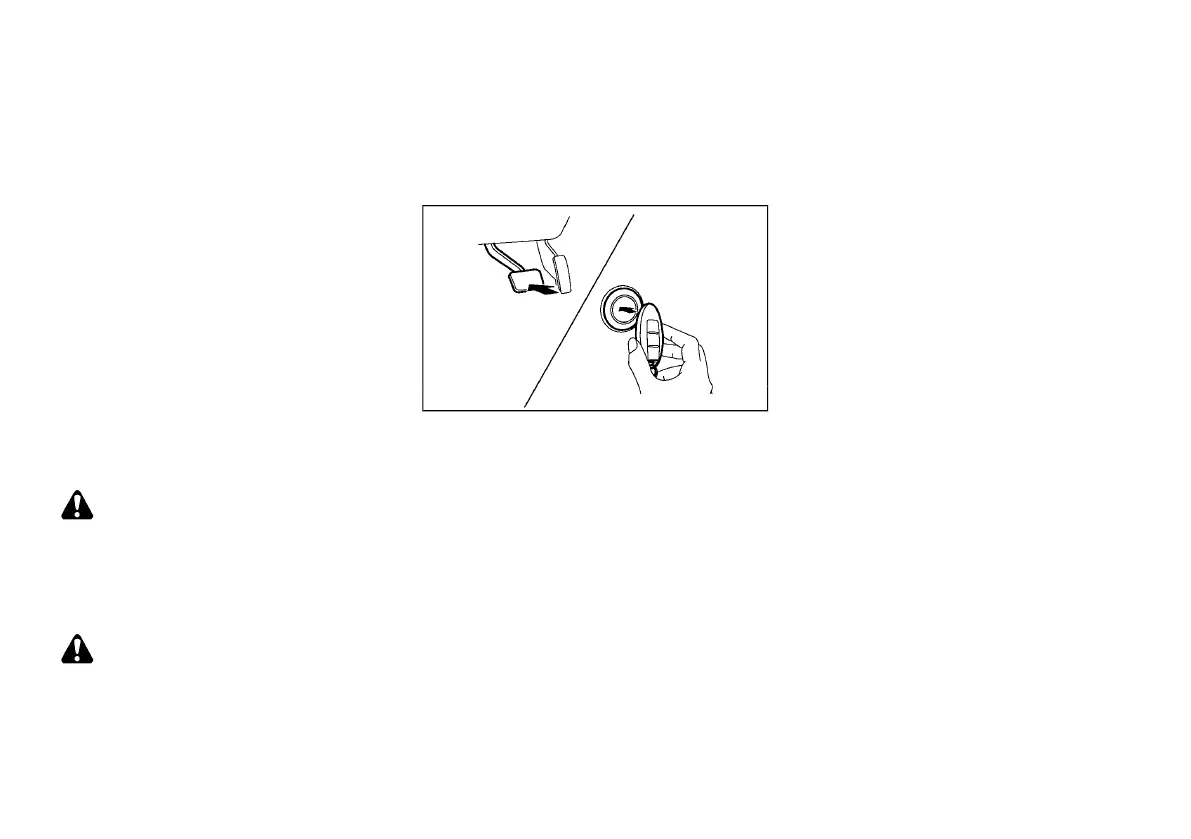
INTELLIGENT KEY BATTERY DISCHARGE
E12-A-120227-6CA4B847-4663-402F-8C4D-438EB193143F
JVS0404X
If the battery of the Intelligent Key is discharged, or
environmental conditions interfere with the Intelligent
Key operation, start the engine according to the
following procedure:
1. Move the shift lever to the “P” (Park) position.
2. Firmly apply the foot brake.
3. Touch the ignition switch with the Intelligent Key
as illustrated. (A chime will sound.)
4. Push the ignition switch while depressing the
brake pedal within 10 seconds after the chime
sounds. The engine will start.
After step 3 is performed, when the ignition switch is
pushed without depressing the brake pedal, the
ignition switch position will change to “ACC”.
NOTE:
. When the ignition switch is pushed to the
“ACC” or “ON” position or the engine is
started by the above procedures, the Intel-
ligent Key system warning light may blink in
yellow (on the meter) even if the Intelligent
Key is inside the vehicle. This is not a
malfunction. To stop the warning light from
blinking, touch the ignition switch with the
Intelligent Key again.
. If the Intelligent Key system warning light in
the meter is blinking in green, replace the
battery as soon as possible. (See “Intelligent
Key battery” (P.8-18).)
Condition:



 To Next Page