[ Edit: 2016/ 11/ 24 Model: E12-A ]
5-16 Starting and driving
. When you operate the lane change signal and
change traveling lanes in the direction of the
signal. (The LDW system will become operable
again approximately 2 seconds after the lane
change signal is turned off.)
. When the vehicle speed lowers to less than
approximately 60 km/h (37 MPH).
After the above conditions have finished and the
necessary operating conditions are satisfied, the LDW
functions will resume.
Turning on or off the LDW system
GUID-9793B2E2-AE92-4CA1-9B85-36D9E77CE5F5
JVS0354X
LDW switch
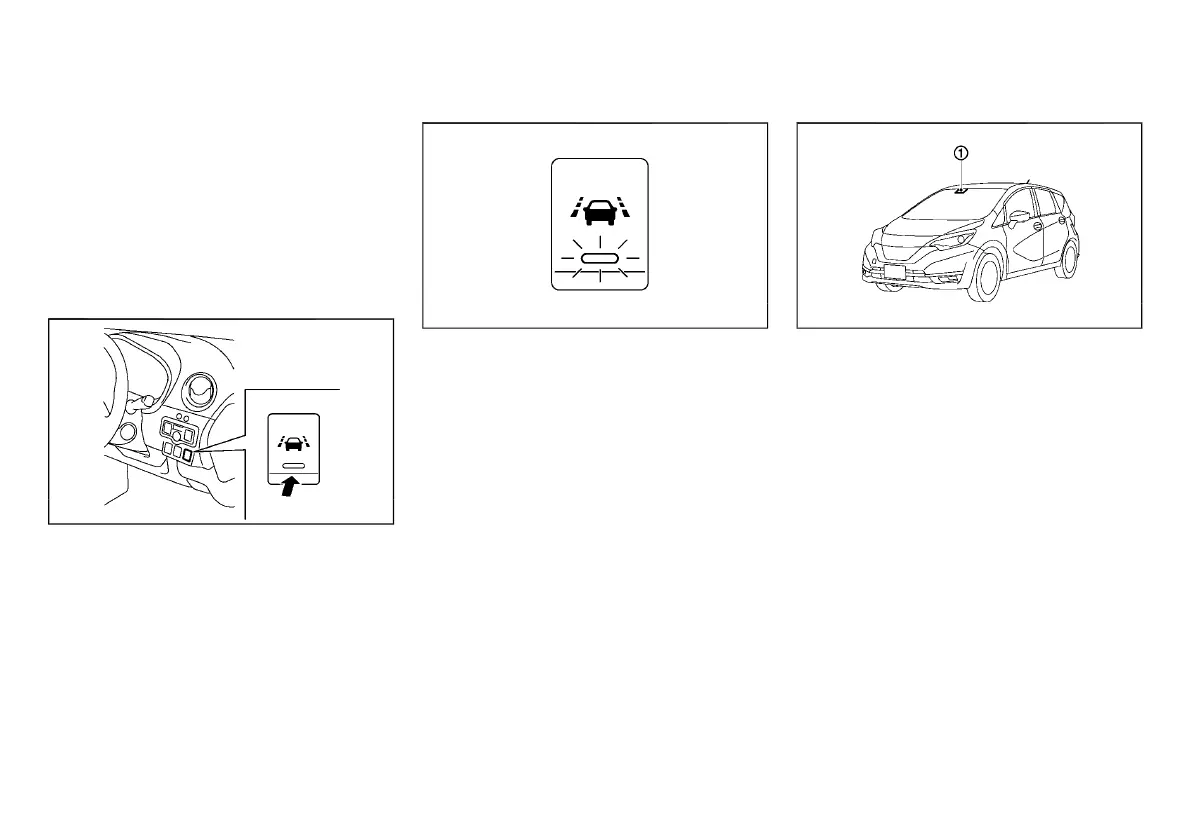
The LDW system can be turned on or off using the
LDW switch on the instrument panel.
When the system is on, the LDW system ON indicator
light on the switch illuminates. To cancel the LDW
system, push the LDW switch. The LDW system ON
indicator light will turn off. To turn on the system, push
the LDW switch again.
The on/off status of the system will remain the same
even if the engine is restarted.
System temporarily unavailable
GUID-4D5803FD-8088-484C-9D22-10526CECB8A7
JVS0355X
. In the following conditions, the LDW system ON
indicator light on the switch will blink and the LDW
system may be deactivated automatically.
— The multi-sensing front camera unit cannot
recognize the front view because the wind-
shield glass is covered with dirt, etc.
— The temperature of the multi-sensing front
camera unit is high because the vehicle is
parked under the direct sunlight. (When the
interior temperature is reduced, the system will
resume operating automatically.)
LDW malfunction
GUID-EF009120-151A-4B08-8FA8-CB20B1CA4187
When the LDW system malfunctions, it will be turned
off automatically and the LDW warning light will
illuminate.
Action to take:
Stop the vehicle in a safe location, turn off and restart
the engine. If the LDW warning light continues to
illuminate, have the LDW system checked by a
NISSAN dealer.
Multi-sensing front camera unit maintenance
GUID-8C4E8F3B-073A-4892-9C5C-1D0CB0385493
JVS0930X
The multi-sensing front camera unit
*
1
for the LDW
system is located on the upper side of the windshield.
To maintain the proper operation of the LDW system
and prevent a system malfunction, be sure to observe
the following:
. Always keep the windshield clean.
. Do not attach a sticker (including transparent
material) or install an accessory near the multi-
sensing front camera unit.
. Do not place reflective materials, such as white
paper or a mirror, on the instrument panel. The
reflection of sunlight may adversely affect the
multi-sensing front camera unit’s detection cap-
ability.
. Do not strike or damage the areas around the
camera unit. Do not touch the camera lens or
remove the screw located on the camera unit. If
the camera unit is damaged due to an accident,
contact a NISSAN dealer.
Condition:



 To Next Page