[ Edit: 2016/ 11/ 24 Model: E12-A ]
2-10 Instruments and controls
indicator
*
A
indicates the shift lever position when
the ignition switch is in the “ON” position.
INSTRUMENT BRIGHTNESS CONTROL
E12-A-120227-43377123-53CD-44A7-8D3B-68904F627F33
Type A
GUID-0B1D2A20-8A75-4DE1-94BE-63E531D88DBE
JVI0473X
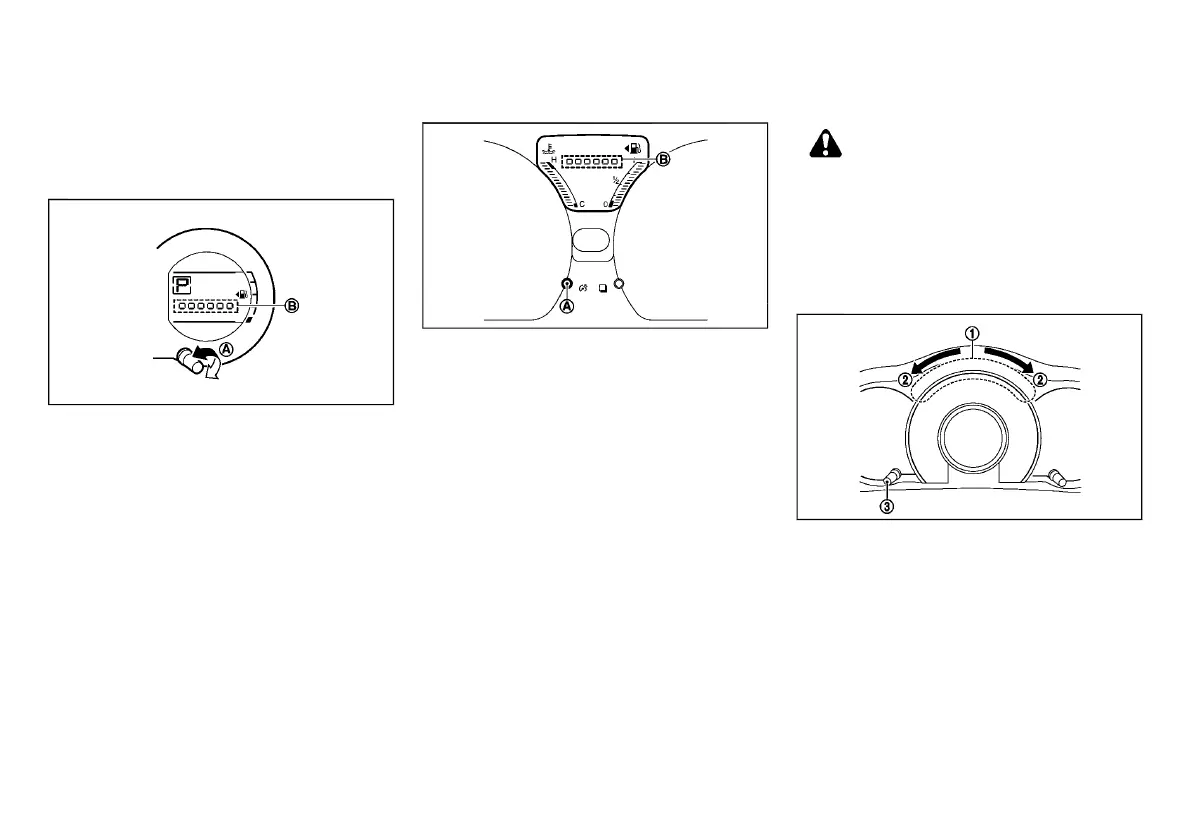
The instrument brightness control operates when the
ignition switch is in the “ON” position.
Turn the brightness control switch
*
A
clockwise or
counterclockwise to increase or decrease the bright-
ness. The brightness indicator
*
B
will be shown
briefly in the display when the brightness control
switch
*
A
is turned.
When the brightness level reaches the maximum or
minimum, a beep will sound.
Type B
GUID-19859A75-28C9-402E-BFD8-ABC5DEC4ED3F
JVI0517X
The instrument brightness control operates when the
ignition switch is in the “ON” position.
Push the brightness control switch
*
A
to decrease
the brightness of the meter panel lights. The brightness
indicator
*
B
will be shown briefly in the display when
the brightness control switch
*
A
is pushed.
If the brightness mode reaches the minimum level, the
next time the switch is pressed, the brightness will
return to the maximum level.
When the brightness level reaches the minimum, a
beep will sound.
OUTSIDE AIR TEMPERATURE (for Type A)
GUID-5D88A35A-536A-4F38-AC38-E360131B2375
The outside air temperature is displayed in 8C .
When the outside air temperature decreases to 38C
(37 8F) or lower, the outside air temperature display
blinks to give a warning.
The display will stop blinking after 1 minute or when
the outside air temperature increases to 48C (398F) or
above.
For information regarding the outside air temperature
(if equipped for Type B), see “Outside air temperature
(if equipped for Type B)” (P.2-8).
ECO METERS (for Type A)
GUID-559631B0-4BE2-469C-82F2-7B55F02DD7D6
WARNING:
Keeping a close watch on the display while
driving may cause a traffic accident. Never keep
a close watch on the display while driving the
vehicle. When driving, minimize the amount of
time spent looking at the display to avoid
causing an accident.
ECO drive indicator
GUID-CB3FC5A5-231A-4806-8B6F-FDBDF0DA41E2
JVI0520X
ECO drive indicator
*
1
is displayed in three steps
according to the accelerator pedal operation, while
driving the vehicle in ECO mode. (ECO drive indicator
is not displayed when the shift lever is in the “R”
(Reverse) position.)
The indicator will illuminate in the directions of
*
2
as
the driving pattern becomes more ECO friendly .
The ECO drive indicator can be switched between
displaying/not displaying, when pushing switch
*
3
for
more than 2 seconds.
Condition:



 To Next Page