[ Edit: 2016/ 11/ 24 Model: E12-A ]
4-2 Monitor, Heater and air conditioner, and audio system
E12-A-120227-76877965-5961-4899-987A-424E87209057
WARNING:
. Do not adjust the heater and air conditioner
controls or audio controls (if equipped)
while driving so that full attention may be
given to vehicle operation.
. If you noticed any foreign objects entering
the system hardware, spilled liquid on the
system, or noticed smoke or fumes coming
out from the system, or any other unusual
operation is observed, stop using the system
immediately and contact the nearest
NISSAN dealer. Ignoring such conditions
may lead to an accident, fire or electric
shock.
GUID-8ACD942F-B27F-4913-8B10-569475627505
JVH0347X
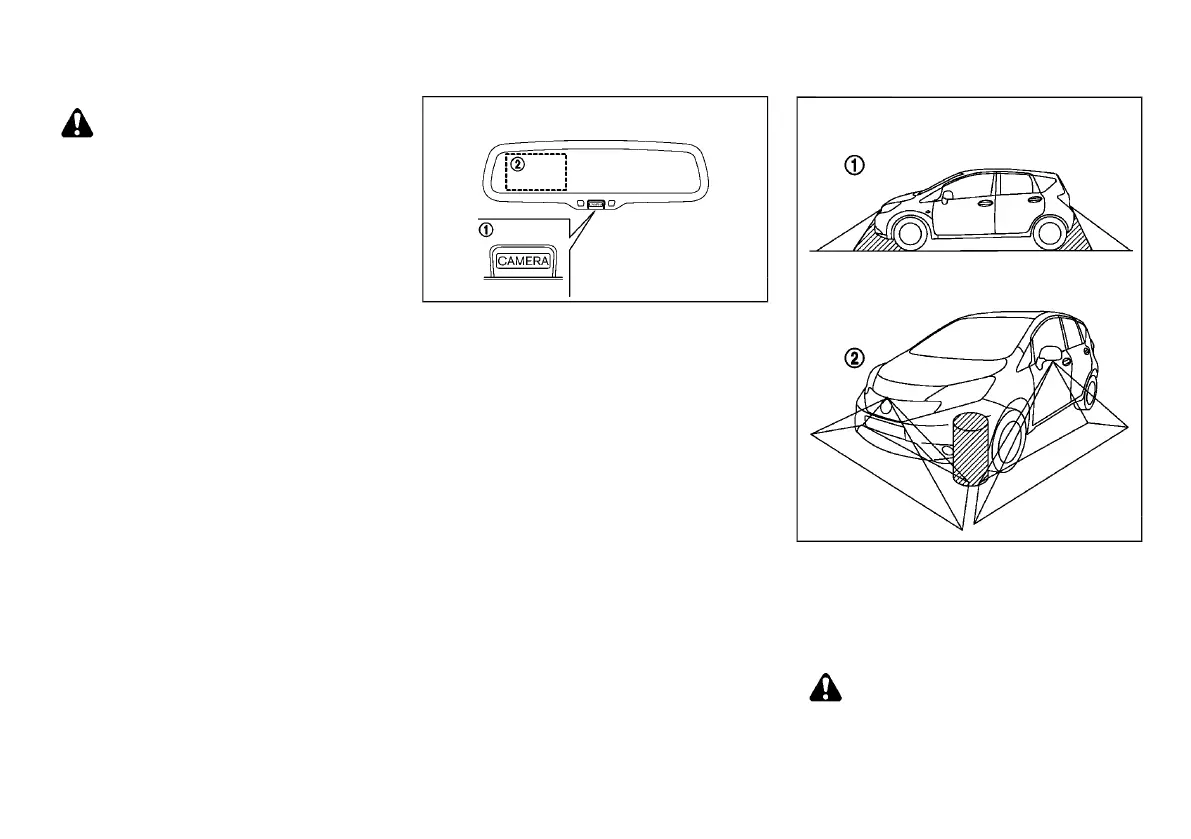
The CAMERA button
*
1
is located below the inside
rearview mirror.
The around view is displayed on the left side of the
inside rearview mirror
*
2
.
When you push the CAMERA button or move the shift
lever to the “R” (Reverse) position while the ignition
switch is in the ON position, the Around View Monitor
operates. The monitor displays various views of the
position of the vehicle.
Available views:
. Bird’s-eye View
The surrounding view of the vehicle.
. Front-side View
The view around and ahead of the front passen-
ger’s side wheel.
. Front View
The view to the front of the vehicle.
. Rear View
The view to the rear of the vehicle.
The system is designed as an aid to the driver in
situations such as slot parking or parallel parking.
JVH0311X
There are some areas where the system will not detect
objects. When in the front or the rear view display, an
object below the bumper or on the ground may not be
detected
*
1
. When in the bird’s-eye view, a tall object
near the seam of the camera detecting areas will not
appear in the monitor
*
2
.
WARNING:
. The Around View Monitor is a convenience
but it is not a substitute for proper vehicle
operation because it has areas where ob-
jects cannot be viewed. The four corners of
SAFETY PRECAUTIONS
AROUND VIEW MONITOR (if
equipped)
Condition:



 To Next Page