[ Edit: 2016/ 11/ 24 Model: E12-A ]
the vehicle in particular, are blind spots
where objects do not appear in the bird’s-
eye, front, or rear views. Always look out the
windows and check with your own eyes to be
sure that it is safe to move before operating
the vehicle. Always operate the vehicle
slowly.
. Do not use the Around View Monitor with
the outside mirror in the stored position, and
make sure that the rear hatch is securely
closed when operating the vehicle using the
Around View Monitor.
. The distance between objects viewed on the
Around View Monitor differs from the actual
distance.
. The cameras are installed above the front
grille, the outside mirrors and above the rear
license plate. Do not put anything on the
cameras.
. When washing the vehicle with highpressure
water, be sure not to spray it around the
cameras. Otherwise, water may enter the
camera unit causing water condensation on
the lens, a malfunction, fire or an electric
shock.
. Do not strike the cameras. They are preci-
sion instruments. Doing so could cause a
malfunction or cause damage resulting in a
fire or an electric shock.
CAUTION:
Do not scratch the lens when cleaning dirt or
snow from the front of the camera.
AVAILABLE VIEWS
GUID-E3477E6E-763A-45B8-9A87-78E1A219F4B9
WARNING:
. The distance guide line and the vehicle width
line should be used as a reference only
when the vehicle is on a paved, level surface.
The distance viewed on the monitor is for
reference only and may be different than the
actual distance between the vehicle and
displayed objects.
. Use the displayed lines and the bird’s-eye
view as a reference. The lines and the bird’s-
eye view are greatly affected by the number
of occupants, fuel level, vehicle position,
road condition and road grade.
. If the tires are replaced with different sized
tires, the predictive course line and the
bird’s-eye view may be displayed incorrectly.
. When driving the vehicle up a hill, objects
viewed in the monitor are further than they
appear. When driving the vehicle down a hill,
objects viewed in the monitor are closer
than they appear. Use the mirrors or actually
look to properly judge distances to other
objects.
. Use the mirrors or actually look to properly
judge distances to other objects.
. The vehicle width and predictive course lines
are wider than the actual width and course.
Front and rear view
GUID-8776342E-7F9D-4A41-A498-964E893A587C
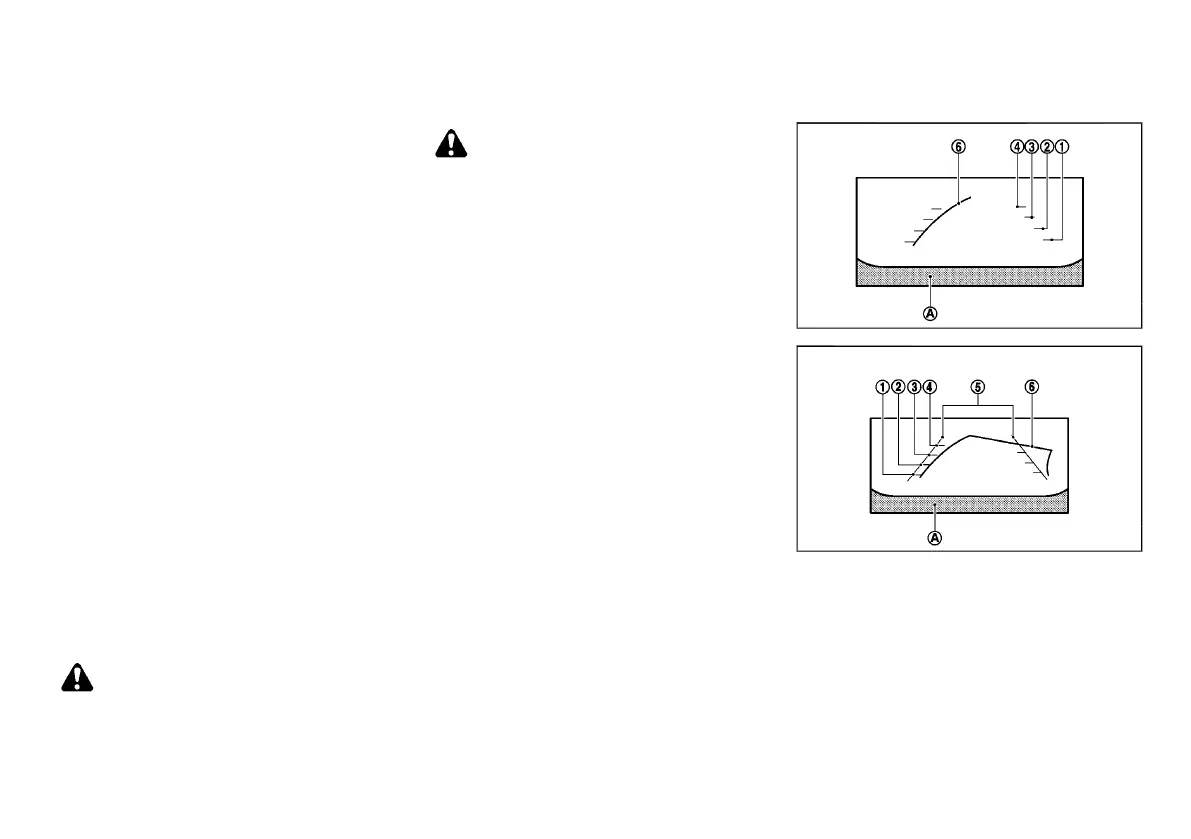
SAA1840
Front view
SAA1896
Rear view
Guiding lines, which indicate the vehicle width and
distances to objects with reference to the vehicle body
line
*
A
, are displayed on the monitor.
Distance guide lines:
Indicate distances from the vehicle body.
. Red line
*
1
: approx. 0.5 m (1.5 ft)
. Yellow line
*
2
: approx. 1 m (3 ft)
. Green line
*
3
: approx. 2 m (7 ft)
. Green line
*
4
: approx. 3 m (10 ft)
Vehicle width guide lines
*
5
:
Monitor, Heater and air conditioner, and audio system 4-3
Condition:



 To Next Page