[ Edit: 2016/ 11/ 24 Model: E12-A ]
4-4 Monitor, Heater and air conditioner, and audio system
Indicate the vehicle width when backing up.
Predictive course lines
*
6
:
Indicate the predictive course when operating the
vehicle. The predictive course lines will be displayed
on the monitor when the steering wheel is turned (only
for the rear view). The predictive course lines will move
depending on how much the steering wheel is turned
and will not be displayed while the steering wheel is in
the neutral position.
The front view will not be displayed when the vehicle
speed is above 10 km/h (6 MPH).
WARNING:
. The distance between objects viewed in the
rear view may differ from the actual dis-
tance. Objects in the rear view will appear
visually opposite in the same way for those
viewed in the inside and outside mirrors.
. On a snow-covered or slippery road, there
may be a difference between the predictive
course line and the actual course line.
. The displayed lines on the rear view will
appear slightly off to the right because the
rear view camera is not installed in the rear
center of the vehicle.
CAUTION:
When the monitor displays the front view and
the steering wheel turns about 90 degrees or
less from the neutral position, both the right and
left predictive course lines
*
6
are displayed.
When the steering wheel turns about 90 degrees
or more, a predictive course line is displayed
only on the opposite side of the turn.
Bird’s-eye view
GUID-1F94DDF5-EB49-450C-8218-86FAFB0E95D0
SAA3570
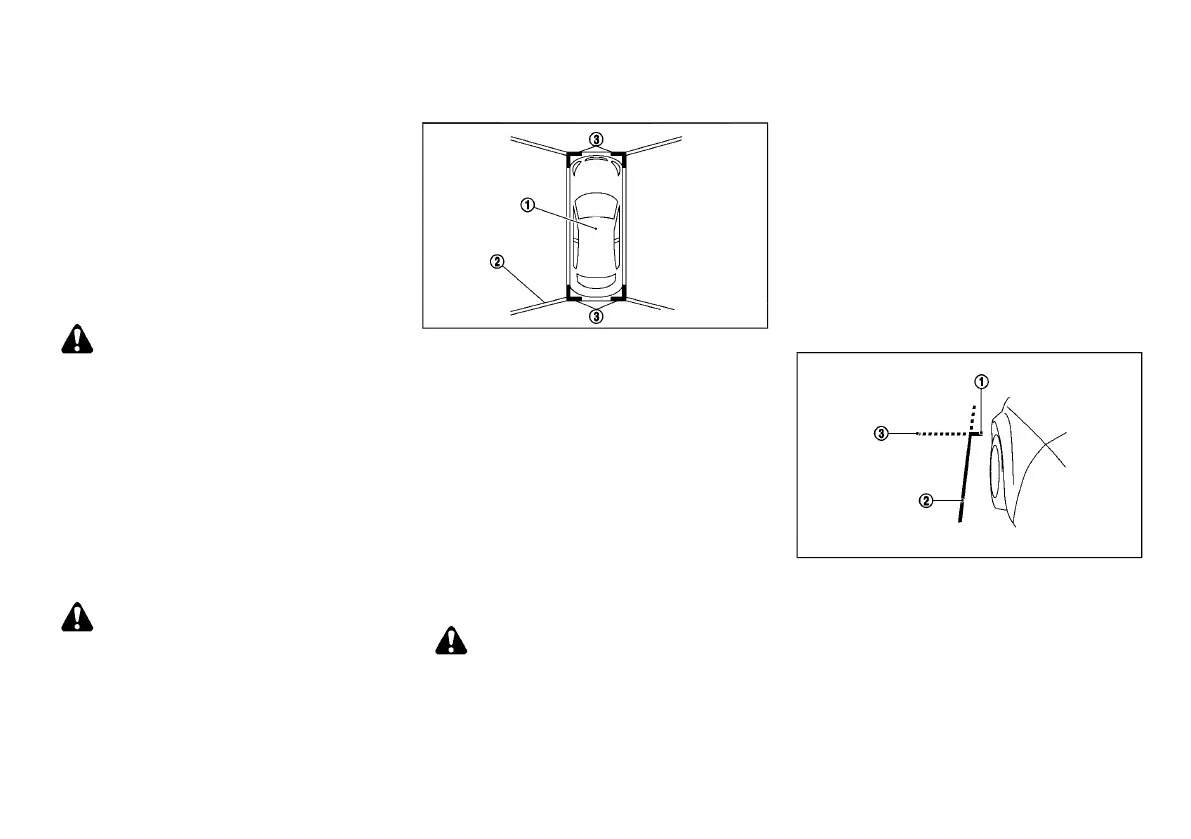
The bird’s-eye view shows the overhead view of the
vehicle which helps confirm the vehicle position and
the predictive course to a parking space.
The vehicle icon
*
1
shows the position of the vehicle.
Note that the distance between objects viewed in the
bird’s-eye view differs from the actual distance.
The areas that the cameras cannot cover
*
2
are
indicated in black.
After the ignition switch is turned on, the non-viewable
area
*
2
is highlighted in yellow for 3 seconds after the
bird’s-eye view is displayed.
In addition, the non-viewable corners are displayed in
red (blink for the first 3 seconds)
*
3
to remind the
drivers to be cautious.
WARNING:
. Objects in the bird’s-eye view will appear
further than the actual distance because the
bird’s-eye view is a pseudo view that is
processed by combining the views from the
cameras on the outside mirrors, the front
and the rear of the vehicle.
. Tall objects, such as a curb or vehicle, may
be misaligned or not displayed at the seam
of the views.
. Objects that are above the camera cannot be
displayed.
. The view for the bird’s-eye view may be
misaligned when the camera position alters.
. A line on the ground may be misaligned and
is not seen as being straight at the seam of
the views. The misalignment will increase as
the line proceeds away from the vehicle.
Front-side view
GUID-FA08C597-9E1D-4DA5-B068-7904E43E6966
JVH1580X
Guiding lines:
Guiding lines that indicate the width and the front end
of the vehicle are displayed on the monitor.
The front-of-vehicle line
*
1
shows the front part of the
vehicle.
The side-of-vehicle line
*
2
shows the vehicle width
including the outside mirrors.
The extensions
*
3
of both the front
*
1
and side
*
2
lines are shown with a green dotted line.
Condition:


 To Next Page
 Loading...