[ Edit: 2016/ 11/ 24 Model: E12-A ]
4-6 Monitor, Heater and air conditioner, and audio system
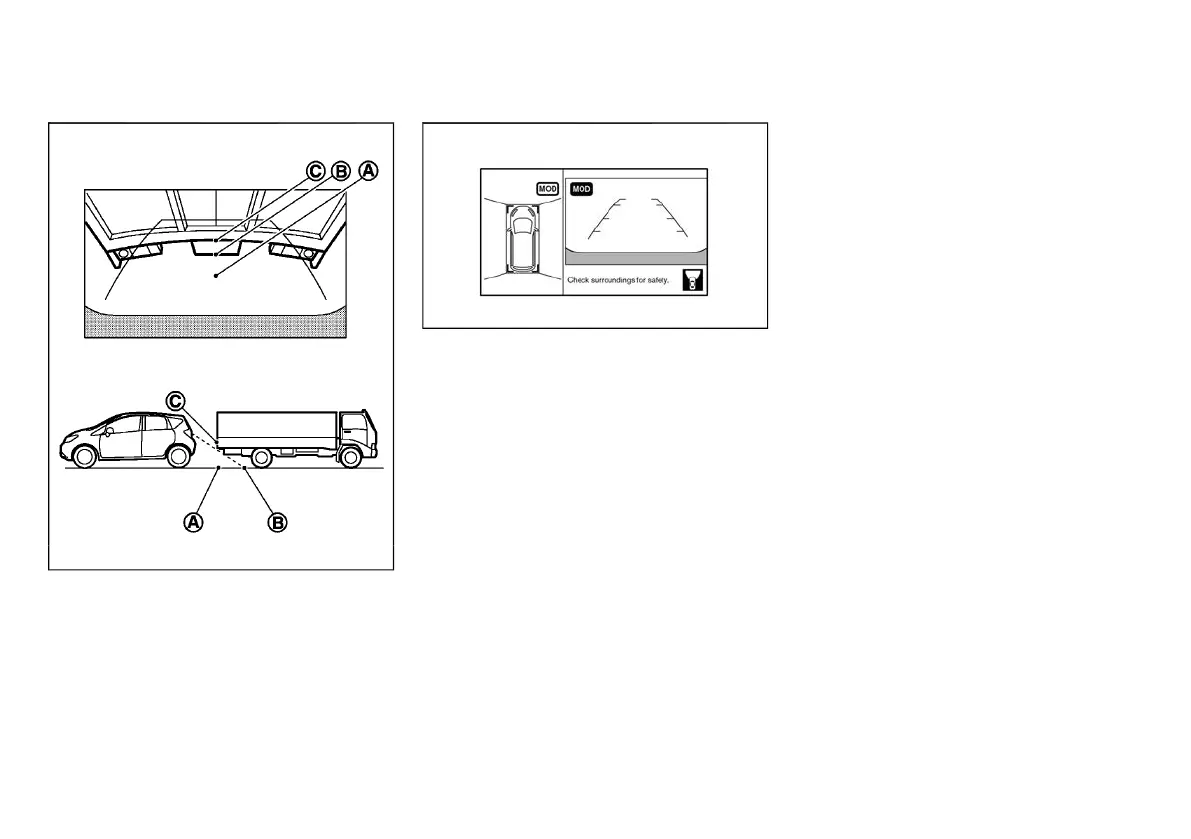
Backing up behind a projecting object
GUID-F000B529-698E-4F46-8504-D872148F7938
JVH0316X
The position
*
C
is shown further than the position
*
B
in the display. However, the position
*
C
is actually at
the same distance as the position
*
A
. The vehicle
may hit the object when backing up to the position
*
A
if the object projects over the actual moving course.
HOW TO SWITCH THE DISPLAY
GUID-80261BC8-D07F-46B4-9A1D-F663E12D6B36
JVH1560X
The Around View Monitor can display two split views.
If the shift lever is not in the “R” (Reverse) position, the
available views are:
. Bird’s-eye view/Front view split screen
. Front-side view/Front view split screen
When the bird’s-eye view/front view is displayed,
pushing the CAMERA button will switch the view on
the bird’s-eye view to the front-side view. When the
CAMERA button is pushed again, the screen will
return to the screen which was displayed before.
If the shift lever is in the “R” (Reverse) position, the
available views are:
. Bird’s-eye view/Rear view split screen
. Front-side view/Rear view split screen
When the rear view is displayed, the view on the left
side switches between the bird’s-eye view and the
front-side view each time the CAMERA button is
pushed.
LANGUAGE SELECT OPERATION
GUID-8293CFDB-0AA6-42BB-92C6-59913A3A4682
To change the language of the warning text displayed
on the mirror display, push and hold the CAMERA
button until the warning text starts blinking. When the
language select screen is displayed, push the CAM-
ERA button repeatedly until the preferred language is
displayed.
If the button is not pushed before the warning text
blinking stops, the language select mode will auto-
matically end and the display will return to the normal
mode.
MOVING OBJECT DETECTION (MOD)
FUNCTION
GUID-A36A8AE2-D8E9-4A32-89E4-4D1A42E3D548
The Moving Object Detection (MOD) system can
inform the driver of moving objects when driving out of
garages, maneuvering into parking lots and in other
such instances.
The MOD system detects moving objects by using
image processing technology on the image shown on
the display. The rear view camera is equipped with the
automatic washer function using window washer fluid.
The MOD system operates in the following conditions
when the camera view is displayed:
. When the shift lever is in the “P” (Park) or “N”
(Neutral) position and the vehicle is stopped, the
MOD system detects the moving objects in the
bird’s-eye view. The MOD system will not operate
if the outside mirror is moving in or out or if either
door is opened.
. When the shift lever is in the “D” (Drive) position,
and the vehicle speed is below approximately 8
km/h (5 MPH), the MOD system detects moving
objects in the front view.
Condition:



 To Next Page