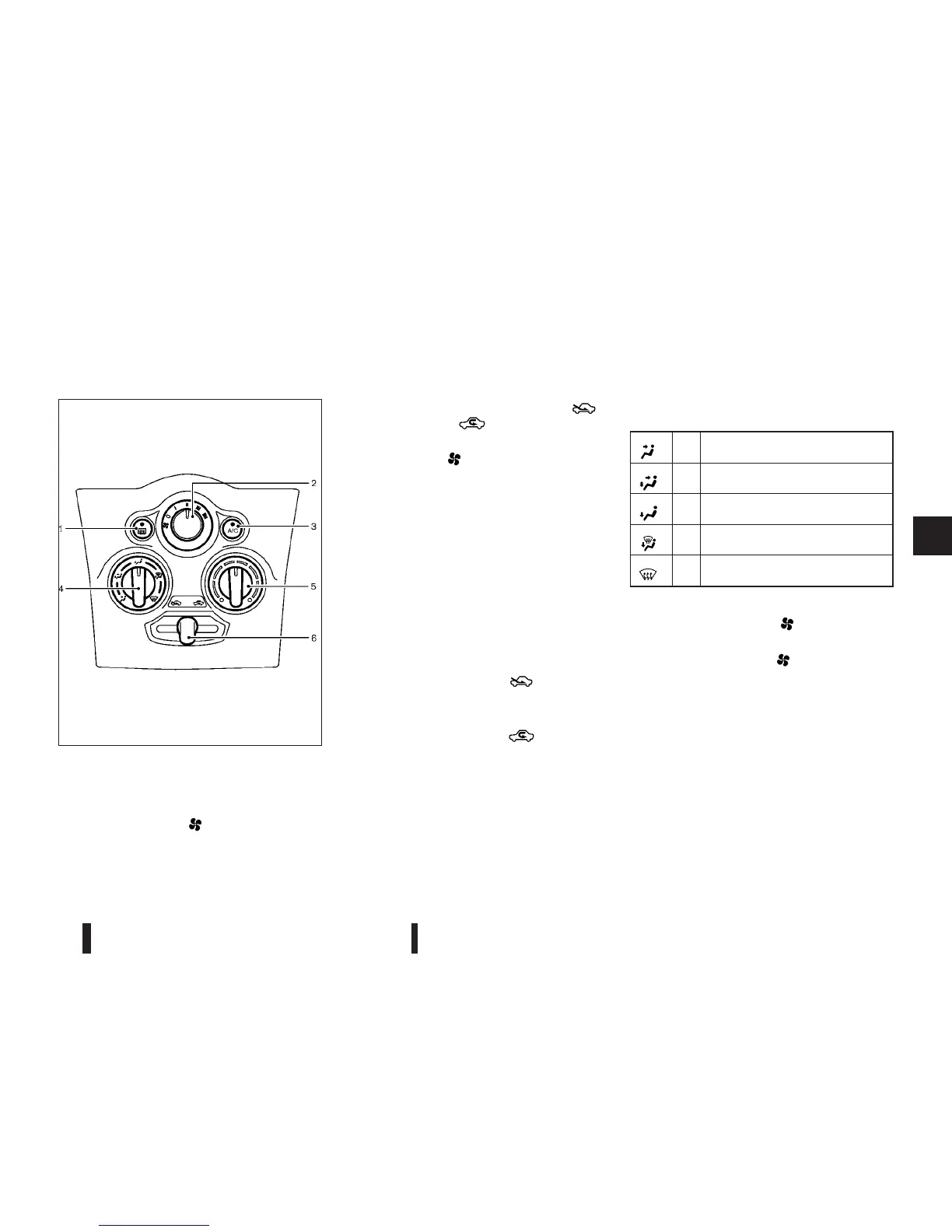
MANUAL AIR CONDITIONER
1.
Rear window defogger switch (See “Defogger
switch” in the “2. Instruments and controls”
section.)
2.
Fan speed control “
” dial
3.
“A/C” (Air Conditioner) button
4.
Air flow control dial
5.
Temperature control dial
6.
Air intake lever (Outside air circulation “
”
/Air recirculation “
”)
To turn off the heater and air conditioner, turn the
fan speed control “
” dial to the “OFF” (0) posi-
tion.
NOTE
The Stop/Start System will not activate under
the following conditions:
•
When the air flow control dial is in the front
defogger position and the fan speed control
dial is on
•
When rear window defogger switch is turned
on
Controls
Outside air circulation:
Move the air intake lever to the “
” position. The
air flow is drawn from outside the vehicle.
Air recirculation:
Move the air intake lever to the “
” position. The
air flow is circulated inside the vehicle.
Air flow control:
Turn the air flow control dial to change the air flow
mode.
m
— Air flows from the centre and side
vents.
m
— Air flows from the centre and side
vents and foot outlets.
m
— Air flows mainly from the foot
outlets.
m
— Air flows from the defogger and
foot outlets.
m
— Air flows mainly from the defogger
outlets.
Fan speed control:
Turn the fan speed control “
” dial clockwise to
increase the fan speed.
Turn the fan speed control “
” dial anticlockwise
to decrease the fan speed.
Temperature control:
Turn the temperature control dial to set the desired
temperature. Turn the dial between the middle and
the right position to select the hot temperature. Turn
the dial between the middle and the left position to
select the cool temperature.
JVH0317XZ
Heater and air conditioner, and audio system 4-15



 To Next Page