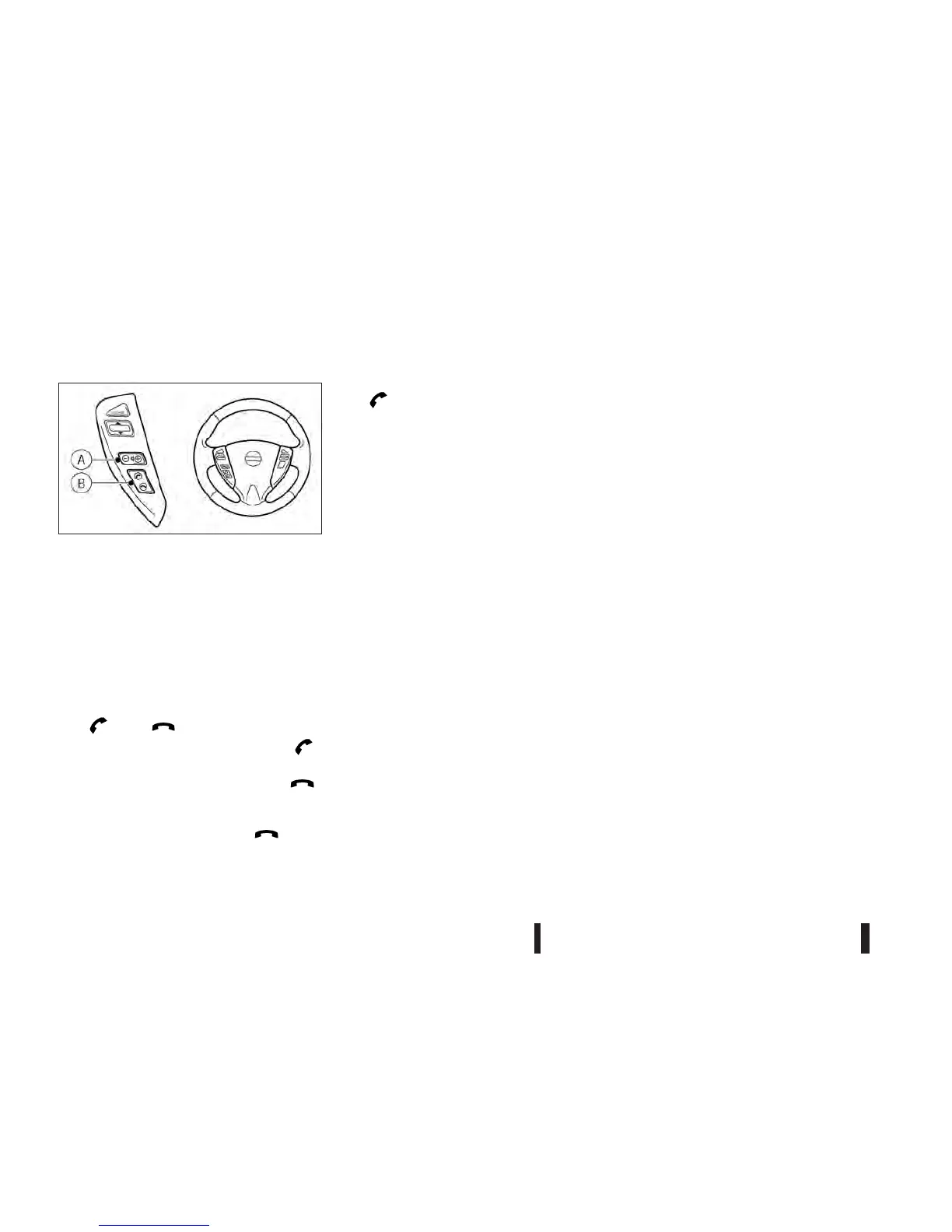
Steering wheel switches for phone
control
The hands-free mode can be operated using the
controls on the steering wheel.
Volume control buttons:
The volume control buttons allow you to adjust the
volume of the speakers by pushing the <+> or <−>
buttons
jA.
Phone buttons:
The <
> and < > buttons jB allow you to:
•
Accept an incoming call by pressing the < >
button.
•
Reject an incoming call by pressing the < >
button for more than 2 seconds during the in-
coming call.
•
End an active call by pushing the <
> button
once.
•
Redial the last outgoing call by pressing the
<
> button for more than 2 seconds.
When installing a CB, ham radio or a car phone in
your vehicle, be sure to observe the following cau-
tions, otherwise the new equipment may adversely
affect the Engine Control System and other elec-
tronic parts.
CAUTION
•
Keep the antenna as far away as possible from
the Electronic Control Module.
•
Keep the antenna wire at least 20 cm (8 in)
away from the Engine Control harnesses. Do
not route the antenna wire next to any har-
nesses.
•
Adjust the antenna standing wave ratio as rec-
ommended by the manufacturer.
•
Connect the ground wire from the radio chas-
sis to the body.
•
For details, consult a NISSAN dealer or quali-
fied workshop.
NAA1335
CAR PHONE OR CB RADIO
4-44 Heater and air conditioner, and audio system



 To Next Page