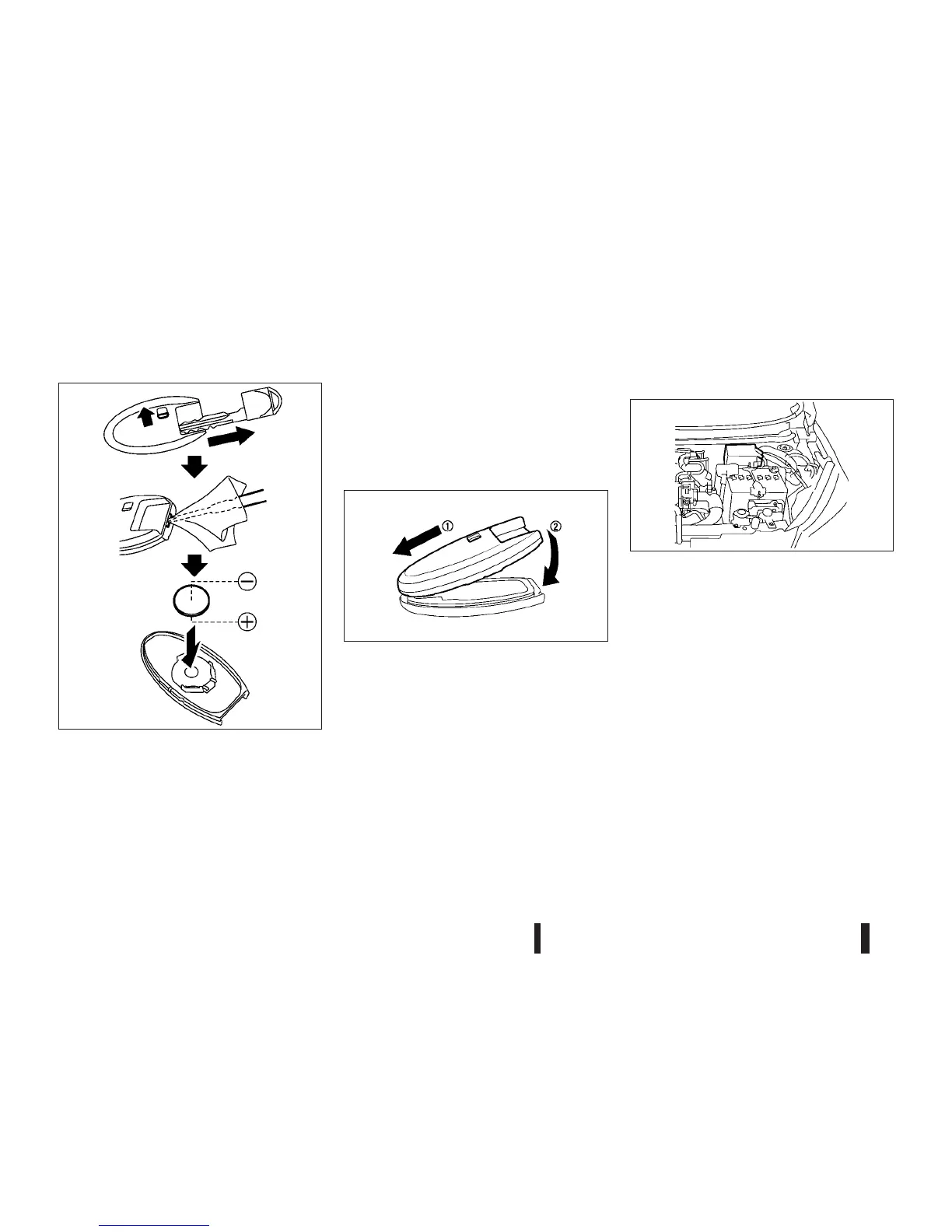
To replace the battery:
1. Release the lock knob at the back of the Intelli-
gent Key and remove the mechanical key.
2. Insert a small screwdriver into the slit of the cor-
ner and twist it to separate the upper part from
the lower part. Use a cloth to protect the casing.
3. Replace the battery with a new one.
•
Recommended battery: CR2025 or equivalent
•
Do not touch the internal circuit and electric ter-
minals as doing so could cause a malfunction.
•
Make sure that the + side faces the bottom of the
case.
4. Align the tips of the upper and lower parts
j1,
and then push them together until it is securely
closed
j2.
5. Operate the buttons to check its operation.
See a NISSAN dealer or qualified workshop if you
need assistance for replacement.
ENGINE COMPARTMENT
For checking and/or replacing, see a NISSAN
dealer or qualified workshop.
Fusible links
If any electrical equipment does not operate and the
fuses are in good condition, check the fusible links.
If any of these fusible links are melted, replace only
with genuine NISSAN parts.
SDI2451
SDI2452Z
JVM0164XZ
FUSES
8-22 Maintenance and do-it-yourself



 To Next Page