For an overview of the instruments of the instru-
ments and controls, see “Meters and gauges” in the
“0. Illustrated table of contents” section.
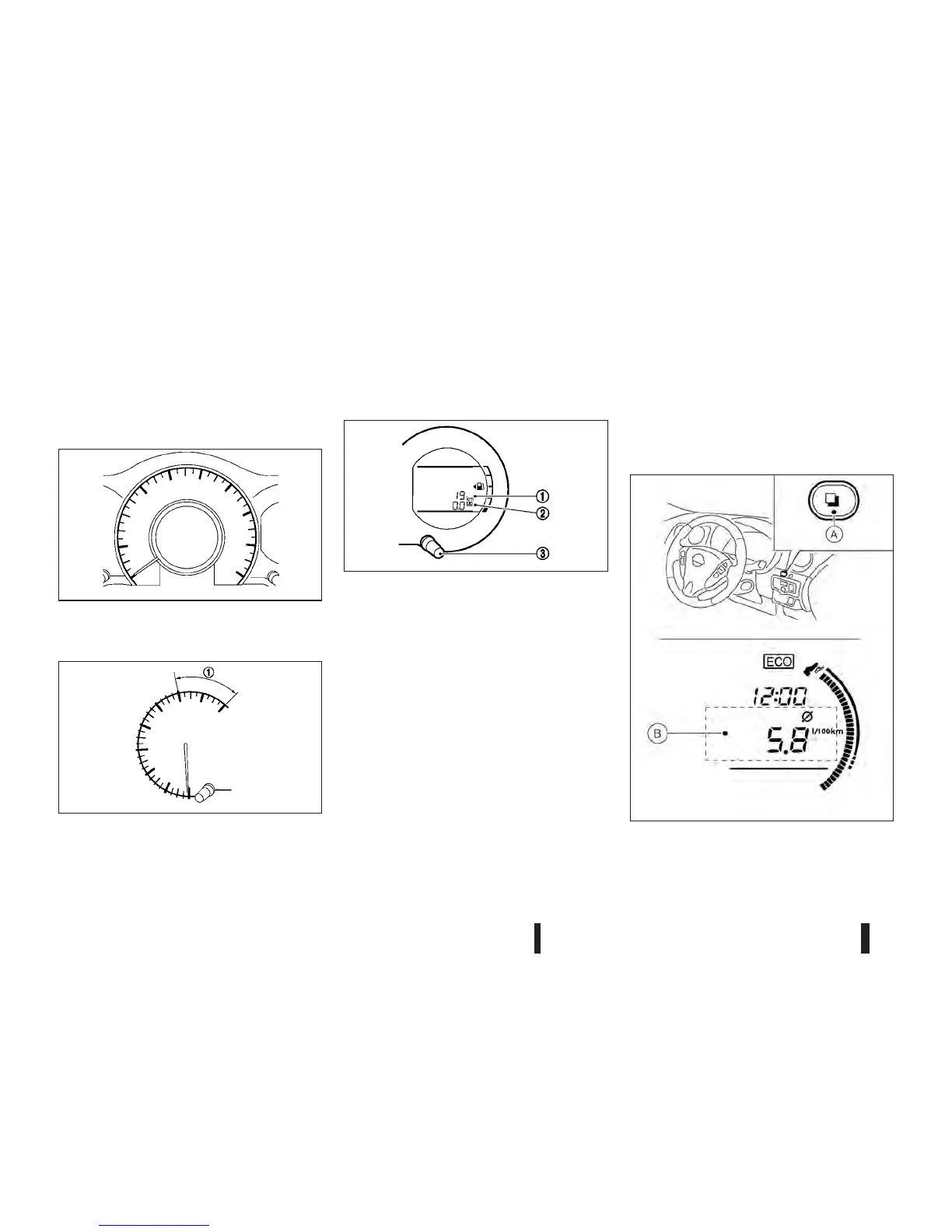
SPEEDOMETER
The speedometer indicates the vehicle speed.
TACHOMETER
The tachometer indicates the engine speed in revo-
lutions per minute (rpm).
Do not rev the engine into the red zone
j1.
ODOMETER/TWIN TRIP ODOMETER
The odometer/twin trip odometer is displayed:
•
when the ignition switch is in the ON position.
•
for 30 seconds after the ignition switch was
placed in the “OFF” position.
The odometer
j1 displays the total distance the
vehicle has been driven.
The twin trip odometer
j2 displays the distance of
individual trips.
Changing twin trip odometer display
Push the trip odometer switch j3 to change the dis-
play as follows:
Odometer → TRIP A → TRIP B → Trip computer
mode → Odometer
For trip computer information, see “Trip computer
and clock (where fitted)” later in this section.
Resetting twin trip odometer
Push the trip odometer switch j3 for more than 1
second to reset the trip odometer to zero.
TRIP COMPUTER AND CLOCK
(where fitted)
The trip computer mode switch jA located at the
side of the meter on the instrument panel.
JVI0486XZ
JVI0467XZ
JVI0468XZ
NIC2216
(A): Trip computer mode switch
METERS AND GAUGES
2-2 Instruments and controls



 To Next Page