[ Edit: 2012/ 4/ 9 Model: E26-A ]
HEATER AND MANUAL AIR CONDITIONER (if equipped)
GUID-54C26CB5-C126-4039-8F1B-1C53624F2DB8
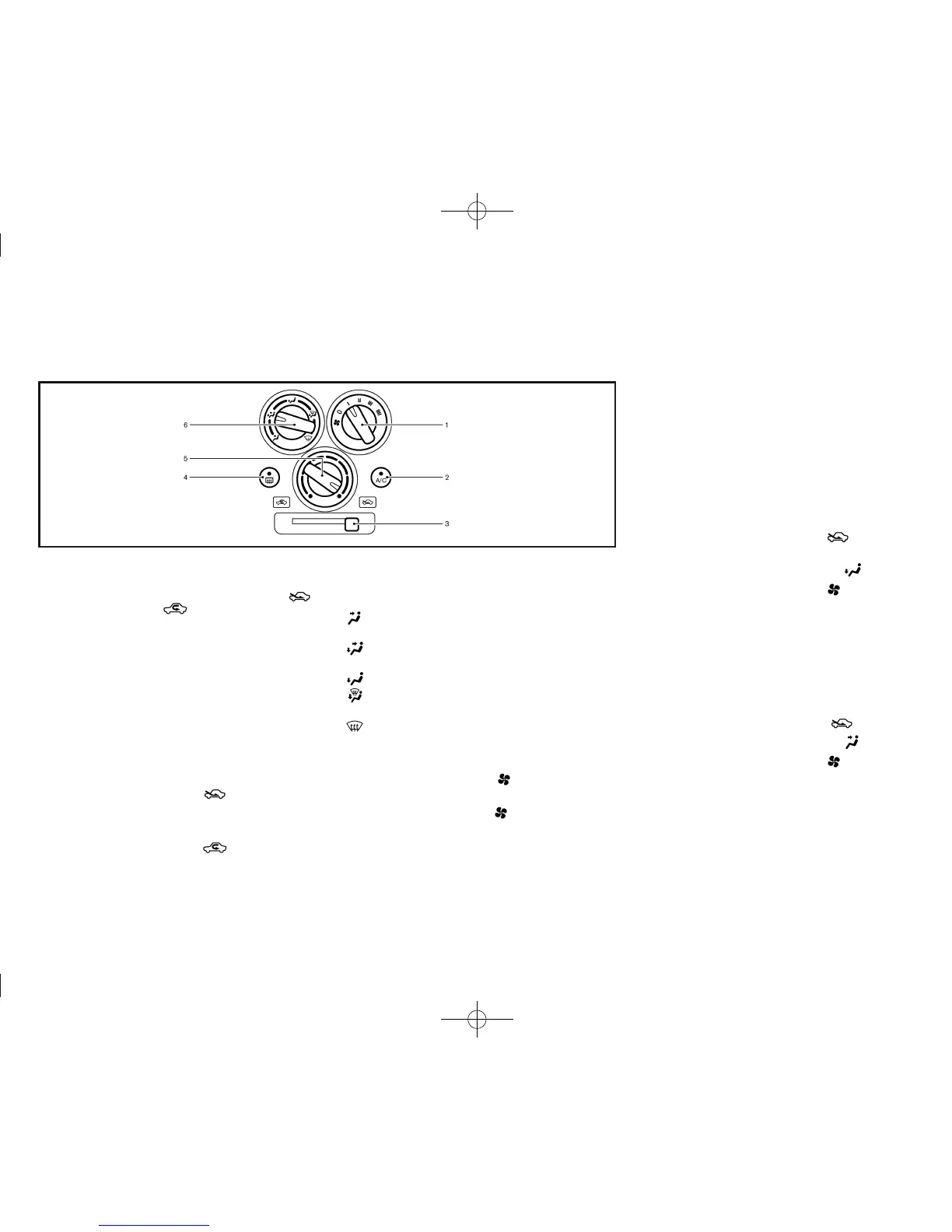
JVH0258X
1. Fan speed control dial
2. “A/C” (Air Conditioner) button (if equipped)
3. Air intake lever (Outside air circulation “
”
/Air recirculation “
”)
4. Rear window defogger switch (if equipped) (See
“Defogger switch” (P.2-19).)
5. Temperature control dial
6. Air flow control dial
The switch layout in the illustration shows that of the
Left-Hand Drive (LHD) model. For the Right-Hand
Drive (RHD) model, some of the switch layout will be
opposite.
Controls
GUID-01C35839-8AE4-40C7-A7E5-D3803732D834
Outside air circulation:
GUID-896AA31A-81D 0-4E9B-81ED-1F58D53AA854
Move the air intake lever to the “ ” position. The air
flow is drawn from outside the vehicle.
Air recirculation:
GUID-896AA31A-81D 0-4E9B-81ED-1F58D53AA854
Move the air intake lever to the “ ” position. The air
flow is circulated inside the vehicle.
Air flow control:
GUID-896AA31A-81D 0-4E9B-81ED-1F58D53AA854
Turn the air flow control dial to change the air flow
mode.
— Air flows from the center and side
ventilators.
— Air flows from the center and side
ventilators and foot outlets.
— Air flows mainly from the foot outlets.
— Air flows from the defogger and foot
outlets.
— Air flows mainly from the defogger out-
lets.
Fan speed control:
GUID-896AA31A-81D 0-4E9B-81ED-1F58D53AA854
Turn the fan speed control “ ” dial clockwise to
increase the fan speed.
Turn the fan speed control “
” dial counterclock-
wise to decrease the fan speed.
Temperature control:
GUID-896AA31A-81D 0-4E9B-81ED-1F58D53AA854
Turn the temperature control dial to set the desired
temperature. Turn the dial between the middle and the
right position to select the hot temperature. Turn the
dial between the middle and the left position to select
the cool temperature.
Heater operation
GUID-2DEE3936-A238-4989-9B9D-819E96BEAFFD
Heating:
GUID-896AA31A-81D 0-4E9B-81ED-1F58D53AA854
This mode is used to direct heated air to the foot
outlets.
1. Move the air intake lever to the “
” position for
normal heating.
2. Turn the air flow control dial to the “
” position.
3. Turn the fan speed control “
” dial to the
desired position.
4. Turn the temperature control dial to the desired
position between the middle and the hot (right)
position.
Ventilation:
GUID-896AA31A-81D 0-4E9B-81ED-1F58D53AA854
This mode directs outside air to the side and center
ventilators.
1. Move the air intake lever to the “
” position.
2. Turn the air flow control dial to the “
” position.
3. Turn the fan speed control “
” dial to the
desired position.
4. Turn the temperature control dial to the desired
position.
Heater and air conditioner, and audio system 4-3



 To Next Page