[ Edit: 2012/ 4/ 9 Model: E26-A ]
CAUTION:
. DEPRESS THE FOOT BRAKE PEDAL - Shift-
ing the selector lever to “D”, “R ”, “3” or “2”
without depressing the foot brake pedal
causes the vehicle to move slowly when
the engine is running. Make sure the foot
brake pedal is depressed fully and the
vehicle is stopped before shifting the selec-
tor lever.
. MAKE SURE OF THE SELECTOR LEVER
POSITION - Make sure the selector lever is
in the desired position. “D”, “3” and “2” are
used to move forward and “R ” to back up.
. WARM UP THE ENGINE - Due to the higher
idle speeds when the engine is cold, extra
caution must be exercised when shifting the
selector lever into the driving position
immediately after starting the engine.
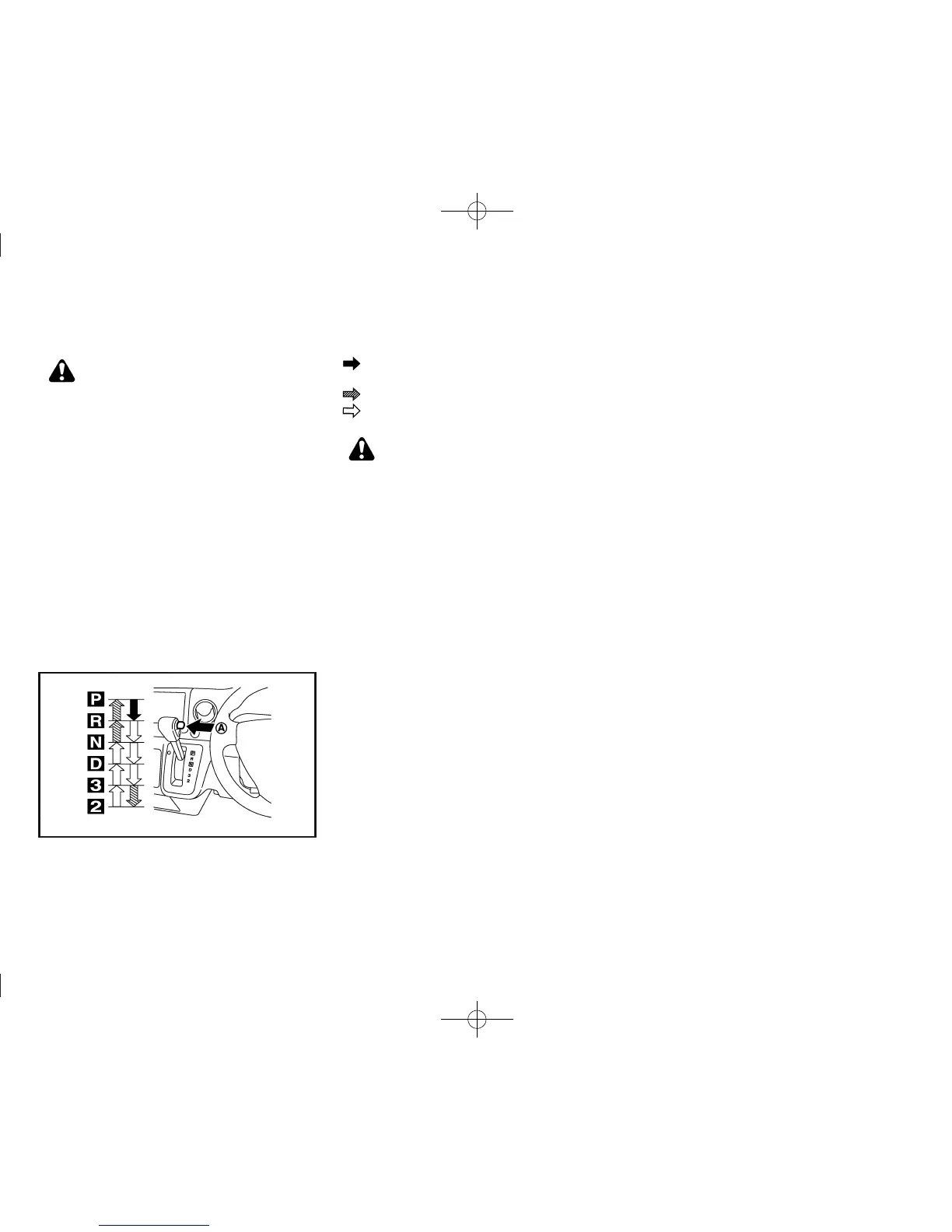
Shifting gear
GUID-58D4D3D8-07 7A-4009-90E5-0A3026B04098
JVS0127X
: Push the button
*
A
while depressing
the foot brake pedal.
: Push the button
*
A
.
: Just move the selector lever.
WARNING:
. Apply the parking brake if the selector lever
is in any position while the engine is not
running. Failure to do so could cause the
vehicle to move unexpectedly or roll away
and result in serious personal injury or
property damage.
. If the selector lever cannot be moved from
the “P” (Park) position while the engine is
running and the foot brake pedal is de-
pressed, the stop lights may not work.
Malfunctioning stop lights could cause an
accident injuring yourself and others.
After starting the engine, fully depress the foot brake
pedal and move the selector lever out of the “P” (Park)
position.
If the ignition switch is turned to the “OFF” or “ACC”
position for any reason while the selector lever is in any
positions other than the “P” (Park) position, the ignition
switch cannot be turned to the “LOCK” position.
If the ignition switch cannot be turned to the “LOCK”
position, perform the following steps:
1. Apply the parking brake.
2. Turn the ignition switch to the “ON” position while
depressing the foot brake pedal.
3. Move the selector lever to the “P” (Park) position.
4. Turn the ignition switch to the “LOCK” position.
P (Park):
GUID-896AA31A-81D 0-4E9B-81ED-1F58D53AA854
Use this position when the vehicle is parked or when
starting the engine. Make sure that the vehicle is
completely stopped and move the selector lever
into the “P” (Park) position. Apply the parking
brake. When parking on a hill, apply the parking brake
first, and then move the selector lever into the “P”
(Park) position.
R (Reverse):
GUID-896AA31A-81D 0-4E9B-81ED-1F58D53AA854
Use this position to back up. Make sure that the vehicle
is completely stopped before selecting the “R”
(Reverse) position.
N (Neutral):
GUID-896AA31A-81D 0-4E9B-81ED-1F58D53AA854
Neither the forward nor reverse gear is engaged. The
engine can be started in this position. You may shift to
the “N” (Neutral) position and restart a stalled engine
while the vehicle is moving.
D (Drive):
GUID-896AA31A-81D 0-4E9B-81ED-1F58D53AA854
Use this position for all normal forward driving.
3 (Third gear):
GUID-896AA31A-81D 0-4E9B-81ED-1F58D53AA854
Use this position for climbing hills or engine braking on
downhill grades.
2 (Low gear):
GUID-896AA31A-81D 0-4E9B-81ED-1F58D53AA854
Use this position when climbing steep hills slowly or
driving slowly through deep snow, sand or mud, or for
maximum engine braking on steep downhill grades.
Do not shift into the gears when the vehicle speed
exceeds the following limits, otherwise the engine may
over-rev and cause engine damage.
Starting and driving 5-9


 To Next Page
 Loading...