To view detailed instructional videos regarding these and other features,
please go to www.nissanownersinfo.mobi.
14
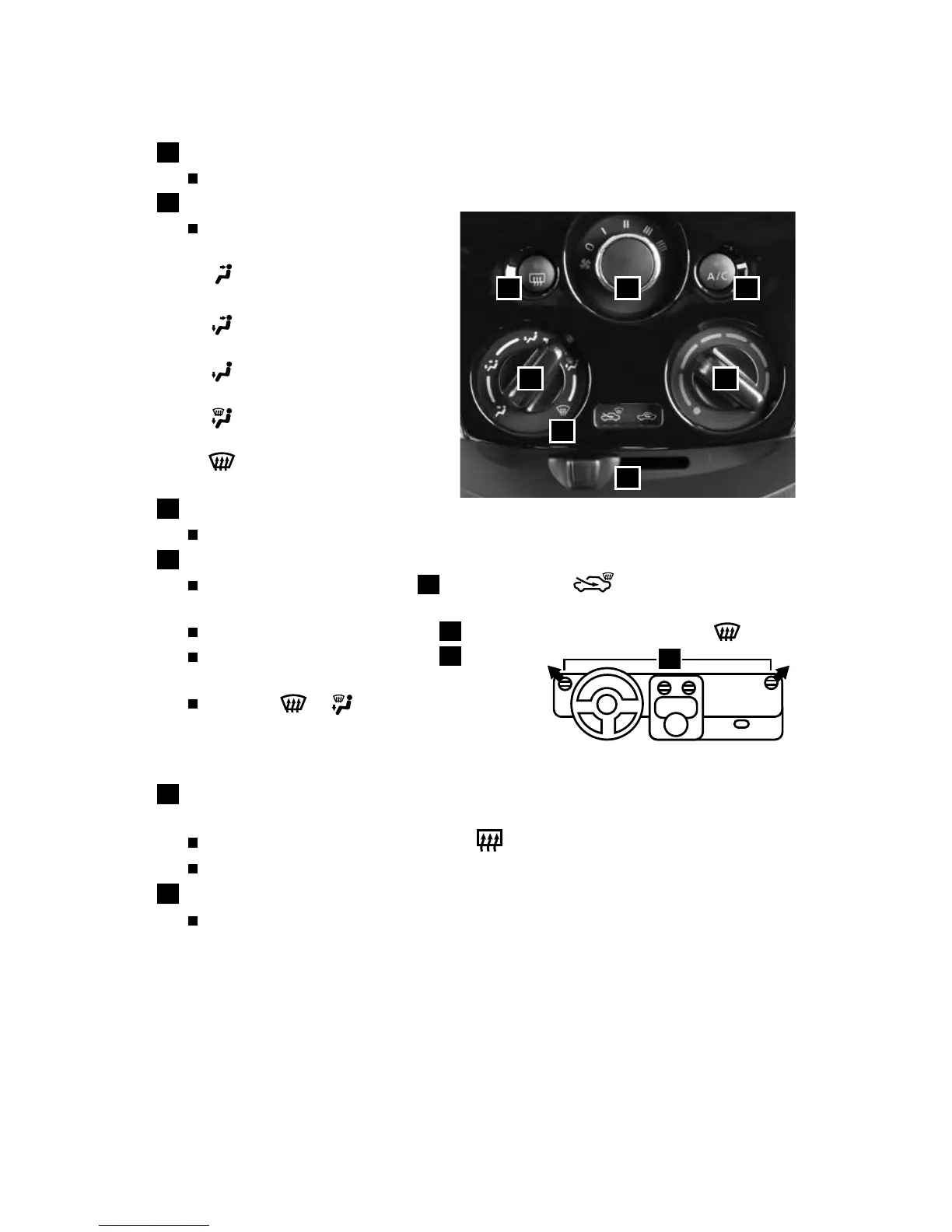
HEATER AND AIR CONDITIONER (manual)
1
FAN SPEED CONTROL DIAL
Turn the dial to the left to decrease fan speed or to the right to increase fan speed.
2
AIR FLOW CONTROL DIAL
Turn the dial to select one of the
following air flow outlets:
Air flows from the center and
side vents.
Air flows from the center, side
and foot vents.
Air flows mainly from the
foot vents.
Air flows from the defroster
and foot vents.
Air flows mainly from the
defroster and side vents.
3
TEMPERATURE CONTROL DIAL
Turn the temperature control dial left for cooler air or right for warmer air.
4
DEFROSTING/DEFOGGING FRONT AND SIDE WINDOWS
First, move the air intake lever
5
to the left position
to draw fresh air into
the vehicle.
Then turn the air flow control dial
2
to the front window defroster mode
.
Align the left and right side vents
6
to direct
airflow towards the front side windows.
When the
or
position is selected, the
air conditioner will turn on automatically for
better performance. This will dehumidify the air
and help defog the windows.
7
REAR WINDOW AND OUTSIDE MIRROR (if so equipped)
DEFROSTER SWITCH
Push the rear window defroster switch
to turn the system on or off.
This function automatically turns off after approximately 15 minutes.
8
A/C BUTTON
Press the A/C button to turn the air conditioner on. This system helps cool and
dehumidify the air inside the cabin and defog the windows.
For more information, refer to the “Monitor, climate, audio, phone and voice recognition systems (section 4)” of
your Owner’s Manual.
1
2 3
4
5
7 8
6
FIRST DRIVE FEATURES
1938147_16a_Versa_Note_QRG_051415.indd 14 5/14/15 1:49 PM



 To Next Page