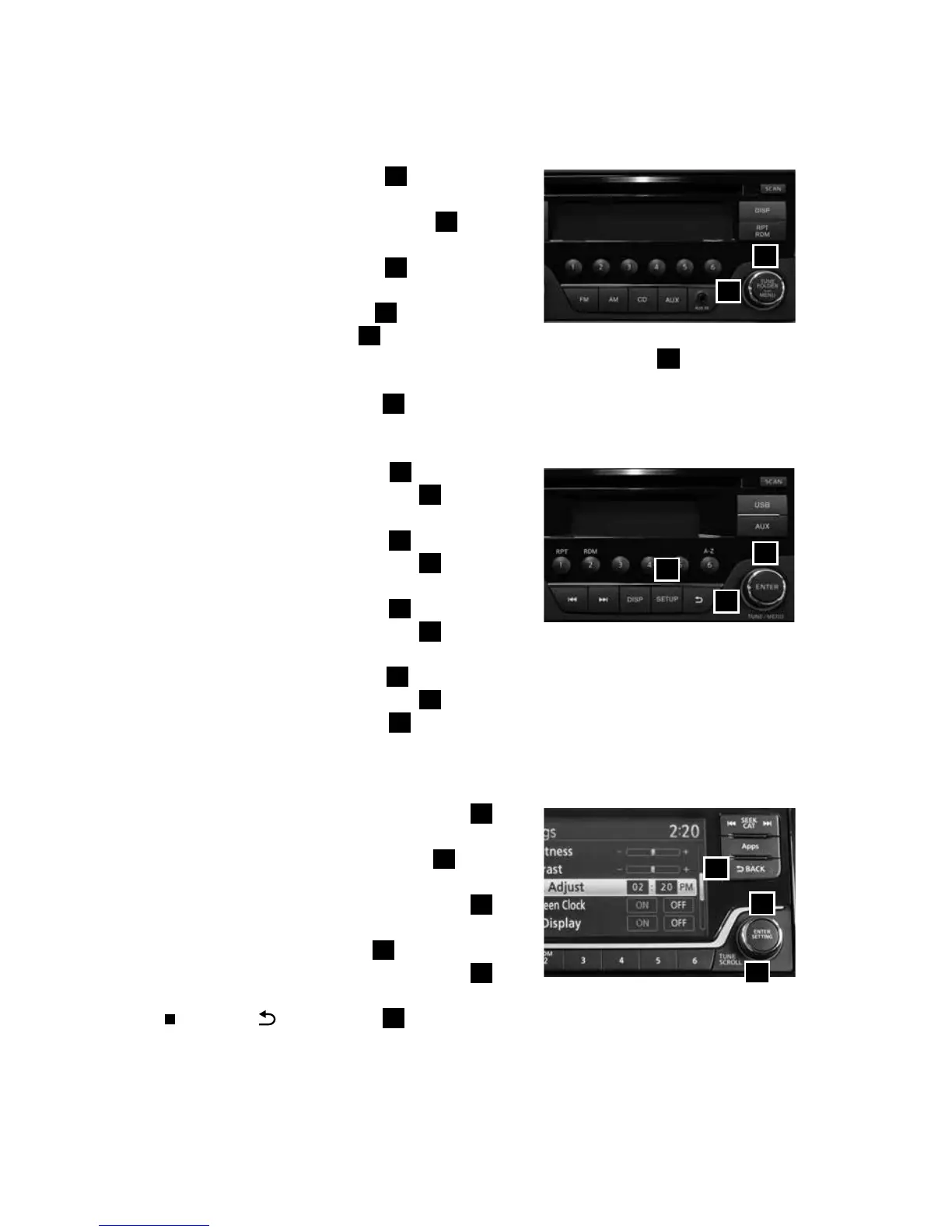
To view detailed instructional videos regarding these and other features,
please go to www.nissanownersinfo.mobi.
7
CLOCK SET/ADJUSTMENT
FM/AM RADIO WITH COMPACT DISC (CD) PLAYER (Type A) (if so equipped)
1. Press the MENU button
1
repeatedly until
“Adjust Clock: NO” appears on the display.
2. Turn the TUNE/FOLDER knob
2
to change
to “Adjust Clock: Yes”.
3. Press the MENU button
1
.
4. When “Change Hour” appears, turn the
TUNE/FOLDER knob
2
to adjust the hours.
5. Press MENU button
1
.
6. When the “Change Minute” appears, turn the TUNE/FOLDER
2
knob to
adjust minutes.
7. Press the MENU button
1
to finish.
FM/AM RADIO WITH COMPACT DISC (CD) PLAYER (Type B) (if so equipped)
1. Press the SETUP button
3
.
2. Turn the TUNE/MENU knob
4
to
select CLOCK.
3. Press the ENTER button
5
.
4. Turn the TUNE/MENU knob
4
to select
“Set time”.
5. Press the ENTER button
5
.
6. Turn the TUNE/MENU knob
4
to
adjust the hours.
7. Press the ENTER button
5
.
8. Turn the TUNE/MENU knob
4
to adjust the minutes.
9. Press the ENTER button
5
.
The display will return to the regular clock display after 10 seconds.
FM/AM/SAT RADIO WITH COMPACT DISC (CD) PLAYER (if so equipped)
1. Press the ENTER/SETTING button
6
to
show the settings screen on the display.
2. Turn the TUNE/SCROLL knob
7
to
highlight “Clock Adjust”.
3. Press the ENTER/SETTING button
6
to
highlight the hours or minutes and use the
TUNE/SCROLL knob
7
to adjust the value.
4. Press the ENTER/SETTING button
6
to
set the value.
Press the
BACK button
8
to return to the previous screen.
1
2
6
8
7
5
4
3
1938147_16a_Versa_Note_QRG_051415.indd 7 5/14/15 1:49 PM



 To Next Page