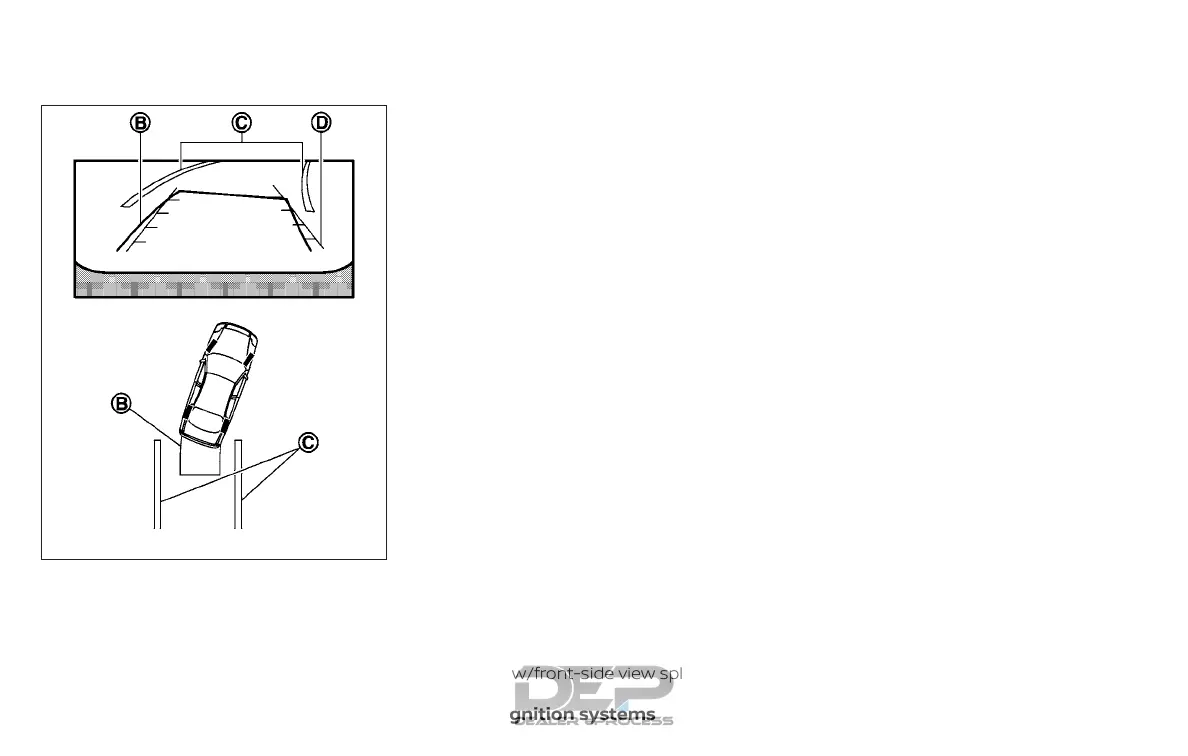
3. Slowly back up the vehicle adjusting
the steering wheel so that the pre-
dicted course lines
䊊
B
enter the park-
ing space
䊊
C
.
4. Maneuver the steering wheel to make
the vehicle width guide lines
䊊
D
parallel
to the parking space
䊊
C
while referring
to the predicted course lines.
5. When the vehicle is parked in the space
completely, move the shift lever to the
P (Park) position and apply the parking
brake.
HOW TO SWITCH THE DISPLAY
With the ignition switch in the ON position,
press the CAMERA button or move the shift
lever to the R (Reverse) position to operate
the Around View® Monitor.
The Around View® Monitor displays differ-
ent split screen views depending on the
position of the shift lever. Press the CAM-
ERA button to switch between the avail-
able views.
If the shift lever is in the R (Reverse) position,
the available views are:
∙ Rear view/bird’s-eye view split screen
∙ Rear view/front-side view split screen
If the shift lever is in the P (Park) position, the
available views are:
∙ Front view/bird’s-eye view split screen
∙ Front view/front-side view split screen
If the shift lever is in the D (Drive) position,
the only available view is front view/front-
side view split screen.
The display will switch from the Around
View® Monitor screen when:
∙ The shift lever is in the D (Drive) position
and the vehicle speed increases above
approximately 6 mph (10 km/h)
∙ A different screen is selected.
LHA1198
4-24 Monitor, climate, audio, phone and voice recognition systems



 To Next Page