EasyManua.ls Logo

Nittan EVA-AD2 - User Manual

Nittan EVA-AD2
4 pages
Print Icon
To Next Page IconTo Next Page
Loading...
Manual
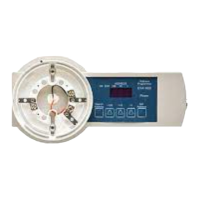
EVA-AD2 Address Programmer
Before use, please read this manual so that you
use the EVA-AD2 correctly.
Keep this manual where it is easily accessible.
If the EVA-AD2 is modified or dismantled,
this will invalidate any warranty.
The EVA-AD2 should be used only by experienced
installers or those authorized by the manufacturer.
OVERSEAS BUSINESS DIVISION
1-54-5 SASAZUKA, SHIBUYA-KU, TOKYO 151-8535,
JAPAN
Telephone +81 (0) 3 5333 7021
Fax +81 (0) 3 5333 8615
http://www.nittan.com
DW1401870_V1
CAUTION!
If the EVA-AD2 is used
incorrectly, there is a
possibility of injury or
damage to property.
Use only the power supply specified. Use of
any other power supply could cause equipment
damage, electric shock or fire.
The EVA-AD2 must be switched [OFF] when
connecting or disconnecting the battery.
Do not dismantle or modify the EVA-AD2.
Keep the EVA-AD2 away from contact with water.
It could cause equipment damage, electric shock
and fire.
Do not immerse the EVA-AD2 in water.
NOTICE!
If the EVA-AD2 is used
improperly, the equipment could
function incorrectly and property
could be damaged.
Avoid subjecting the EVA-AD2 to excessive
vibration or shock.
If the EVA-AD2 is to be stored for any length of
time, the batteries should be removed from the
compartment.
This avoids the batteries leaking.
Do not leave the EVA-AD2 in direct sunlight, near
hot surfaces, or in areas where magnetic or
electromagnetic waves are generated.
Do not mix batteries of different types or
capacity.
Avoid using in conditions of extreme humidity or
temperature.
Question and Answer IconNeed help?

Do you have a question about the Nittan EVA-AD2 and is the answer not in the manual?

Overview

The NITTAN EVA-AD2 is an address programmer designed for setting the addresses of analogue addressable devices that utilize the Evolution communications protocol. This manual provides comprehensive instructions for its correct usage, emphasizing safety precautions and proper handling to prevent injury or property damage.

Function Description:

The EVA-AD2's primary function is to program addresses for compatible detectors and modules. It allows users to read the current address of a device and set a new one using a straightforward interface. The device features a 7-segment LED display that shows the customer code, type of device, and address in a cycling sequence, distinguished by a dot position. It also includes various control buttons for searching, increasing address values (+100, +10, +1), and setting the address.

Important Technical Specifications:

  • Product Name: EVA-AD2
  • Power Supply:
    • DC18V (2 × PP3 Type Alkaline Batteries) (Not supplied).
    • DC24V (using AC power unit).
  • Operating Temperature: 0°C to +40°C
  • Humidity: Up to 85%RH (non-condensing)
  • Weight: Approximately 360g (Without battery)
  • Test Device Capacity: 1 EVA protocol device at a time.

Usage Features:

  • Intuitive Interface: The EVA-AD2 features a clear 7-segment LED display and dedicated buttons for easy operation.
  • Address Programming: Users can easily set new addresses for devices by incrementing values using the +100, +10, and +1 buttons, then confirming with the SET SW.
  • Current Address Indication: Pressing the SEARCH SW initiates a transmission to the device, and the 7-segment LED displays the customer code, device type, and current address in sequence.
  • Stand-by Mode: To conserve battery power, the EVA-AD2 automatically switches to STAND-BY MODE after one minute of inactivity. The 7-segment display goes blank, but the Power LED remains lit. Any key press will reactivate the device.
  • Error Codes: The device provides specific error codes (E01-E22) to diagnose issues such as receive frame errors, no communication, checksum errors, write new address errors, EEPROM errors, and low battery conditions.
  • Connection Methods: The manual details how to connect various devices to the EVA-AD2, including detectors, EVA-DIP-SCI modules, EVA-MiniIP modules, and EVA-S6 Bases, using appropriate cables and clips.
  • Power Management: The EVA-AD2 requires two 9V PP3 batteries. Users are advised to check battery polarity and ensure the device is switched off before inserting batteries to prevent damage. An AC power unit (not supplied) can also be used.
  • Safety Precautions:
    • Use only the specified power supply to avoid equipment damage, electric shock, or fire.
    • Always switch the EVA-AD2 OFF when connecting or disconnecting the battery.
    • Do not dismantle or modify the device.
    • Keep the EVA-AD2 away from water and do not immerse it.
    • Avoid excessive vibration or shock.
    • Do not leave the device in direct sunlight, near hot surfaces, or in areas with strong magnetic or electromagnetic waves.
    • Do not mix batteries of different types or capacities.
    • Avoid using in conditions of extreme humidity or temperature.

Maintenance Features:

  • Battery Care: If storing the EVA-AD2 for an extended period, remove the batteries from the compartment to prevent leakage. The device will display error codes (E21, E22) to indicate low battery conditions, prompting users to replace them.
  • Warranty Information: Nittan warrants its products to be of merchantable quality and to comply with agreed specifications. The warranty period is three years from the shipment date from Nittan's factory. The warranty covers replacement of defective products or repayment of the price.
  • Disposal: Users are advised to follow local codes and regulations for the proper disposal of the EVA-AD2 and its batteries.
  • Troubleshooting: The error codes provided in the manual assist in identifying and resolving common issues, such as "E20" for step-up transformer or overcurrent problems, which triggers a switch to STAND-BY MODE to prevent damage.

The EVA-AD2 is a specialized tool designed for professional use by experienced installers or authorized personnel, ensuring accurate and safe address programming for Nittan's Evolution protocol devices.

Nittan EVA-AD2 Specifications

General IconGeneral
BrandNittan
ModelEVA-AD2
CategoryMotherboard
LanguageEnglish