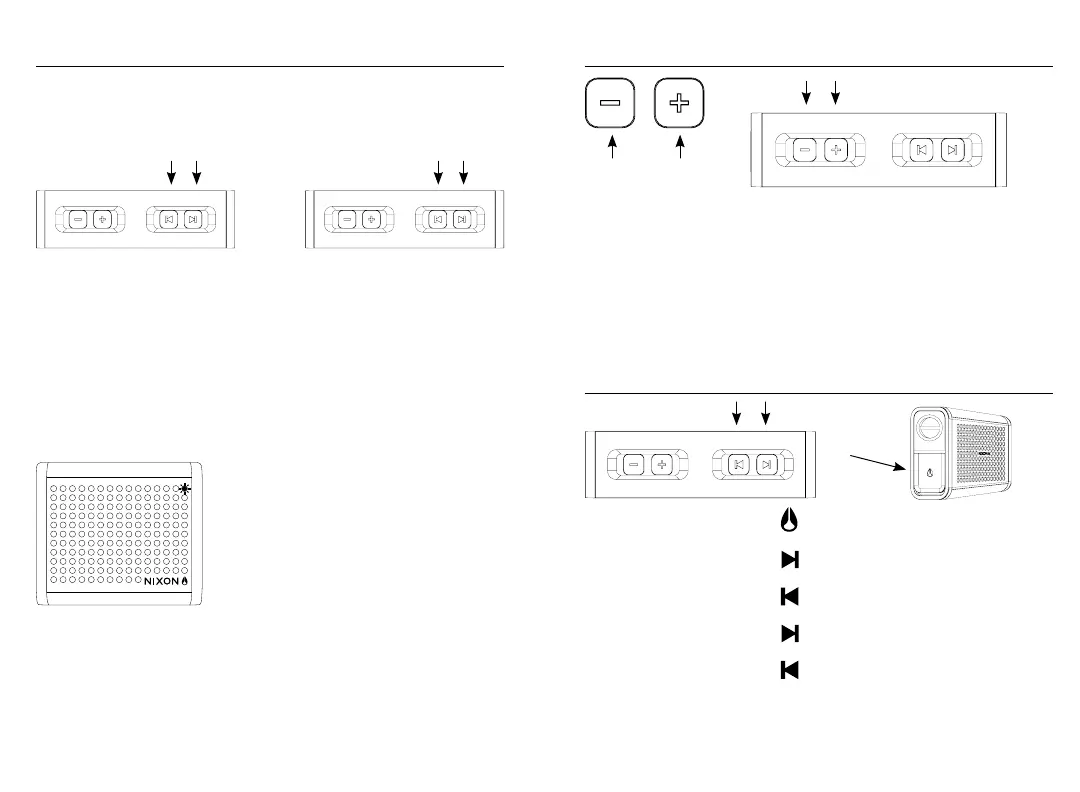
Multi pair it Crank it up
Switch it up
Use the Volume Up and Volume Down buttons to set the playback level of The Mini
Blaster.
If the sound is distorted, decrease the volume setting on your music device first, then
set the volume level of The Mini Blaster. A low battery can also cause the sound to
become distorted, so it is important to keep a healthy charge.
NOTE: Because the volume control buttons of The Mini Blaster do not control the
volume output of your music device, you must properly adjust the volume settings of
each device independently.
You can control many functions of your music device directly from The Mini Blaster
when connected via Bluetooth
®
.
NOTE: When you first power ON The Mini Blaster and reconnect to your music
device, simply pressing the Multi Button will begin music playback from where you
last stopped.
Hold both track skip buttons on both
speakers to engage + 3 SEC
+
Volume
Down
Volume
Up
PLAY/PAUSE
NEXT TRACK
PREVIOUS TRACK
FAST-FORWARD
REWIND
HOLD
HOLD
Press and hold both track skip buttons at the same time on 2 Mini Blasters for 3
seconds then release to enter into Multi-Pairing mode.
This will activate a sound prompt explaining that 2 devices are entering into
Multi Pair Mode.
After 5 seconds a sound prompt will notify you that 2 Mini Blasters are Multi Paired.
Press and hold the Multi Button for 2 seconds then release to enter Bluetooth
®
Pairing
Mode. The speaker will sound a tone and the Bluetooth
®
LED will flash repeatedly.
Now locate the Bluetooth® settings on your music device, enable Bluetooth®, and
then select “NIXON MINI BLASTER“ from the list of local Bluetooth
®
devices.
It is important to note that your Bluetooth
®
enabled
device is connected to 1 Mini Blaster at a time and
the second Mini Blaster is connected by a signal sent
out by the main Mini Blaster. You will need repeat
these instructions to connect to authentic Mini Blaster
through “multi – pairing” mode.
When Bluetooth
®
pairing is successful, the Bluetooth
®
LED will stop flashing and illuminate solid.
NOTE: If your music device supports automatic
Bluetooth
®
connection requests, The Mini Blaster may ask your music device to
connect. Simply confirm by selecting “OK” on your music device.
If your music device does not support Bluetooth
®
connections, use the included AUX
Audio Cable to play music directly to The Mini Blaster.
NOTE: When using the AUX input of The Mini Blaster, the Bluetooth
®
audio signal
is disconnected, and the remote control buttons and internal microphone will not
function.


 To Next Page