50 cm USB Cable, Micro USB
(Included)
50 cm USB Cable, Micro USB
(Included)
Talk it up
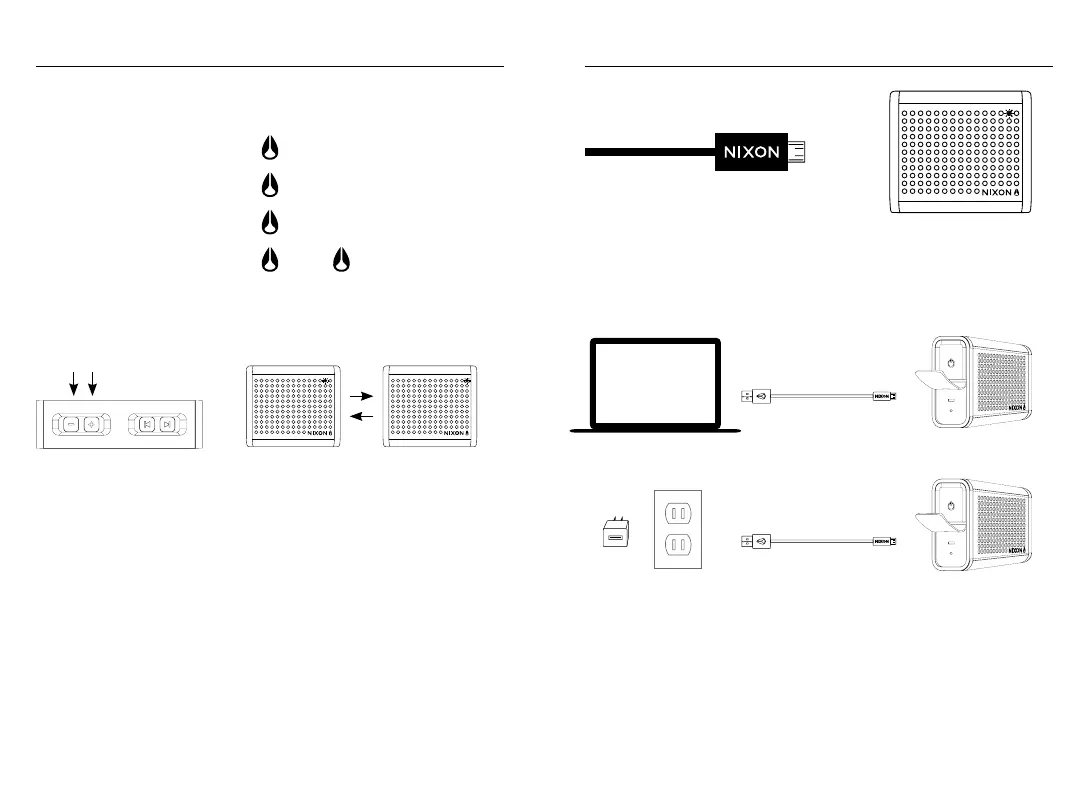
You can also use The Mini Blaster as a “speakerphone” when connected via
Bluetooth
®
. Incoming and outgoing calls will automatically pause music playback,
then resume when the call is ended.
Answer Incoming Call
Reject Incoming Call
End Current Call
Redial Last Number
(pause music)
Hold 2 Seconds
(resume music)
+
Press both volume buttons at the same time to MUTE the microphone during a call.
The two LEDs will alternate flashing to let you know MUTE is enabled. Press both
buttons again to UNMUTE the microphone.
NOTE: The internal microphone is designed to pick up your voice from a reasonably
short distance. It is not necessary hold The Mini Blaster close to your mouth.
Charge it up
Connect the USB Charging Cable between The Mini Blaster and a USB port on
a notebook or desktop computer, or use the included USB to AC adapter. While
charging, the Power LED will flash in a repeating pattern to indicate the current
battery status as shown in the following Battery Check section.
When charging is complete, the Power LED will stop flashing and illuminate solid
if The Mini Blaster is powered ON, or turn off completely if The Mini Blaster is
powered OFF.
NOTE: A full charge will take about 6 hours when connected the USB port of a
computer and only 3 hours when connected to a power source using the included
USB to AC adapter.


 To Next Page