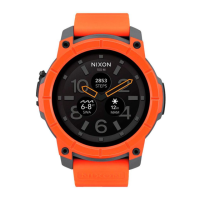
This document is a Quick Start Guide for "The Mission" smartwatch, which runs on Android Wear. It outlines the initial setup, charging, pairing, and a crucial maintenance feature: the Mic-Lock operation.
Function Description:
The Mission is a smartwatch designed to be paired with a smartphone. It operates on the Android Wear platform, allowing users to receive notifications, track activities, and utilize various apps directly from their wrist. The device is intended to extend the functionality of a smartphone, providing convenient access to information and controls without needing to constantly interact with the phone itself. Its core functions include displaying time, running Android Wear applications, and facilitating communication with a paired smartphone via Bluetooth. The watch also features a microphone, which is protected by a unique "Mic-Lock" mechanism, indicating potential voice command capabilities or other audio-related functions.
Important Technical Specifications:
While specific technical specifications like processor speed, RAM, or storage are not detailed in this quick start guide, the document does highlight key operational aspects:
- Operating System: Android Wear. This implies compatibility with the Android ecosystem and access to the Google Play Store for apps.
- Connectivity: Bluetooth for pairing with a smartphone.
- Charging: Magnetic charging dock with a USB connection for power.
- Compatibility: Requires the Android Wear App, available on both Google Play Store (for Android phones) and Apple App Store (for iPhones), indicating cross-platform compatibility with both Android and iOS smartphones.
- Water/Moisture Resistance: The device features a "Mic-Lock" mechanism that must be in the closed position to protect against liquid and moisture, suggesting a degree of water resistance when properly secured. Failure to close the Mic-Lock before exposure to liquids can result in permanent damage.
Usage Features:
The guide outlines a straightforward three-step process for initial usage:
- Download Android Wear App: Users must first download and install the Android Wear application on their smartphone from either the Google Play Store or Apple App Store. This app serves as the bridge between the smartphone and the smartwatch.
- Charge the Watch: The watch is charged by laying it flat on a magnetic charging dock. The pins on the watch's caseback must align with the pins on the dock for a secure connection. The dock connects via USB to a power source. The watch will automatically power on and begin its startup sequence once it has sufficient charge.
- Pairing: After charging, users follow on-screen instructions on the watch to pair it with their smartphone. Once paired, a tutorial on the Mission watch itself will guide users through its setup, functions, and various features. For additional support, FAQs, and troubleshooting tips, users are directed to nixon.com/mission.
Maintenance Features:
The most prominent maintenance feature detailed in the guide is the Mic-Lock Operation (Patent Pending). This mechanism is crucial for protecting the smartwatch from environmental damage:
- Purpose: The Mic-Lock is designed to prevent liquid and moisture from entering the microphone area of the watch.
- Operation: The guide provides a six-step visual and textual instruction set for operating the Mic-Lock:
- Mic-Lock Open Red: The initial state where the Mic-Lock is open, indicated by a red visible component.
- Open Double-Lock: The first step to secure the Mic-Lock involves an action to open a "double-lock" mechanism. This is depicted as a rotational movement.
- Flip Open Cam-Lock: Following the double-lock, a "cam-lock" needs to be flipped open, again shown with a rotational movement.
- Slide Mic-Lock: After the cam-lock is open, the Mic-Lock itself is slid into position. This is shown as a linear movement.
- Close Cam-Lock "Click": To secure the Mic-Lock, the cam-lock is flipped back into place, with an audible "click" confirming its closure.
- Close Double-Lock: Finally, the double-lock is closed, completing the sealing process.
- Importance: Users are explicitly warned that the Mic-Lock must be in the closed position before exposing the Mission to any liquid or moisture. Failure to do so will result in permanent damage to the smartwatch. This highlights the critical nature of this maintenance step for the device's longevity and water resistance.
In summary, The Mission smartwatch offers a connected experience via Android Wear, emphasizing ease of setup and a critical user-operated Mic-Lock for protection against environmental elements.

 Need help?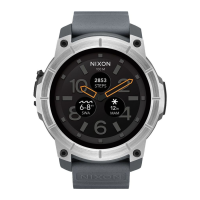

 To Next Page
 General