
 Need help?
Do you have a question about the NKE Topline Series and is the answer not in the manual?
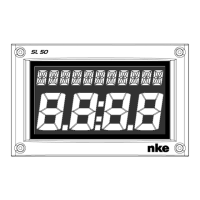
Overview of the Multifunction SL50 display and its capabilities, including screen technology and connectivity.
Details the various channels automatically created by the SL50 and TOPLINE sensors when connected to the bus.
Explains the functionality of each key on the remote control for operating the SL50 display.
Guide on how to select different channels to be displayed on the SL50 using the remote control.
Explains the concept and purpose of sub-channels for modifying setting and display parameters.
Guide to setting, activating, and disabling high and low alarms for channel monitoring.
Process for adjusting the filtering level to stabilize displayed data based on sea conditions.
Guide to setting the backlighting level and choosing between red or green colour for the display.
Steps to select display units for various sensor measurements like speed, temperature, and depth.
Guide for selecting the user interface language from the six available options.
Procedure to reset the daily log to zero for tracking nautical miles of new sailing legs.
Instructions on using the built-in regatta chronometer, including starting and setting T1/T2.
Steps to adjust the calibration coefficient for accurate sensor readings, e.g., for boat speed.
Procedure for setting the offset value for a sensor to ensure accurate measurements.
Guide for performing autocompensation of the fluxgate compass for accurate heading information.
Lists the technical details, power requirements, dimensions, and operating conditions of the SL50.
How to check the software version and network address of the SL50 display.
A table listing common problems with the SL50 and their potential solutions.
Lists the items included in the SL50 package, such as the display, cable, and user guide.
Details optional accessories available for the SL50, like different terminal boxes and remote controls.
Important considerations and recommendations before installing the SL50 for optimal performance.
Instructions for mounting the support and the SL50 unit on a mast foot, including drilling details.
Procedure for installing the SL50 on a flat wall surface, ensuring proper sealing and cable routing.
Instructions for connecting the SL50 to the TOPLINE bus system via the terminal box.
Explains the function and color coding of the SL50's cable wires for correct connection.
Steps for initializing the SL50 and remote control on the bus, covering first-time and re-initialization.
 General
| Brand | NKE |
|---|---|
| Model | Topline Series |
| Category | Boating Equipment |
| Language | English |

 To Next Page