EasyManua.ls Logo

Noblewell NWOC6 - User Manual

Noblewell NWOC6
8 pages
Print Icon
To Next Page IconTo Next Page
Loading...
Model: NWOC6
English ---------------------------- 01-06
Deutsch ---------------------------- 07-12
Français ---------------------------- 13-18
Español ---------------------------- 19-24
Italiano ---------------------------- 25-30
(A)
Office Chair
Instruction Manual
Thank you for choosing this NOBLEWELL product! At NOBLEWELL we strive to
provide you with the best quality products and services in the industry. Should
you have any issues, please don't hesitate to contact us at
Technical Support:
(US/CA)1-800-556-2032 Mon-Fri 8am - 8pm(CST)
(UK)44-808-196-3873 Mon-Fri 2pm - 10pm(UTC)
Other Info: supportus@noblewellfurni.com
Manufacturer: BESTQI INNOVATION(HONGKONG)TECHNOLOGY CO., LIMITED
Address: RM21 UNIT A 11/F TIN WUI IND BLDG NO 3 HING WONG ST TUEN
MUN NT HONGKONG
Recyclable
Question and Answer IconNeed help?

Do you have a question about the Noblewell NWOC6 and is the answer not in the manual?

Summary

Important Safety Information

Installation Steps

Install Legs and Casters

Insert chair legs into the leg connector and press casters firmly into their holes.

Attach Base Components

Connect the decorative cover and gas lift cylinder to the leg connector assembly.

Mount Armrests

Secure armrests to the seat using bolts, ensuring the leveler control is correctly oriented.

Attach Seat Plate and Backrest

Fasten the seat plate and then the backrest to the seat using the provided bolts.

Install Headrest and Final Assembly

Insert and secure the headrest, then attach the assembled seat to the gas lift cylinder.

Chair Adjustments

Headrest Adjustment

Adjust the tilt angle and height of the headrest for desired comfort and positioning.

Armrest Adjustments

Adjust armrest height, swivel direction, and forward/backward positioning for comfort.

Backrest Tilt Tension

Fine-tune the rocking tension using the knob to match user weight for optimal comfort.

Seat Height Adjustment

Use the lever to adjust seat height, holding it while raising or lowering the seat.

Backrest Tilt Angle

Pull lever outward and lean back to set desired tilt angle, then return lever to lock.

Backrest Rocking Function

Pull lever outward to enable rocking; chair rocks with user, not fixed.

Overview

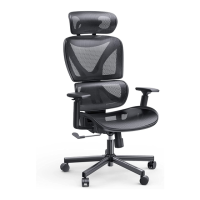
The NOBLEWELL Office Chair (Model: NWOC6) is a versatile and ergonomically designed office chair intended for single-person use, offering a range of adjustments to ensure comfort and support during extended periods of sitting. This instruction manual provides comprehensive guidance for assembly, usage, and maintenance, emphasizing safety precautions throughout.

Function Description:

The NOBLEWELL NWOC6 office chair is designed to provide adjustable ergonomic support for individuals in an office or home office environment. Its primary function is to offer a comfortable and customizable seating experience, promoting good posture and reducing strain during work. Key adjustable features include headrest tilt and height, armrest height, swivel, and forward/backward positioning, seat height, and backrest tilt angle and tension. The chair is built for stability and durability, with a focus on user safety through proper assembly and usage guidelines.

Important Technical Specifications:

  • Model: NWOC6
  • Components:
    • Leg (x1)
    • Leg Connector (x1)
    • Decorative Cover (x1)
    • Caster (x5)
    • Gas Lift Cylinder (x1)
    • Seat (x1)
    • Armrest (x1 pair, L/R)
    • Seat Plate (x1)
    • Backrest (x1)
    • Headrest (x1)
  • Hardware:
    • Bolt M6X15mm (A x5)
    • Bolt M6X30mm (B x6)
    • Bolt M8X20mm (C x7)
    • Bolt M6X16mm (D x2)
    • 13/64 in (5mm) Allen Key (E x1)
  • Weight Capacity: Designed for a single user. The manual emphasizes adjusting tilt tension based on user weight.
  • Material: The chair features a mesh backrest and headrest, a cushioned seat, and a five-star base with casters for mobility. Specific material compositions for upholstery and frame are not detailed but imply standard office chair construction with metal and plastic components.
  • Dimensions: Not explicitly stated, but inferred from the components to be a standard-sized office chair.
  • Assembly Time: The manual provides step-by-step instructions, indicating a user-assembly process. Assistance is recommended for certain steps involving heavy or awkward components.

Usage Features:

The NOBLEWELL NWOC6 chair offers extensive customization to suit individual preferences and ergonomic needs:

  • Headrest Adjustment:
    • Tilt Adjustment: The headrest can be tilted to a desired angle by holding and adjusting it.
    • Height Adjustment: The headrest can be lifted or lowered to the preferred height.
  • Armrest Adjustment:
    • Height Adjustment: Armrest height can be adjusted by lifting the adjustment buttons to raise or lower them.
    • Swivel Adjustment: The front of the armrests can be swiveled inward or outward (diagonally).
    • Forward/Back Adjustment: Armrests can be pushed forward or backward to the desired position.
  • Seat & Backrest Adjustment:
    • Seat Height Adjustment: Pulling up the lever control allows the user to raise or lower the seat. Releasing the lever locks the seat height. The manual advises resting body weight on the seat to lower it and lifting body weight off to raise it.
    • Backrest Tilt Angle Adjustment: Pulling the lever control completely outward allows the user to lean against the backrest to achieve a desired angle. Returning the lever to its original position locks the backrest at that angle.
    • Backrest Rocking Function: Pulling the lever control completely outward activates the rocking function, allowing the chair to rock back and forth with the user.
    • Backrest Quick or Slight Tilt Tension Adjustment: A knob allows for fine-tuning the rocking tension. Turning the knob in the [+] direction increases tension, while turning it in the [–] direction decreases tension. This feature is crucial for adapting the chair's rocking resistance to the user's weight, with heavier users typically requiring more tension.

Maintenance Features:

The manual emphasizes preventative measures and proper handling to ensure the longevity and safety of the chair:

  • Initial Inspection: Users are instructed to check package contents against the supplied parts list to ensure all components are received undamaged. Damaged or defective parts should not be used, and replacement parts can be requested from NOBLEWELL customer service.
  • Cleaning: While specific cleaning instructions are not detailed, the general advice to "not use items with sharp or hook to scratch the chair" implies a need for gentle cleaning methods to preserve the chair's surfaces.
  • Safety Guidelines (Preventative Maintenance):
    • Single-Person Use: The chair is designed for one person only.
    • Flat Surface Use: Always place the chair on a flat surface.
    • Child Safety: Children under 5 years old should not sit on the chair alone.
    • Avoid Misuse: Do not sit on armrests, stand on the chair, use it as a ladder/stair, or use it as a trolley for heavy objects.
    • Hand Safety: Keep hands away from the seat base mechanism (except the knob) to prevent injuries.
    • Fire Hazard: Keep the chair away from fire.
    • Proper Sitting Posture: Sit completely at the end of the chair to avoid tipping. When standing up, clench the armrests for stability.
    • Tilting Safety: Do not lift legs up while tilting the backrest backward to avoid tipping.
    • Component Integrity: The manual implicitly encourages users to report any damaged or defective parts to prevent further damage or injury, highlighting the importance of maintaining the chair's structural integrity.

The NOBLEWELL NWOC6 office chair is a comprehensive seating solution, combining ergonomic adjustability with clear safety and assembly instructions to provide a comfortable and secure user experience.

Noblewell NWOC6 Specifications

General IconGeneral
BrandNoblewell
ModelNWOC6
CategoryIndoor Furnishing
LanguageEnglish

Related product manuals