
 Need help?
Do you have a question about the Nocai NC-UV0609 2017 and is the answer not in the manual?
Details the NC-UV0609 2017 model and its physical size of 151CM*160CM*74CM.
Includes PhotoPrint CD and Printer Driver CD for software installation.
Lists essential tools like spanners, screwdrivers, power wires, and network cables.
Identifies major parts such as the print bridge, carriage assembly, spray tank, and print table.
Highlights the control panel, capping pump station, and waste ink bottle.
Details the general power switch and power wire interface for system operation.
Covers the scalable handlebar and waste ink bottle for usability and maintenance.
Explains status indicators like Lifting Height Display and control switches for sensors and power.
Details buttons for directional control (Up, Down, Left, Right, Front, Back) and operation (Enter, Exit, Pause, Clean, Test).
Guides users through menu functions, upward/downward viewing, and cleaning procedures.
Provides special instructions for entering maintenance mode and performing a UV lamp test.
Details the scalable station, print table (61*90CM), and carriage assembly with ink supply.
Covers the capping pump station, ink tank, and ink adding area for ink management.
Explains how to use the adding ink switch to turn ink supply on (right) or stop (left).
Describes the ink tank's low ink warning light, stirring switch, and how to add ink based on signs.
Lists necessary accessories like a base, electric strip, and PC/Laptop with i5 Core.
Provides crucial advice on daily use, cleaning after downtime, spraying distance, and material limitations (UVModel).
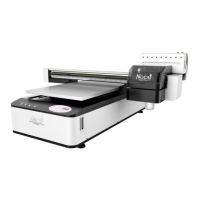
The Nocai NC-UV0609 2017 is a small, smart, and splendid digital printer designed for making great improvements in various printing applications. This UV printer is engineered for ease of use and maintenance, making it suitable for both professional and personal use.
The NC-UV0609 is a UV flatbed printer, meaning it can print directly onto a wide range of flat materials using UV-curable inks. The "UV" in its name refers to the ultraviolet light used to cure or dry the ink instantly as it is printed, resulting in durable, vibrant, and high-quality prints. The printer features a carriage assembly that moves across the print bridge, delivering ink from the ink tank to the printhead. An encoder strip ensures precise positioning of the printhead. The device includes a spray tank and a print table where materials are placed for printing. LED UV lights are integrated for efficient ink curing.
The printer is designed for straightforward operation with a user-friendly control panel. The control panel features buttons for various functions, including "Up," "Left," "Front," "Right," "Back," "Enter," "Exit," "Pause," "Clean," and "Test." A "Lifting Height Display" shows the current printhead height, which is crucial for accommodating different material thicknesses. Dedicated switches are available for "Power," "UV Lamp Control," "Suction Control," and "Infrared Control." The "White ink stirring switch" and "Ink indicator switch" are located on the ink tank assembly, helping to maintain ink quality and monitor ink levels.
To navigate the printer's functions, users can press "Enter" to access the function menu. From there, options like "Settings Menu," "Device Maintenance," and "Device Information" can be selected. The "Front" and "Back" buttons allow for upward and downward movement, respectively. For cleaning, pressing "Clean" provides access to nozzle selection, allowing users to choose between cleaning both printheads, the left printhead, or the right printhead. Pressing "Enter" directly initiates the cleaning process.
The printer also offers special operations, such as a UV lamp test. This can be accessed by pressing and holding "Front," "Right," and "Exit" simultaneously after turning on the power switch. This allows users to check the UV light output and ensure proper functionality.
Ink management is designed to be user-friendly. The "Ink Adding Area" provides access to individual ink bottles for different colors (K, C, M, Y, LC, LM, W). Each ink bottle has an "Adding Ink Switch" that, when turned to the right, enables ink supply and, when turned to the left, stops it. The "Ink indicator switch" and "Low Ink Warning Indicator Light" provide visual cues for ink levels, prompting users to add ink as needed.
The printer's scalable station and scalable handlebar allow for flexible material handling and adjustment. The print table, measuring 61x90CM, provides a generous printing area.
Regular maintenance is crucial for the longevity and performance of the NC-UV0609. The "Device Maintenance" menu, accessible via the control panel, includes options for nozzle tests, automatic cleaning, and manual ink operations.
The manual strongly suggests using the printer daily. If the printer is not used for an extended period, such as a month or more, it is recommended to disassemble the printhead and perform manual cleaning, storing it in an appropriate environment. This prevents ink from drying and clogging the nozzles.
The "Capping pump station" is an integral part of the maintenance system, designed to keep the printheads moist and prevent clogging when the printer is not in use.
The manual also provides important tips for optimal printing and maintenance:
The accessories provided with the printer, such as the spanner set, screwdrivers, power wire, network wire, syringe, cap tops, dampers, tubes, and printhead cables, are essential for installation, basic maintenance, and troubleshooting. The PhotoPrint CD and Printer Driver CD are crucial for software installation and printer operation.
 General
| Print Area | 600mm x 900mm |
|---|---|
| Printing Width | 600mm |
| Printing Resolution | 1440dpi |
| Media Thickness | Up to 100mm |
| Color | CMYK, White |
| Printer Type | Flatbed Printer |
| Ink Type | UV Ink |
| Power Requirements | 220V, 50/60Hz |
| Machine Dimensions | 1600mm x 2000mm x 1200mm |

 To Next Page