EasyManua.ls Logo

NOCO Genius BOOST X GBX55 - User Manual

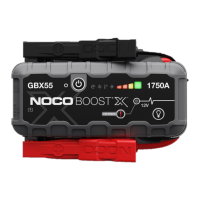
NOCO Genius BOOST X GBX55
345 pages
Print Icon
To Next Page IconTo Next Page
Loading...
GBX55

Table of Contents

Questions and Answers

  • J
    jamie46Aug 15, 2025
    What to do if the Hot LED is solid or flashing on my NOCO Genius Battery Pack?
    • K
      Kevin CardenasAug 15, 2025
      If the Hot LED is solid or flashing, the unit is approaching its upper temperature limit or is too hot to jump start. Allow the unit to cool down. In this state, only the flashlight function is available.
  • S
    Sandra AndersonAug 18, 2025
    How to fix a solid or flashing cold LED on NOCO Genius Remote Starter?
    • A
      Andre MartinezAug 18, 2025
      If the Cold LED is solid or flashing, it means the unit is either approaching its lower temperature limit or is too cold to jump-start. Let the unit warm up.
  • T
    tarabirdAug 21, 2025
    Why is my NOCO Genius BOOST X GBX55 showing a solid red light?
    • E
      Edward AvilaAug 21, 2025
      A solid red light indicates reverse polarity. To fix this, reverse the battery connections.
  • J
    Jennifer GibsonAug 25, 2025
    How to fix a solid or flashing cold LED on NOCO Genius BOOST X GBX55?
    • K
      Kaitlin LeeAug 26, 2025
      A solid or flashing cold LED means the unit is near its lower temperature limit or is too cold to jump start. Let the unit warm up. Only the flashlight can be used when it's too cold.
  • S
    sbradleyAug 28, 2025
    What to do if the NOCO Genius Battery Pack shows a solid red light?
    • M
      Mitchell HebertAug 28, 2025
      A solid red light indicates reverse polarity. To fix this, reverse the battery connections.
  • R
    Robert JimenezSep 1, 2025
    Why is the hot LED solid or flashing on my NOCO Genius Battery Pack?
    • M
      Michelle CampbellSep 1, 2025
      When the hot LED is solid or flashing, it means the unit is either approaching its upper temperature limit or is too hot to jump start. In either case, allow the unit to cool down.
  • N
    Nicholas Gutierrez PhDSep 4, 2025
    Why is my NOCO Genius Remote Starter showing a solid red light?
    • S
      ssmithSep 4, 2025
      A solid red light indicates reverse polarity. To resolve this, reverse the battery connections.
  • L
    Leslie RhodesSep 7, 2025
    What to do if the Hot LED is solid or flashing on my NOCO Genius Remote Starter?
    • J
      Julia MorrisonSep 7, 2025
      If the Hot LED is solid or flashing, the unit is either approaching its upper temperature limit or is too hot to jump-start. In either case, allow the unit to cool down.
  • C
    claudiaphillipsSep 12, 2025
    What does it mean if the NOCO Genius Remote Starter is flashing with Single (1) Flash Double (2) Flash Triple (3) Flash Quadruple (4) Flash Sextuple (6) Flash?
    • G
      Gary RangelSep 12, 2025
      This flashing pattern indicates several potential issues: * A short circuit is detected on the battery clamps. Remove all loads and reconnect the clamps to the battery. * High voltage is detected at the clamps (the GBX55 is connected to a voltage system greater than 12V, such as 24V). * A bad battery cell is detected. * A charge timeout error occurred (the GBX55 has been in bulk charge for too long). * Back-Charge detected into the GBX55 through the clamps while in a Boost Mode (the GBX55 is in Manual Override and then connected to a system greater than 12V, such as 24V).

Summary

Safety Warnings and Hazards

Electrical Shock Hazard

Details risks and precautions related to electrical shock from the product.

Explosion Hazard

Outlines dangers of battery explosion when using the product.

Fire Hazard

Warns about fire risks associated with product heat and sparks.

Eye Injury Hazard

Explains potential for eye injuries from battery explosions and acid.

Explosive Gases Hazard

Addresses dangers of explosive gases from lead-acid batteries.

Important Safety Precautions

How to Use the GBX55

Step 1: Charge the GBX55

Guides on fully charging the GBX55 before first use via USB-C.

GBX55 Usage Procedures

Step 2: Connect to the Vehicle Battery

Details on identifying battery polarity and connecting clamps safely.

Step 3: Jump Starting Procedure

Step-by-step instructions for jump starting a vehicle.

Advanced Usage Features

Low Voltage Batteries and Manual Override

How to jump start batteries with very low voltage using manual override.

Device Interface and Indicators

Manual Override Button

Enables manual override for low-voltage batteries, disabling safety features.

Troubleshooting Common Errors

Solid Red: Reverse Polarity

Troubleshooting for detected reverse polarity connection.

Single Flash: Short Circuit

Troubleshooting for short circuits detected at the clamps.

Double Flash: High Voltage

Troubleshooting for detection of voltage systems over 12V.

Triple Flash: Bad Battery Cell

Troubleshooting for detected internal battery cell failure.

Quadruple Flash: Charge Timeout

Troubleshooting for extended charging time errors.

Sextuple Flash: Back-Charge Detected

Troubleshooting for back-charge detected in boost mode.

Flashing Red Charging Error

Troubleshooting charging issues indicated by flashing red light.

Technical Specifications

NOCO One Year Limited Warranty

NOCO Genius BOOST X GBX55 Specifications

General IconGeneral
BrandNOCO Genius
ModelBOOST X GBX55
CategoryBattery Pack
LanguageEnglish

Related product manuals