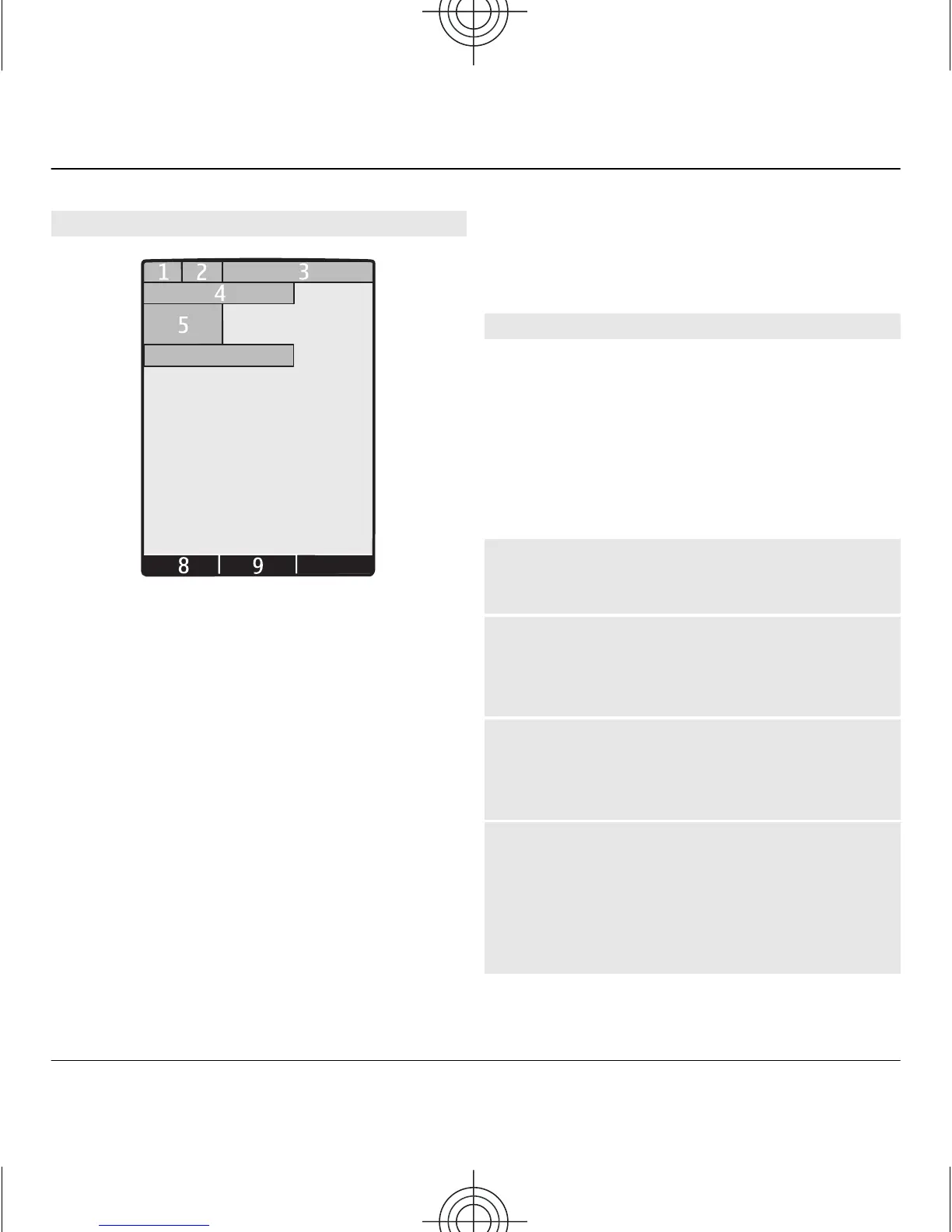
Display
7
6
10
1 Signal strength of the cellular
network
2 Battery charge status
3 Indicators
4 Name of the network or the
operator logo
5 Clock
6 Date (only if the enhanced home
screen is deactivated)
7 Display
8 Function of the left selection key
9 Function of the scroll key
10 Function of the right selection key
You can change the function of the left
and right selection key. See " Left and
right selection keys ", p. 24.
Enhanced home screen
With the enhanced home screen, you
can display a list of selected information
and features that you can directly
access.
Select Menu > Settings and
Display > Home screen.
Activate the enhanced home screen
Select Home screen mode > On.
Organise and personalise the
enhanced home screen
Select Personalise view.
Select the key used to activate the
enhanced home screen
Select Home screen key.
Navigate in the home screen
Scroll up or down to navigate the list,
and select Select, View, or Edit. The
arrows indicate that further
information is available.
14 Switch it on
www.nokia.com/support
Cyan
Magenta
Yellow
Black


 To Next Page