Need help?
Do you have a question about the Nokia HS-123W and is the answer not in the manual?
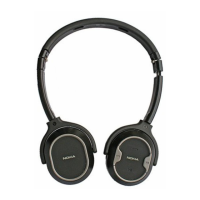
The Nokia Bluetooth Stereo Headset BH-504 allows you to make and answer calls hands-free with a compatible mobile phone and listen to music from a compatible music player. This headset is designed for use with devices that support Bluetooth wireless technology. It's important to read the user guide carefully before using the headset, as well as the user guide for the device you connect it to.
The BH-504 operates using Bluetooth wireless technology, enabling cable-free connections to compatible devices. The headset and the connected device do not need to be in line of sight, but should be within 10 meters (33 feet) of each other for optimal performance. The connection can be affected by distance, obstructions, or other electronic devices.
The headset is compliant with Bluetooth Specification 2.1 + EDR and supports several profiles: Headset Profile 1.1, Hands-Free Profile (HFP) 1.5, Advanced Audio Distribution Profile (A2DP) 1.0, and Audio Video Remote Control Profile 1.0. This broad compatibility allows for a range of functions, from basic call handling to stereo music playback.
The headset features several keys and parts for easy operation:
Before initial use, the battery must be charged, and the headset must be paired with a compatible device. The device contains magnetic parts, so avoid placing credit cards or other magnetic storage media near it to prevent data erasure.
Use only Nokia-approved chargers. Connect the charger to a wall outlet, then connect the cable to the headset's charger connector. A red indicator light will be displayed during charging. Charging for 15 minutes provides approximately 4 hours of talk or music playing time, while a full charge takes up to 45 minutes. A fully charged battery offers up to 9 hours of talk time, 90 hours of standby time, or 7 hours and 30 minutes of music playing time. When the battery is low, the headset will beep every minute, and the red indicator light will flash slowly. Once fully charged, the green indicator light appears, and the charger should be disconnected.
To switch on, press and hold the multifunction key for about 2 seconds. The headset will beep, and a green indicator light will briefly appear. It will then attempt to connect to the last used device; if successful, a blue indicator light will flash slowly. If not paired, it automatically enters pairing mode. To switch off, press and hold the multifunction key for about 5 seconds. The headset will beep, and a red indicator light will briefly appear. If the headset remains unconnected for about 10 minutes, it will automatically switch off.
If your phone supports the A2DP Bluetooth profile and has a music player, it can be used to play music through the headset. If your phone does not support A2DP, you can pair the headset separately with the phone and a compatible music player.
0000 to pair and connect. Some devices may use this passcode by default or require a separate connection step after pairing.
Successful pairing is indicated by the headset appearing in your device's Bluetooth menu, and the blue indicator light flashing slowly when connected and ready for use.To disconnect, switch off the headset or disconnect it via your device's Bluetooth menu. If disconnecting from a music player during playback, first press the play/pause key. Deleting the pairing is not necessary for disconnection. To reconnect, simply switch on the headset, or initiate the connection from your device's Bluetooth menu. Some devices can be set to automatically reconnect.
Placing the Headset: Unfold the headset and place it over your head, ensuring the speaker pads rest comfortably on your ears. The pad marked 'L' goes on the left ear, and 'R' on the right. Adjust the headband for a secure fit. Be aware that using the headset may affect your ability to hear outside sounds, which could be a safety concern.
Press the volume up or down key during a call or while listening to music. Press and hold for quick adjustments.
Connect the headset to a compatible music player supporting the A2DP Bluetooth profile. Music functions depend on your player. If a call is received or made, music playback will pause until the call ends.
To clear pairing settings, switch off the headset, then press and hold the multifunction key and the volume up key for over 8 seconds until the red, green, and blue indicator lights alternate three times. To reset the headset if it malfunctions (even when charged), connect it to a charger, then press and hold the multifunction key and the volume up key. This reset does not clear pairing settings.
Your device is a product of superior design and craftsmanship and should be treated with care. Following these suggestions will help protect your warranty coverage:
The crossed-out wheeled-bin symbol on your product, literature, or packaging indicates that all electrical and electronic products, batteries, and accumulators must be collected separately at the end of their working life. This applies to the European Union and other regions with separate collection systems. Do not dispose of these products as unsorted municipal waste. By returning products to collection points, you help prevent uncontrolled waste disposal and promote the reuse of material resources. More detailed information is available from the product retailer, local waste authorities, national producer responsibility organizations, or your local Nokia representative. For Eco-Declaration or instructions for returning your obsolete product, refer to country-specific information on the Nokia website.

 To Next Page
 General