CONFIDENTIAL 22 (25)
NPE-4 6310/NPL-1 6310i Repairhints
Customer Care Europe & Africa Version 1.0 Approved
SCCE Training Group Date 15.08.2002
© NMP 2002
Checked by:
SCCE Training Group
Approved by:
SCCE
Keypad faulty
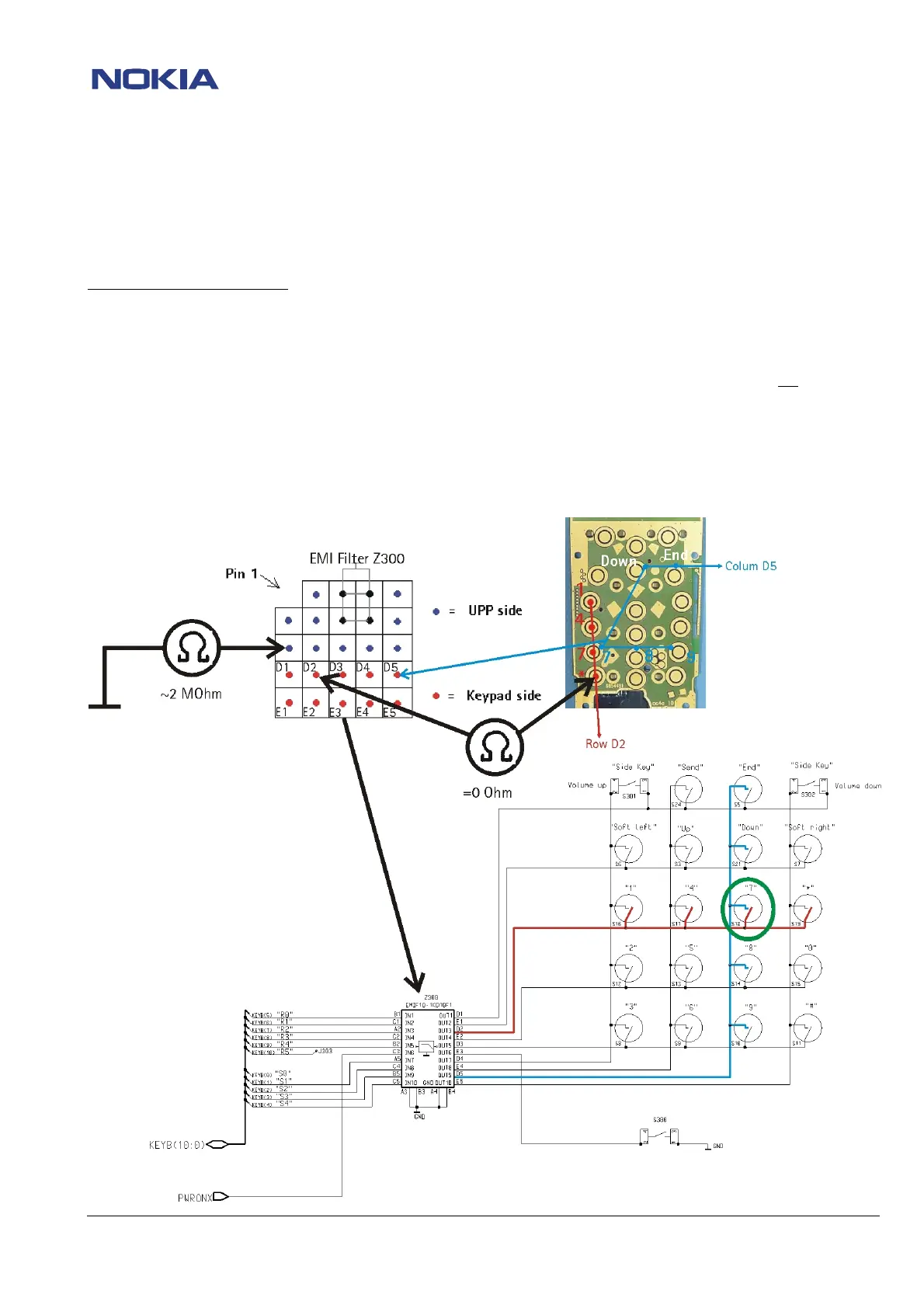
If one or more keys are not working, disassemble phone and check resistance = 0Ω between keys on same Colum and Row with
ohmmeter.
For example key 7 is not working
:
Check Row D2 keys “1”, “4”, “7”, “*” resistance between the one and the other keys= 0Ω
Check Colum D5 keys “End”, Down” 7”, “8”, “9” resistance between the one and the other keys = 0Ω
If between two keys the resistance is approximate MΩ, change PWB because of broken connection.
If all resistance = 0Ω, remove Z300 EMI-Filter and measure the connection between keypad and red
marked
solderpads from EMI-Filter. If connection is not ok, change PWB, because of broken connection.
If connection is ok, check with ohmmeter the resistance between ground and blue marked solderpads
resistance around 2MΩ
If resistance is lower than 1MΩ or higher than 10MΩ, change PWB, because the UPP D400 is faulty and not
changeable.



 To Next Page