Operator menu
67
D
RAFT
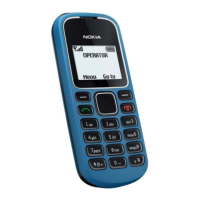
10. Operator menu
This menu lets you access a portal to services provided by your network
operator. The name and the icon depends on the operator. For more
information contact your network operator.
The operator can update this menu with a service message. For more
information, refer to “Service inbox,” p. 85.
11. Gallery
In this menu you can manage graphics, images, recordings
and tones. These files are arranged in folders.
Your phone supports an activation key system to protect acquired
content. Always check the delivery terms of any content and activation
key before acquiring them, as they may be subject to a fee.
Copyright protections may prevent some images, music (including ringing tones),
and other content from being copied, modified, transferred or forwarded.
To see the list of folders, select Menu > Gallery.
To see the available options of a folder, select a folder and Options.
To view the list of files in a folder, select a folder and Open.
To see the available options of a file, select a file and Options.



 To Next Page