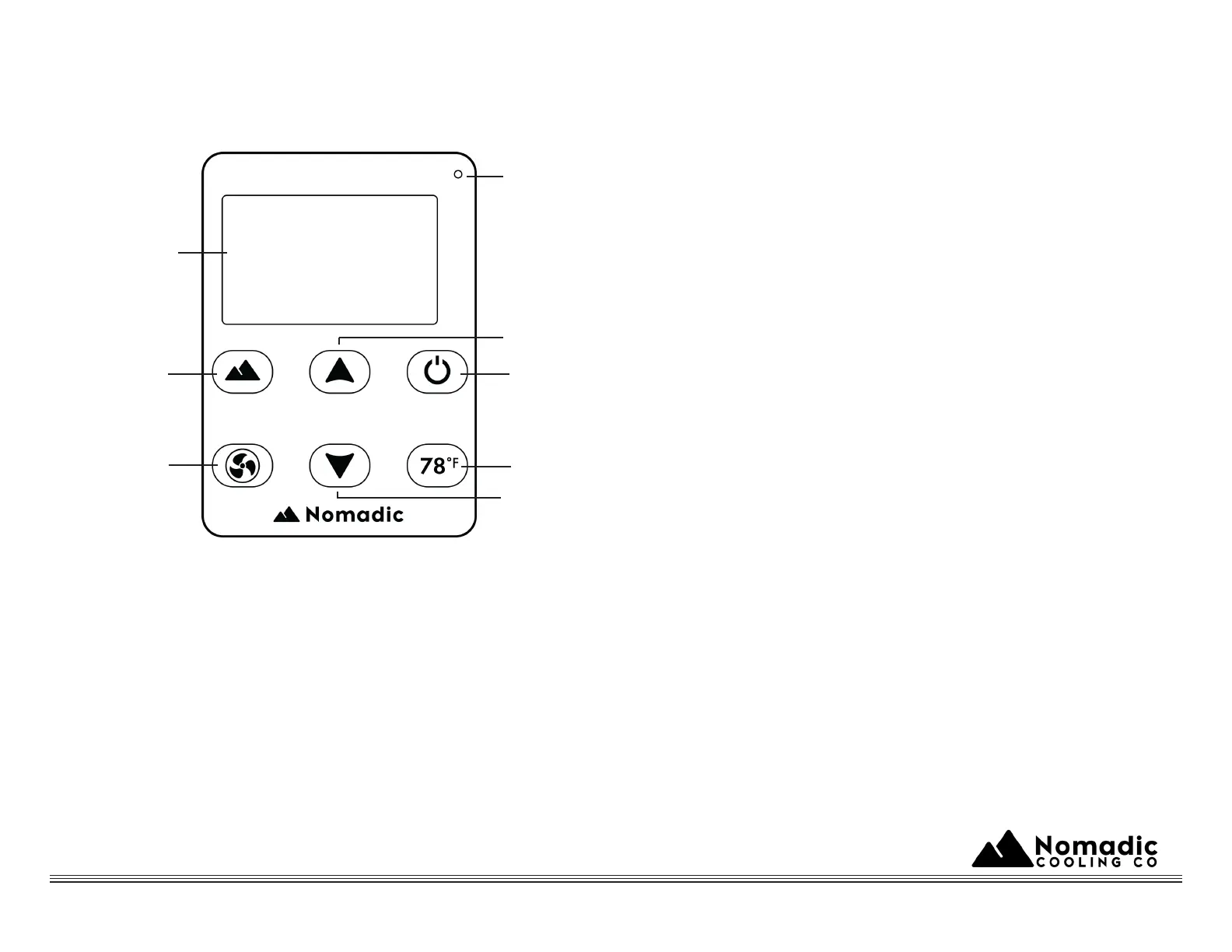
Control Panel Legend
ON-OFF: Press this button to switch the device ON or OFF
Mode: Push this button to switch between the modes; Auto
Eco and Power
Airflow: Each push on this button corresponds to a cycle
through 5 different airflow levels
Auto 78 ºF: Pressing this button enables automat-
ic management towards ºF
Temperature “+”: Each push of this button corre-
sponds to the increase of ºF of temperature
Temperature “-”: Each push of this button corre-
sponds to the decrease of ºF
of temperature
Display Window: Display temperature airflow
voltage error codes and ambient temperature
Infrared Signal: Acceptance of infrared signal
from remote controller by users
Low-Voltage Protection Function
Settings: Long press on “ºF” button until screen
starts blinking adjust low-voltage cutoff value (de-
fault value is 11V ranging 9 -11V) via Temp “+”
or “-” button and then long press on “ ºF” button
again for 5 seconds
In order to ensure the usage time it is
recommended to use the battery after it is fully
charged
1.
2.
3.
4.
5.
6.
7.
8.
7. Display
2. Mode
3. Airflow
8. Infrared
5. Temp “+”
1. ON-OFF
4. Auto 78ºF
6. Temp “-”



 To Next Page