Entering personal data
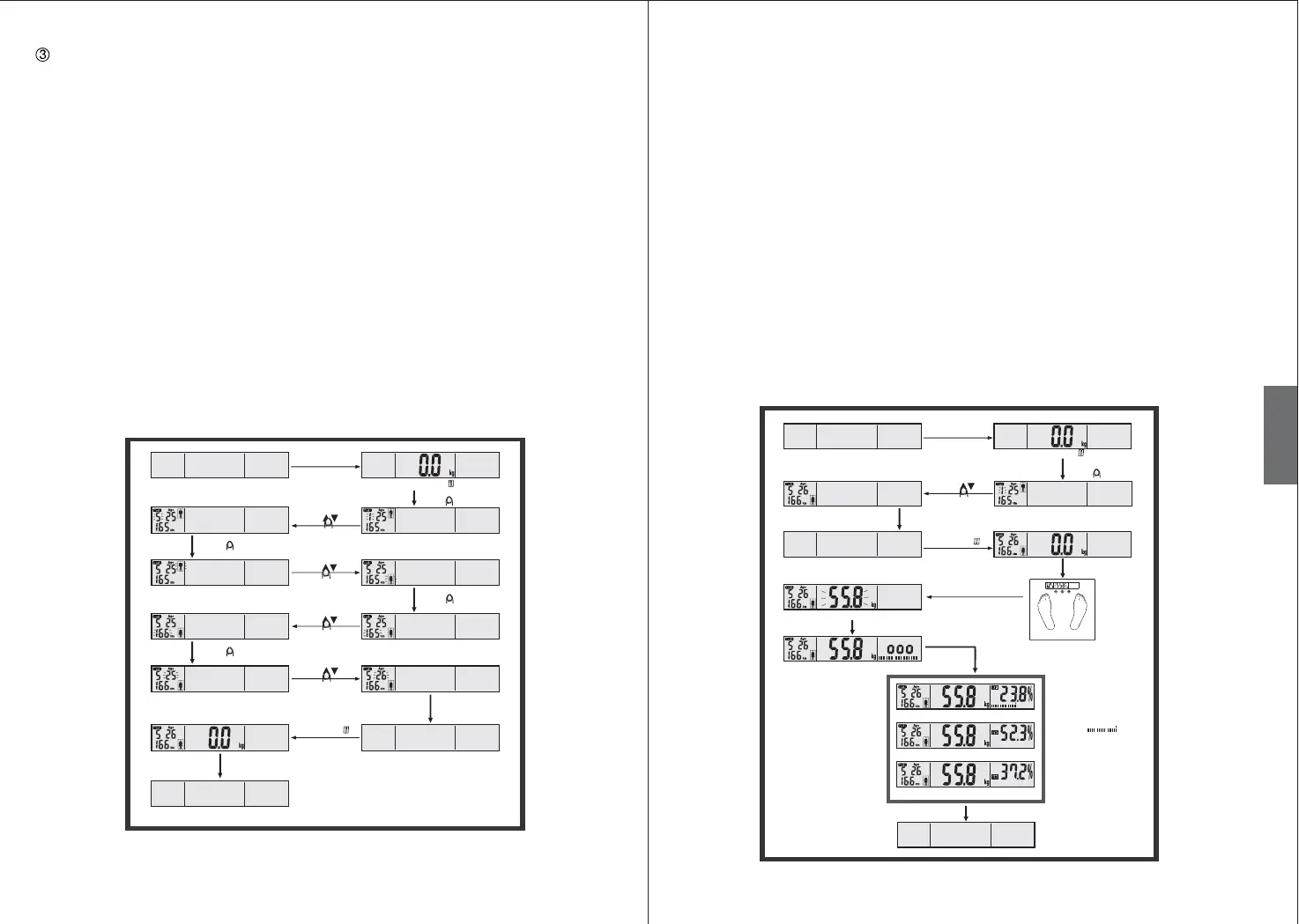
1. Gently tap on the scale platform with your hand or foot.
2. Press the SET buon to set your personal data.
Note: The User ID will flash in the LC display. The number stands for the data profile of one
person from the user group.
3. Press the Up/ Down buon to select the data profile (1–12). Press the SET buon to confirm
the selected data profile.
4. Press the Up/ Down buon to select the option of the gender. Press the SET buon to
confirm the selected data profile.
5. Press the Up/ Down buon to select your height. Press the SET buon to confirm the
selected data profile.
6. Press the Up/ Down buon to select your age.
Aer you have made all these seings, gently tap on the scale platform with your hand or
foot. The display will show the last measurement record of your User ID code (no record for
first time of seing).
7. The display will show zero and the scale will switch off automatically aer about 8 seconds if
it is not used. Your personal data have successfully seen saved. You can either make seings
for further users or measure your body weight.
NOTE: During the personal profile seing, you can always gently tap on the scale platform
with your hand or foot anytime to reset the value to zero. You can start measuring the body
fat / body water content based on your newly entered or updated personal data.
10 11
(2) Measuring the body weight and analysis of proportion of body fat, body water
and body muscles.
Always remove your shoes and socks, and clean your feet before use. Place even weight on
each leg and do not move. Make sure your feet are in good contact with the two electrodes on
the scale platform.
1. Gently tap on the scale platform with your hand or foot, the display will show zero.
2. Press the SET buon, the display will show the last measurement record of the last User ID
code.
3. Press the Up/ Down buon to select the data profile (1–12). Gently tap on the scale platform
with your hand or foot. The display will show the last measurement record of your User ID code.
4. Wait until the display show zero. Step barefoot onto the platform and do not move. Ensure
that you are standing on the two electrodes. The scales will start to measure immediately.
Aer flashing, the weight display will show the result.
5. The body fat/ body water/ body muscle analysis is beginning; remain standing on the two
electrodes. The measurement lasts a few seconds (display indication ooo)
6. The display then shows the measured values three times to show the percentage of body fat &
body fat index, body water and body muscle. The scales switch off automatically aer these
values have been displayed.
NOTE: The display will show "C", if you do not stand on the two electrodes during weighing.
GB
Shut down
automatically
Power off
LCD show s
Default parameters
to select user code
Tou c h
to select gender
Tou c h
Touch SET to switch on
prompt to next seing
Touch SET to confirm and
prompt to next seing
Touch SET to confirm and
prompt to next seing
Touch SET to confirm and
Tou c h
to set height
Tou c h
to set age
LCD show s
Scale shut off
automatically
aer 8 seconds
Your personal parameters have been saved
LCD shows last measuring record
of the 5th user (No record in the
first time of use)
Slightly tap on the
scale platform by
your hand or your
foot
Slightly tap on the
scale platform by
your hand or your foot
Power off
LCD shows
Touch SET
to select user
code or reset
parameters
Tou c h
Show parameters of the last user or
default parameters
LCD shows last measuring record of the
5th user (No record in the first time of use)
LCD shows
Step onto
weighing
Wait until the
digits stabilize
Weight readings locked and flash
for 1 times
Measuring fat/water/muscle
Fat % and status
Water %
Muscle %
Display result (repeat
for 3 times):
Fat status ,
Fat 23.8 %,
Hydration 52.3 %,
Muscle 37.2%.
You are perfectly built.
Please keep your shape!
Shut down
automatically
Slightly tap on the
scale platform by
your hand or your
foot
Slightly tap on the scale platform
by your hand or your foot


 To Next Page
 Loading...