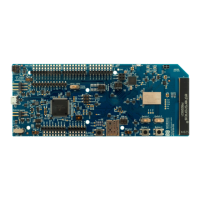
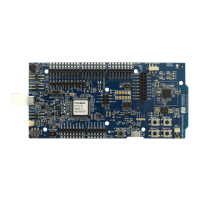
The Power Profiler Kit (PPK) is a flexible and affordable tool designed for measuring the real-time power consumption of electronic designs. It allows users to gain detailed insights into the current profile of their applications, supporting both development and optimization phases.
Function Description
The PPK measures current consumption for a connected nRF5 Development Kit (DK) or any external board. It operates by using an nRF52832 System on Chip (SoC) to measure voltage drops across a series of measurement resistors. These voltage drops are then used to calculate power consumption. To ensure optimal resolution across a wide range of currents, the PPK features three different measurement ranges with automatic switching circuitry. Data is transferred to a desktop application via SEGGER RTT (Real-Time Transfer), utilizing the SEGGER J-Link debug probe on an nRF5 DK or an external SEGGER J-Link debugger.
The PPK supports various measurement configurations:
- Measuring current on an nRF5 DK: This is a typical setup for quick current measurements in reference applications from the SDK or custom applications during the design phase when custom hardware is not yet available.
- Measuring current on an nRF5 DK while debugging: This configuration is used during the design and optimization phase when no custom hardware is available, utilizing the SEGGER J-Link debugger on the nRF5 DK for debugging. An additional SEGGER J-Link is required to connect the PPK to the computer.
- Measuring current on custom hardware with an nRF5 DK: This setup is for the design phase with custom hardware acting as the Device Under Test (DUT). The nRF5 DK serves as a SEGGER J-Link interface to the computer, and power can be supplied either by the PPK's onboard regulator or an external power source.
- Measuring current on custom hardware without an nRF5 DK: This configuration is used during the design phase with custom hardware, where the nRF5 DK is not used. Power can be provided by the PPK's onboard regulator or an external power source, with the PPK's External 5V supply USB connector (J1) supplying power to the onboard analog measurement circuitry and regulator.
Important Technical Specifications
- Current Measurement Range: 1 µA to 70 mA
- Resolution: Down to 0.2 µA
- Measurement Accuracy: Better than ±20% (for average current measurements)
- Power Supply Voltage (Software Configurable): 1.8 V to 3.6 V
- Maximum DUT Admissible Current: 70 mA
- Measurement Resolution (Typical):
- 1-70 µA range: 0.2 µA
- 70 µA-1 mA range: 3 µA
- 1-70 mA range: 50 µA
- Measurement Accuracy (Typical):
- 1-70 µA range: +/- 20% (Readout on Average value), +/- 2 R1_Resol (Offset)
- 70 µA-1 mA range: +/- 15% (Readout on Average value), +/- 2 R2_Resol (Offset)
- 1-70 mA range: +/- 15% (Readout on Average value), +/- 2 R3_Resol (Offset)
- Sampling Rate (Fixed Value): 77 kHz
- Operating Temperature: 15 °C to 30 °C
- Power Supply Options: DK interface, PPK onboard voltage regulator, external supply.
- Connectors:
- P16: External DUT output
- J1: USB (for 5V supply input when standalone)
- P22: External DUT supply input (for custom/external hardware)
- P20: External trigger (input/output)
- P21: External SEGGER J-Link connection
- Switches:
- SW2 (DUT select): Selects between nRF5 DK or external/custom hardware measurements.
- SW4 (Power select): Selects power source for PPK and DUT (DK, Reg., External).
- SW3 (COM): Selects SEGGER J-Link connection (DK or EXT for external J-Link).
Usage Features
- Automatic Range Switching: Ensures optimal resolution by automatically switching between three current measurement ranges.
- Desktop Application: The Power Profiler app (installed via nRF Connect for Desktop) provides a user-friendly interface for measurement analysis.
- Real-time Display: Shows current measurements in real-time with a resolution down to 13 µs.
- Recording Display: Allows recording and display of data for up to two minutes.
- Internal/External Trigger: Supports triggering for specific measurement events.
- Software-Configurable Voltage: The PPK's onboard voltage regulator output can be adjusted between 1.8 V and 3.6 V through the Power Profiler app.
- DUT Power Control: The DUT can be turned on and off using the "Enable power output" toggle in the Power Profiler app.
- Views in the App:
- Data logger view: Continuously examines power consumption over a period of time.
- Real-time view: Functions like an oscilloscope, plotting power consumption when it reaches a specified trigger level.
- Advanced Controls: Access to advanced controls for switch levels and resistor calibration by pressing CTRL+ALT+SHIFT+A in the app.
Maintenance Features
- Firmware Upgrade: The Power Profiler app checks for and prompts for firmware upgrades if needed, ensuring the PPK is always running with the latest software.
- Troubleshooting Guide: The manual provides basic troubleshooting steps for common issues, such as "PPK only measuring noise" (requiring preparation of the nRF5 DK by cutting the current measurement solder bridge) and "Measurements fluctuate when there should be a steady current draw" (suggesting adjustment of switching points).
- Support Resources: Users can find more information on Nordic DevZone and access personalized technical support by signing up or logging in to Nordic Developer Zone to enter a private ticket.
- Environmental Protection: The device is designed with environmental considerations, advising users to recycle waste electrical products and check with local authorities for recycling advice.

 Need help?
 General

 To Next Page