3
Your Fiber TV Digital Receiver
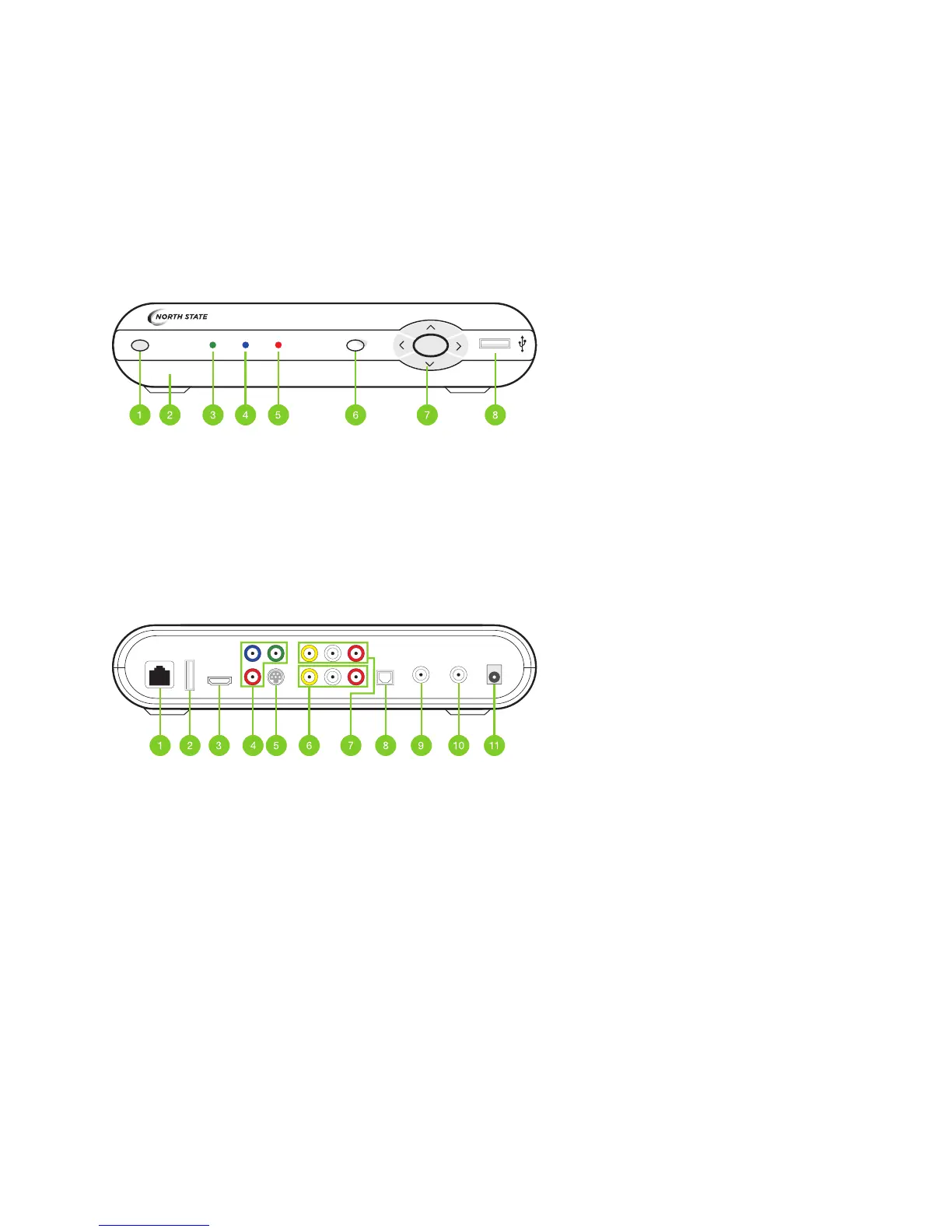
The following illustrations outline your digital receiver (HD or HD DVR) functions and connections. Digital receivers may
not be exactly as shown below.
1� Power: Turns your digital receiver on or off and is lit when power is on�
2. Model number: Identies hardware model.
3� Link: Lit when the digital receiver is connected to the North State network�
4. HD: Lit when the digital receiver is congured to display HD content.
5� Record: Lit on all digital receivers when a DVR recording is in progress�
6� Menu: Displays onscreen menu�
7� Navigation: Moves selection up, down, left or right�
8� USB: Not currently enabled�
Model numbers: SA430, SA330, Cis430, Cis330 and ISB 7,000
1� Network In: Connects the network cable from your home network or modem�
2� USB: Not currently enabled�
3. HDMI (Out): HDMI is the HD connection that contains both audio and video signals.
4� Use for HDTVs Component Video Out: Component video cables can be used for high quality signals
to either HD or non-HDTVs�
5� S-Video Out: S-Video is preferred for older TVs�
6� RCA Video / Audio 1 Out: These connections are ideal for VCRs and older TVs� The audio ports can
be used independently if other video connections have been used�
7� RCA Video / Audio 2 Out: These duplicate connections are available for users with multiple devices�
8� Optical: This is an all-digital audio connection, ideal for audio receivers�
9� Video Out: Connects to the antenna jack on the TV�
10� Video In: For North State installer use only�
11� Power In: Connects to the supplied adapter to power the unit�
LINK HD RECORD MENU OKPOWER



 To Next Page