EasyManua.ls Logo

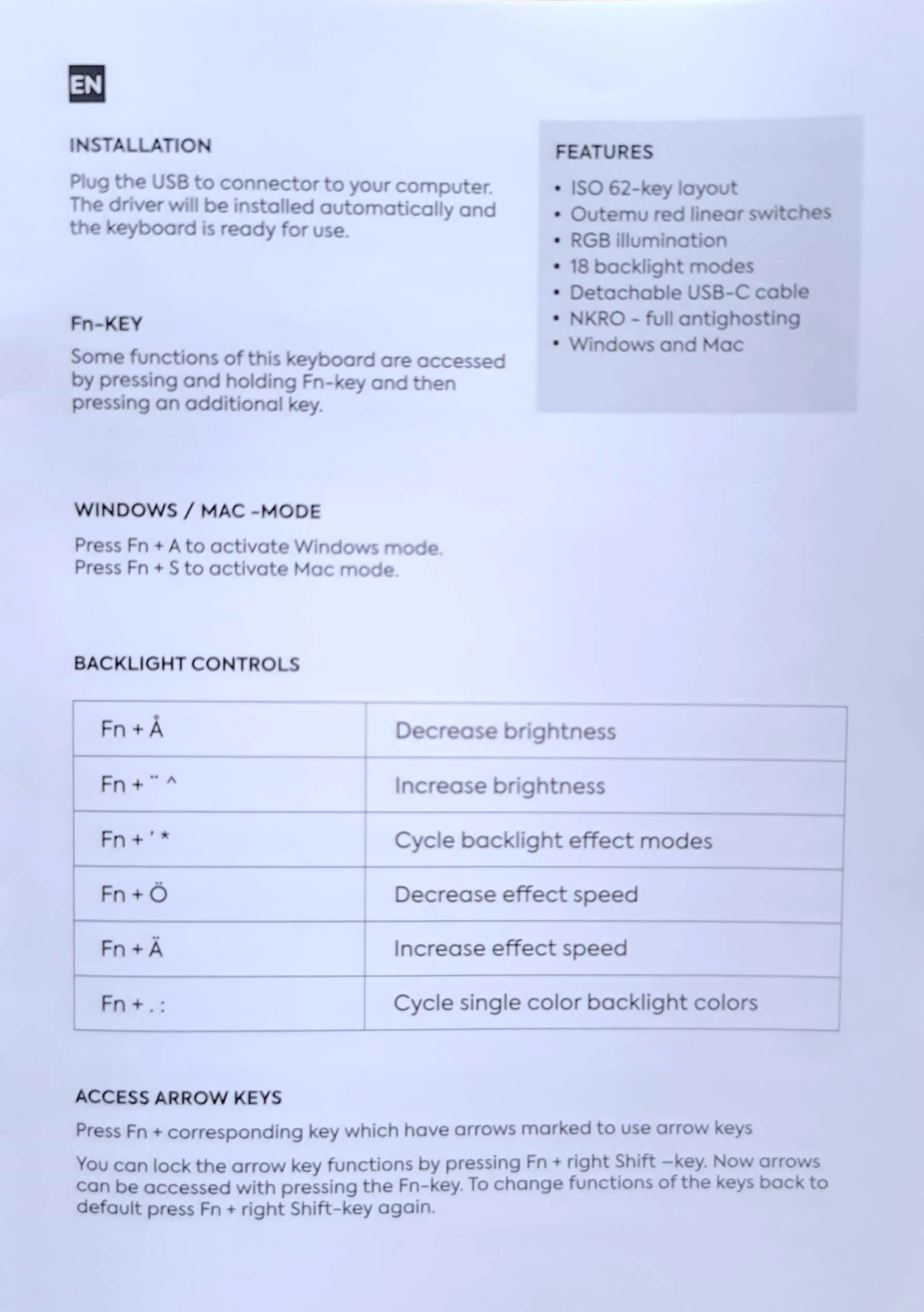
Nos C-450 - Installation and Features; Installation; Fn-Key Functionality; Operating System Modes

Default Icon
7 pages
Print Icon
To Next Page IconTo Next Page
To Previous Page IconTo Previous Page
Loading...
I 0
ug
e)
USS
to
co
e
or
o
our
compu
·
er
.
~-
d
v·2:-
1 b i
~-tlc:id
ouromo
icolly
and
-~
yboord
1s
reo
y
or
u e.
ISO
-
"'
.
....
o
Oul
·
-u
·
-d
GB
1llum
no
o
18
bac
119
D
lac
a
s
US
-C
Fn
-
EY
/ 0 -
ull
n i
OS
Som
.
.......
u
Ctio
so
·
"·""is
.,
eyboo
do
e
accessed
by
ss,
go
d oldin_, - ey
and
+-ke
r
ss,
g on , .di
•o
ol
.,
,
y.
WINDOWS/
MAC
~"10DE
Pr~ss
Fn
t o
ac
iva!lo/~
ind
0
r
ss
n S o
oc
iva,
.
._.
.'-
""'"'·ac
·
-od
BACKLIGHT
CONTRO
-.....,
ri A
s
ss
Fr
1
I\
Fn
C.;
cle
bac
~
""lig
e
ec
r;nodes
••
Fn
-t- 0
Decrease
effec
speed
Incr
e
as
e
e;-,
ecL
speed
Fn
"'t
:
C.,
cle
si,1
gle
color
o
ac
..
'lig
, colors
ACCESS
ARROW
KEYS
Pr
ss
Fn
·
corr
spending
~y
which
hav::)
arrows
mar'"ed
o use
arro
'ou
con
loc,
t:Jh
arrov
ey -unc ions
by
pressing
Fn
righ
Shift
-
_..e
1
can
be
ace
ssed ·a
..
•ith pressing
he
Fn-
'ey.
To
change
functions
of
the
d -cul press
Fn
righ
Shi- -
ey
again.