EasyManua.ls Logo

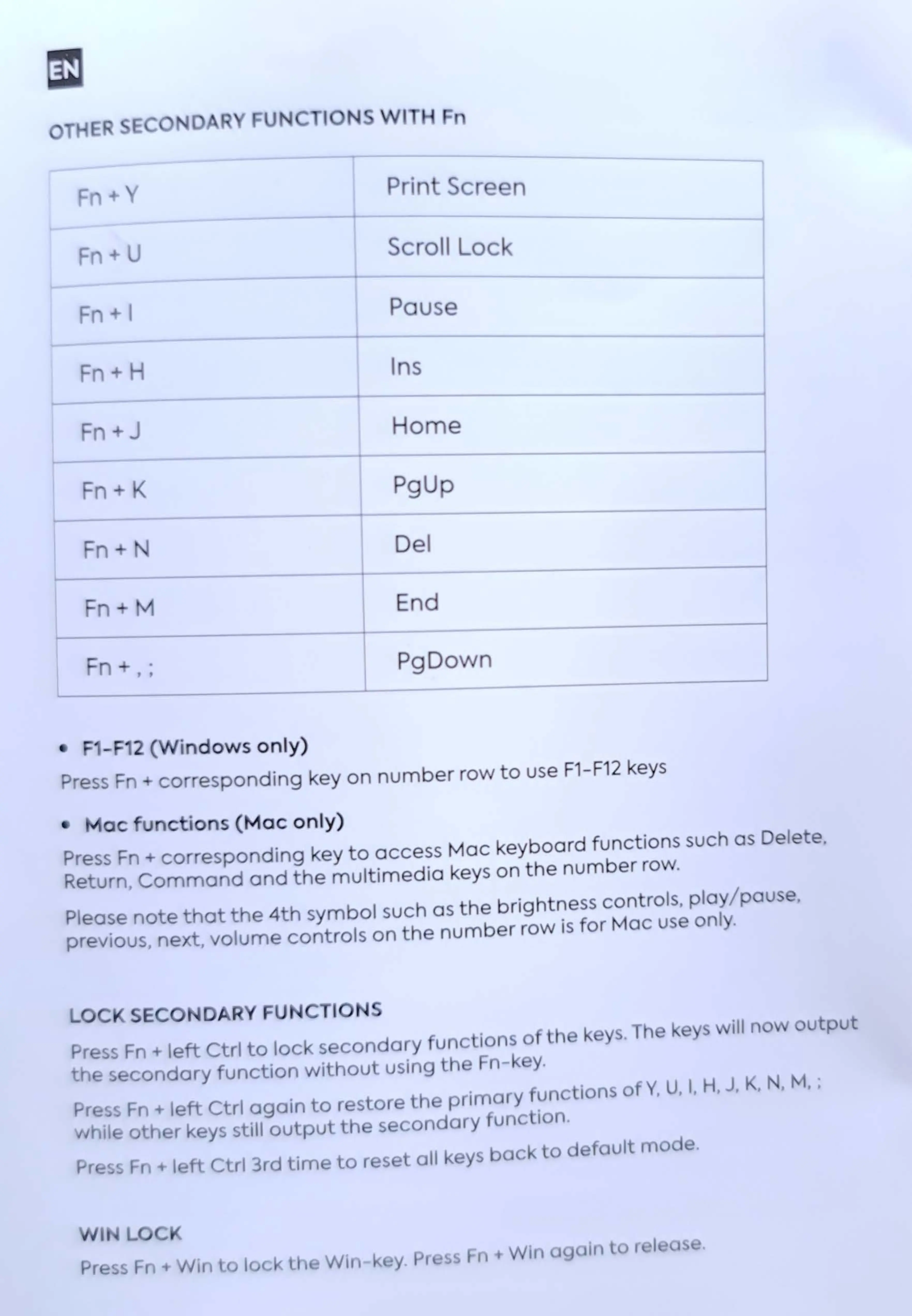
Nos C-450 - Advanced Keyboard Functions; Secondary Functions with Fn; Locking Secondary Functions; Win Lock Feature

Default Icon
7 pages
Print Icon
To Next Page IconTo Next Page
To Previous Page IconTo Previous Page
Loading...
EN
E
lN
I
F
Fn
U
Sc "
OI
i L
oe
Fn+ H
I s
Fn
J
Fn
PgUp
Fn
Del
End
r
n -
, '
PgDown
'
-F
2
(Win
dows
only)
Pre
ss
Fn c
orre
s
ponding
key
on
number
row
to
use
F1-F12
keys
Mac
functions
(
Mac
only)
Pr
e
ss
Fn
· c
orre
s
po
ding
key
to
access
tv1ac
keyboard
functions such
as
Delete.
Re
turn,
Comm
and
and
the
multimedia
keys on
the
number
ro
Pl
ease
note
tho
th
e
4t
h s
ymbol
s
uch
as
the
brightness controls pla P u
t?
pr
evious.
ne
x
t,
volume
c
on
·rols
on
the
number
row
is
for
tv1a
c use onl
••
LOC ECO
DAR
FU
' 10
Press
Fn
+
left
Ctrl
to
lock
secondar
y f
unc
ions o
t1
k,..,.
,
s.
T~, e s ill no
output
th
s
condary
function
withou
using ·l
1e
n-
y.
Press
Fn
+
left
Ctrl
again
to
restore he
primary
unc ions
of
Y,
U,
I,
H,
J,
K,
,
M.
;
whil
other
keys still
output
the
secondary
unc
ion.
Pr
ss
Fn
+
left
Ctrl
3rd
time
to
rese all keys
back
o
default
mode.
Win k y. r
ss
n Win
in
or
I